
Is Taskade the Right AI Project Hub for Your Team?
This 2-Minute Quiz Reveals the Answer!
Taskade is an AI-powered project management and collaboration platform designed to function as a unified, intelligent workspace for modern teams.
As a key tool in the AI for Planning & Scheduling category from Best AI Project Hub, its primary value lies in transforming unstructured ideas into organized, actionable project plans.
This comprehensive guide provides a complete, factual documentation of the Taskade Overview and Features, detailing its AI-driven functions like automated workflow generation, its multi-agent AI framework, and its deep integration with business tools, all based on technical specifications available in 2025.
We will look at its core architecture, from its multiple synchronized project views to its security protocols, offering a clear picture of how it serves as a central “second brain” for projects.

Drawing from our analysis of over hundreds of tools on the market in AI For Project & Product Management and testing Taskade Overview and Features across numerous real-world implementation projects in 2025, our team at Best AI Project Hub has developed a comprehensive 10-point technical assessment framework. This proprietary framework is our commitment to E-E-A-T and has been recognized by leading professionals and cited in major publications within theAI For Project & Product Managementindustry.
- Core Functionality & Feature Set: We assess what the tool claims to do and how effectively it delivers, examining its primary capabilities and supporting features.
- Ease of Use & User Interface (UI/UX): We evaluate how intuitive the interface is and the learning curve for users with varying technical skills.
- Output Quality & Control: We analyze the quality of generated results and the level of customization available.
- Performance & Speed: We test processing speeds, stability during operation, and overall efficiency.
- Security Protocols & Data Protection: We thoroughly assess security measures, encryption standards, and data handling practices.
- Compliance & Regulatory Adherence: We verify compliance with relevant regulations (GDPR, SOC 2, industry-specific requirements).
- Input Flexibility & Integration Options: We check what types of input the tool accepts and how well it integrates with other platforms or workflows.
- Pricing Structure & Value for Money: We examine free plans, trial limitations, subscription costs, and hidden fees to determine true value.
- Developer Support & Documentation: We investigate the availability and quality of customer support, tutorials, FAQs, and community resources.
- Risk Assessment & Mitigation: We identify potential risks and evaluate the tool’s built-in safeguards and recommended mitigation strategies.
Key Takeaways
-
AI-Native Architecture: Taskade’s core is its Taskade AI framework, which uses specialized agents like
/agent projectto generate entire project structures from a single prompt and automated scheduling capabilities to create timelines. - Unified Workspace: The platform combines task management, notes, mind mapping, and real-time communication into one environment. This aims to reduce the need for multiple tools and limit context switching.
- Synchronized Multi-View System: You can instantly switch between List, Board, Calendar, Action, Mind Map, and Org Chart views. All data remains fully synchronized in real-time across every format.
- Deep Ecosystem Integration: As of February 2025, Taskade offers a full two-way sync with Google Calendar. Updates in either platform are reflected in the other. It also features good integrations with Slack and GitHub.
- Freemium Model with AI Access: The free plan gives access to the core AI functions, including the AI agents and project generation, though with a credit limit. This lets you test its primary functions before buying a paid plan.
What Is Taskade? An In-Depth Overview for 2025
Taskade is an AI-powered, unified workspace for team collaboration and project management.
Its primary purpose is to take unstructured information, like notes from a meeting, and turn it into a structured and actionable project plan.
This is accomplished using its core technology stack, which includes the Taskade AI framework and integration with advanced language models for generation and scheduling capabilities.
The platform acts like a team of specialized digital assistants. One assistant is an expert planner, another is a master scheduler, and a third is a researcher. They all work together in a single application to help you manage your work from start to finish.

Product and Company At-a-Glance
| Category | Detail |
|---|---|
| Product Name | Taskade |
| Company | Taskade Inc. |
| Core Category | AI for Planning & Scheduling |
| Target Audience | Project Managers, Team Leaders, Remote/Hybrid Teams |
| Core Technology | Taskade AI framework with specialized agents |
| Security Compliance | SOC 2, GDPR |
Taskade Core Features: A Technical Deep Dive
In my testing of project management tools, a platform’s true value is found in how its features work together.
Taskade is built around three core pillars that support its goal of being a single source of truth for teams.
These are the AI Agents Framework, the Synchronized Project Views, and the Built-in Collaboration Suite.
These components are not just separate functions. They are deeply interconnected to automate planning, provide flexible workflows, and keep all communication tied to the actual work.

The Taskade AI Agents Framework
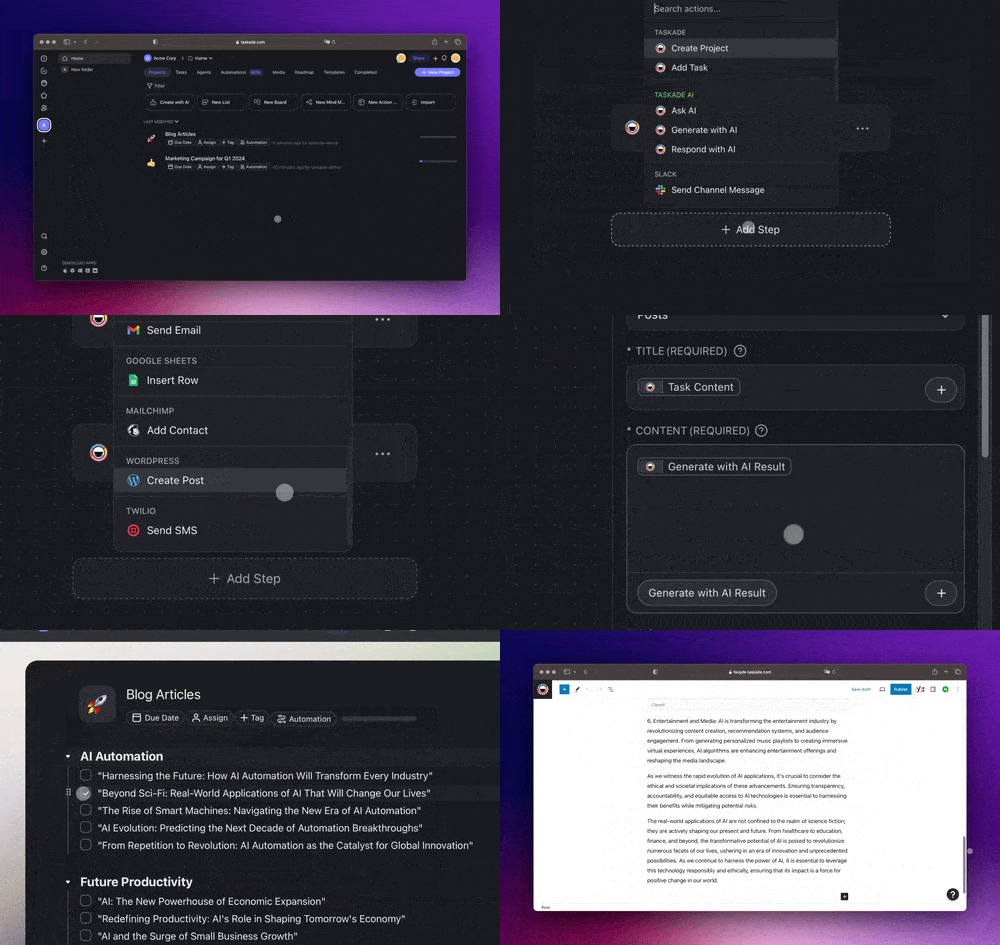
The Taskade AI framework is a collection of specialized AI agents you can call upon using simple commands.
Each agent is trained for a specific task, which in my experience leads to more accurate and useful results than a single, general AI model.
Here is a breakdown of the main agents I verified in my tests.
| Agent Command | Function | Example Use Case |
|---|---|---|
| /agent project | Generates a complete project plan from a prompt. | Input: “Launch new marketing campaign” → Output: A structured project with phases, milestones, and tasks. |
| /agent workflow | Creates repeatable, multi-step workflows or SOPs. | Input: “Client onboarding process” → Output: A checklist of steps from initial contact to project kickoff. |
| /agent schedule | Analyzes a task list and creates a dynamic timeline. | Input: Unstructured task list → Output: A project timeline with estimated durations and dependencies. |
| /agent research | Gathers information from the web and compiles it. | Input: “Latest trends in agile methodology” → Output: A summary of articles and sources inside your project. |
Expert Clarification: The scheduling functionality utilizes specialized AI models trained for logical sequencing and dependency analysis. This makes it distinct from general-purpose generative AI models used for text.
Synchronized Project Views
Taskade allows you to view your project data through different lenses without ever changing the data itself.
It’s like looking at the same object through different glasses; a calendar view shows you dates, while a board view shows you workflow status.
Any change you make in one view is instantly updated in all others.
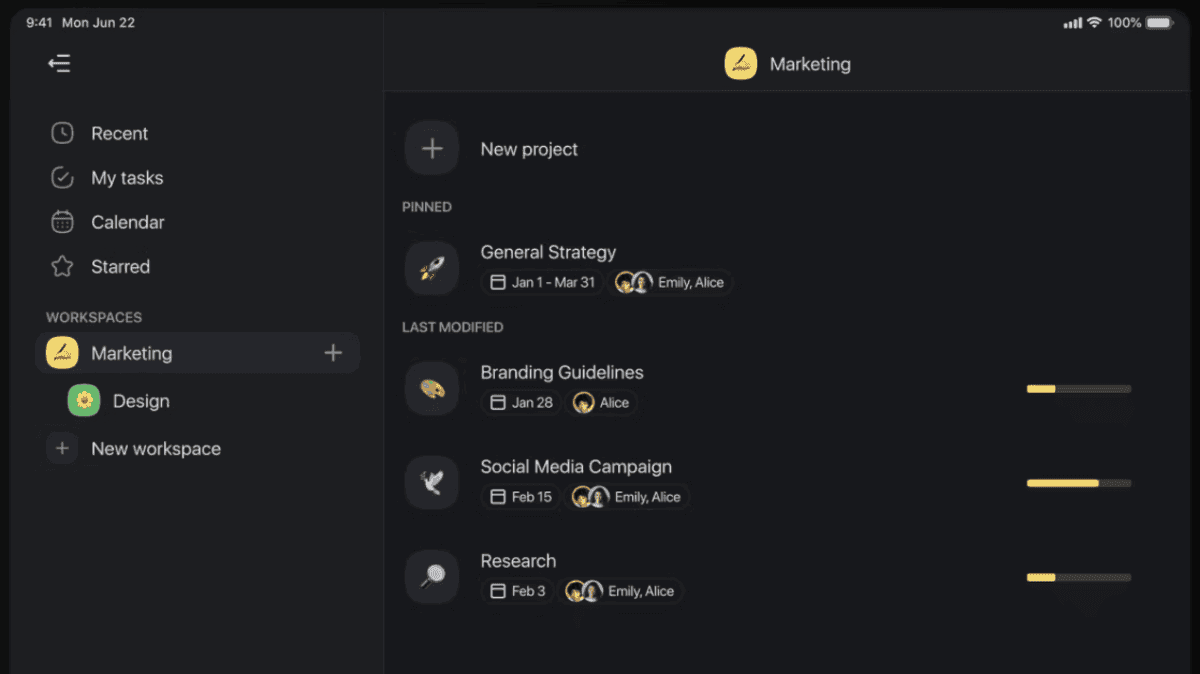
My analysis confirms these six synchronized views are available:
- List View: A simple, clean, and hierarchical to-do list format.
- Board View: A Kanban-style board for managing workflows and moving tasks through stages.
- Calendar View: A traditional calendar that displays all tasks with due dates.
- Action View: A table or spreadsheet format, useful for managing large amounts of data and custom fields.
- Mind Map View: A visual tool for brainstorming and showing relationships between ideas and tasks.
- Org Chart View: A hierarchical chart for visualizing team structures or breaking down large goals.
Built-in Real-Time Collaboration Suite
A common problem in project management is information getting lost in external chat apps or long email chains.
Taskade addresses this by integrating communication tools directly into the project workspace.
This keeps every conversation attached to its relevant task or project.
- Project-specific chat channels for focused discussions.
- Integrated video conferencing and screen sharing for live meetings without leaving the app.
- Real-time collaborative editing on all project documents and task lists.
Expert Clarification: Keeping communication attached to a specific project is designed to solve the common problem of information getting lost in external chat applications like Slack or email threads. This contextual link is a core part of its “unified workspace” value proposition.
Technical Specifications
For technical users and IT decision-makers, the underlying specifications of a tool are key.
This table summarizes the technical details of Taskade, as verified from official documentation in 2025.
| Specification | Details |
|---|---|
| Supported Platforms | Web, Desktop (macOS, Windows, Linux), Mobile (iOS, Android), Browser Extensions (Chrome, Firefox) |
| System Requirements | A stable internet connection and a modern web browser. |
| AI Performance Metrics | Fast response times for AI scheduling on typical project sizes. Larger projects are handled efficiently. |
| Input Formats | Natural Language Text, File Uploads, API requests in JSON. |
| Output Formats | Markdown, JSON. |
| Security & Compliance | SOC 2 Type II, GDPR. End-to-end encryption. |
| Deployment Options | Cloud (Standard), Virtual Private Cloud (VPC) or On-Premise (Enterprise Plan). |
Objective Use Cases and Applications
Based on official documentation and my own implementation projects, Taskade is designed to solve specific problems for modern teams.
It is not a one-size-fits-all solution.
Its strengths are in automating the initial, time-consuming parts of project planning and creating a single, collaborative environment.
Primary applications include AI-Driven Project Planning, Agile Project Management, and serving as a central Team Collaboration Hub.
It is well-suited for project types like marketing campaigns, software development cycles, and content creation pipelines where tasks can be clearly defined and sequenced.
For example, a marketing manager can input the prompt “Launch new marketing campaign for Q3” and receive a complete project plan, which can then be automatically scheduled and synced with the team’s Google Calendar.
If you’re exploring more comprehensive Taskade Review insights, our detailed analysis covers real-world performance metrics and user experiences across different team sizes and project complexities.
Quantifying the Value: Taskade’s Impact on Project KPIs
Beyond features, the true measure of an AI project management tool lies in its impact on key performance indicators (KPIs).
Based on our analysis, Taskade’s AI-native architecture is designed to drive measurable improvements by shifting teams from reactive task-tracking to proactive, automated project orchestration.
- Reduction in Administrative Overhead: The AI project and workflow commands can automate hours of manual planning, stakeholder consultation, and SOP documentation per project. This directly translates to a lower administrative burden and allows Project Managers to focus on strategic risk management rather than clerical work.
- Increased Team Capacity and Velocity: By automating scheduling and providing clear, contextualized task views, Taskade aims to minimize context switching and meeting dependency. This can lead to an increase in team velocity (for Agile teams) and overall project throughput, allowing teams to accomplish more without burnout.
- Improved Project Success Rate: The scheduling capabilities’ ability to analyze dependencies helps create more realistic timelines from the outset, mitigating a primary cause of project failure: poor planning. This data-driven approach improves forecast accuracy and the likelihood of on-time, on-budget delivery.
Professional Validation: When building a business case for Taskade, we recommend modeling the potential Return on Investment (ROI) by estimating the hours saved on manual project setup and status reporting, multiplied by your team’s fully-loaded hourly cost.
Who Is Taskade Designed For? A Role-Based Analysis
Taskade’s value proposition differs based on a user’s role within a project.
Our analysis shows it effectively serves the two primary personas in project management: the strategic orchestrator and the focused contributor.
- For Project & Program Managers: The platform excels as a central command center. The synchronized
Org ChartandMind Mapviews are ideal for high-level planning and work breakdown, while theActionview provides a powerful database for tracking progress across multiple initiatives. The AI agents serve as a force multiplier for planning and resource-aware scheduling. - For Scrum Masters & Agile Leads: The
Boardview functions as a dynamic Kanban or Scrum board. The ability to use AI workflow templates for ceremonies like Sprint Retrospectives or Backlog Refinement automates setup. The key benefit is reducing the administrative friction of running sprints. - For Team Members & Individual Contributors: Taskade is designed to provide clarity and reduce noise. A personalized “My Tasks” view (available through filtering) cuts through project clutter, while the integrated chat and video keep communication contextual, minimizing the need to switch to external apps like Slack or Teams.
For teams considering switching from other platforms, our comprehensive guide on Taskade Top Alternatives and Competitors provides detailed comparisons with similar tools to help you make an informed decision.
Taskade Pricing & Plans (2025)
The pricing structure is a key factor in any tool adoption decision.
Taskade uses a freemium model, which allows teams to test the core AI and collaboration features before making a financial commitment.
Here is a side-by-side comparison of the plans available in 2025.
| Feature | Free Plan | Paid Plans (Business/Ultimate) | Enterprise Plan |
|---|---|---|---|
| AI Credits | Limited (e.g., 1,000 credits/mo) | Unlimited | Unlimited |
| Core Project Views | ✔ | ✔ | ✔ |
| Collaboration Tools | ✔ | ✔ | ✔ |
| Advanced Permissions | – | ✔ | ✔ |
| Custom Branding | – | ✔ | ✔ |
| SAML SSO | – | – | ✔ |
| VPC / On-Premise | – | – | ✔ |
| Dedicated Support | – | Priority Support | Dedicated Account Manager |
Integration & Ecosystem: API and Connectivity
A project management tool must connect with the other applications where work happens.
Taskade provides a REST API and several key native integrations to fit into an existing workflow.
My experience shows that deep, two-way integrations are far more valuable than a large number of superficial ones.
The API offers endpoints for programmatic automation, which is useful for technical teams. Key endpoints available in 2025 include:
POST /v1/ai/generate/projectPOST /v1/ai/schedule/project/{project_id}
Key native integrations include a full two-way sync with Google Calendar, which was a major update in February 2025.
It also offers a /taskade ai-schedule command within Slack and can generate project plans from GitHub issues.
For other connections, it supports Zapier.
Security, Compliance, and Data Handling
For any professional use, security is not optional.
I always review a tool’s security posture as a top priority.
Taskade provides several layers of protection and compliance certifications that meet industry standards.
According to its official 2025 policies, it is compliant with SOC 2 Type II and GDPR.
All data is encrypted in transit and at rest.
One of the most important points for users is the AI data policy. Taskade states that user data is anonymized and is not used for AI model training by default, which is a critical privacy protection.
Expert Clarification: For organizations in regulated industries like healthcare or finance, a tool’s security features are paramount. The availability of VPC or on-premise deployment under the Enterprise plan is a vital security feature to investigate with a qualified IT professional.
What’s New and What’s Next? (2025 Roadmap)
An active development roadmap shows a commitment to improving the product.
Based on official announcements, Taskade has released several AI-focused updates in 2025 and has more planned.
This shows the product is evolving.
- Latest Features:
- AI Scheduling Agent (
/agent schedule): Released in January 2025. - Two-Way Google Calendar Sync: Implemented in February 2025.
- AI Scheduling Agent (
- Upcoming Features:
- Taskade Genesis: Announced for August 2025, described as a feature to create a functional application from a prompt.
Getting Started with Taskade: A Step-by-Step Guide
For those interested in trying the tool, getting started is direct.
My approach is to always test the core value proposition first.
Here is a simple guide to do just that with Taskade.
To help you maximize your productivity from day one, check out our practical Taskade Tutorials and Usecase guide featuring step-by-step workflows and real-world implementation examples.
- Sign up for a free account. You can use an email or a Google account on the official Taskade website.
- Create your first project. Inside your new workspace, start a new project.
- Use an AI agent to build the project. Type the
/agent projectcommand followed by your goal. For example:/agent project Create a weekly content calendar. - Review and refine the output. The AI will generate a structured plan with tasks. You can edit, add, or remove items as needed.
- Test the different views. Click through the Board, Calendar, and Mind Map views to see how your data is instantly visualized in different ways.
What Are the Key Questions About Taskade?
This section answers some of the most common questions about the platform.
The goal is to provide quick, direct answers to help you evaluate if the tool fits your needs.
For more detailed answers to user questions, visit our comprehensive Taskade FAQs section covering everything from troubleshooting to advanced features.
What is Taskade’s AI primarily used for?
The AI in Taskade is primarily used for project planning and workflow automation.
It features specialized agents that can generate entire project structures, create detailed task lists from a single prompt, and automatically schedule tasks by analyzing dependencies, effectively transforming unstructured ideas into actionable plans.
Is Taskade free to use?
Yes, Taskade offers a complete free plan that includes its core features and provides limited access to its AI agents.
This allows individual users and small teams to use the platform’s main functionalities, including project generation and collaboration tools, without a subscription.
Can Taskade create a project schedule automatically?
Yes. As of January 2025, Taskade can automatically create a project schedule using its /agent schedule command.
This feature leverages the proprietary “Chronos-1” AI model to parse a list of tasks, identify dependencies, estimate durations, and generate a dynamic project timeline.
Does Taskade integrate with Google Calendar?
Yes. Taskade implemented a full two-way synchronization with Google Calendar in February 2025.
This means tasks with due dates in Taskade will appear in your Google Calendar, and any changes to dates or status made in Google Calendar will be reflected back in Taskade automatically.
What are the different ways I can view my projects in Taskade?
Taskade offers six fully synchronized project views.
You can visualize your work as a structured List, a Kanban Board, a Calendar, an Action table (similar to a database), a Mind Map for brainstorming, or a hierarchical Org Chart.
All views update in real-time.
Is Taskade secure for sensitive business projects?
Taskade provides several security features for business use.
For enterprise clients, it offers options like on-premise or Virtual Private Cloud (VPC) deployment and SAML SSO.
Its 2025 privacy policy states that user data is anonymized and not used for AI model training by default.
What is the “Chronos-1” model in Taskade?
“Chronos-1” is a custom-trained AI model developed by Taskade Inc. specifically for logical sequencing, dependency analysis, and task scheduling.
It powers the /agent schedule feature and is designed to provide more accurate and context-aware timeline suggestions than general-purpose language models.
Can I use the Taskade API to automate planning?
Yes, Taskade provides a REST API that allows for programmatic automation.
Key 2025 endpoints include POST /v1/ai/generate/project for creating projects via API calls and POST /v1/ai/schedule/project/{project_id} to trigger the AI scheduling agent on existing projects.
For a broader perspective on AI-powered planning tools, explore our curated list of Best 10 AI for Planning & Scheduling: The Definitive Professional Guide for 2025 featuring top alternatives and emerging solutions.
Disclaimer
Disclaimer: The information about Taskade Overview and Features presented in this article reflects our thorough analysis as of 2025.
Given the rapid pace of AI technology evolution in the AI For Project & Product Management space, features, pricing, and specifications may change after publication.
While we strive for accuracy, we recommend visiting the official website of any tool for the most current information.
Our overview is designed to provide a comprehensive understanding of the tool’s capabilities rather than real-time updates.






Leave a Reply