
Is Clockwise the Right AI Scheduler for Your Team?
This 2-Minute Quiz Reveals the Answer!
As the founder of Best AI Project Hub, I’ve seen firsthand the high cost of fragmented time. Constant context-switching destroys deep work, and industry data shows that only 35% of projects succeed, often due to poor management of time and resources.
This is the exact problem this Clockwise Review will address, as we examine a leading tool in AI for Planning & Scheduling designed to fix this chaos.

My goal is to walk you through a deep, security-vetted analysis of Clockwise. Think of it as if we’re on a project team together, figuring out whether this is the right strategic investment for your teams.
We’ll examine its security posture, provide a competitive analysis based on user personas, quantify its return on investment, and offer a comprehensive guide for enterprise implementation.
But I must state a critical point upfront: Clockwise performs differently in Google Workspace versus Microsoft 365 environments. This review will cover its security protocols, provide a competitive analysis based on user personas, quantify its return on investment, and offer a guide for enterprise implementation.
| Evaluation Pillar | Rating | Summary Finding |
|---|---|---|
| AI Team Scheduling & Optimization | 9.2/10 | Best-in-class for creating and defending team-wide focus time in complex organizations. |
| Security & Enterprise Readiness | 9.5/10 | Enterprise-grade security posture with SOC 2 Type II and ISO 27001, suitable for risk-averse organizations. |
| Ecosystem & Integration | 7.0/10 | Flawless for Google Workspace. Functional but limited for Microsoft 365, posing a significant adoption risk. |
| ROI & Business Value | 9.0/10 | Strong, with verifiable case studies demonstrating significant gains in productive time and reduced conflicts. |
| Overall Verdict | 8.7/10 | The definitive choice for Google Workspace teams. A cautious, pilot-first approach is mandatory for Microsoft 365. |
Key Takeaways for Busy Leaders
Key Takeaways
- Team-First AI: Clockwise excels at team-wide time orchestration. This makes it superior for collaborative work compared to individual-focused tools like Motion. Think of it as an air traffic controller for your team’s calendar, ensuring everyone has a clear runway for their most important work.
- Quantifiable ROI: Verified case studies show Clockwise creates 2.5% more Focus Time company-wide with substantial improvements in development speed and output quality.
- Gold-Standard Security: With SOC 2 Type II and ISO 27001 certifications, Clockwise meets strict enterprise security and compliance needs from the start.
- The Microsoft 365 Caveat: The Microsoft 365 and Outlook integration is much weaker than the Google Workspace version. This is a significant risk that you must test before purchasing.
- More Than a Tool: To succeed with Clockwise, your team needs a cultural shift towards flexible meetings. This is an important factor to consider during planning.
- Not a Task Manager: Clockwise organizes your time, not your tasks. If you need a tool that combines task and project management, you should look at other options like our comprehensive Best 10 AI for Planning & Scheduling: The Definitive Professional Guide for 2025.
Our Testing Methodology & Authority
After analyzing over hundreds of tools in AI For Project & Product Management and testing Clockwise across numerous real-world implementation projects in 2025, our team at Best AI Project Hub provides a comprehensive 10-point technical assessment framework recognized by leading AI For Project & Product Management professionals.
This review is not just a list of features. It is a deep analysis of business value, security readiness, and real-world performance.
Our evaluation for Clockwise is based on these ten points:
- Core Functionality & Feature Set: AI Scheduling, Focus Time Creation, Team Analytics.
- Ease of Use & User Interface (UI/UX): Onboarding, Settings Configuration, Calendar Readability.
- Output Quality & Control: Scheduling Accuracy, Algorithm Flexibility, Conflict Resolution Success Rate.
- Performance & Speed: Sync Latency (Google vs. Microsoft), UI Responsiveness.
- Security Protocols & Data Protection: SOC 2 and ISO 27001, Encryption, Data Access Policies.
- Compliance & Regulatory Adherence: GDPR, CCPA, and Enterprise Audit Support.
- Input Flexibility & Integration Options: Google and Microsoft Calendars, Slack, Asana, Jira.
- Pricing Structure & Value for Money: Per-seat cost vs. Quantifiable ROI.
- Developer Support & Documentation: Enterprise Support Quality, Onboarding Resources.
- Risk Assessment & Mitigation: Implementation Risks, Data Privacy Concerns, Vendor Lock-in.
Comprehensive Clockwise Evaluation
Core Features & AI Capabilities Analysis

The main strength of Clockwise is its AI-powered creation of focus time. The algorithm works to identify and protect blocks of two or more hours for deep work, which I call “maker time.”
It understands the difference between flexible events, like an internal team sync, and fixed events, like a client call, to intelligently rearrange your day. It’s like having a polite assistant who tidies up your calendar, turning messy bits of “calendar confetti” into useful, solid blocks of work time.
I saw this firsthand with a product team I advised; after two weeks, they successfully used Clockwise to make Fridays a no-meeting day for deep work. That’s a huge win that a simple calendar tool could never achieve on its own.
The intelligent meeting scheduling is also very effective. The “Best Time” suggestion feature analyzes everyone’s availability and focus time preferences to find a time that disrupts the fewest people. The system can also automatically resolve conflicts for flexible meetings. In my tests, this feature alone saved managers hours of back-and-forth scheduling each week.
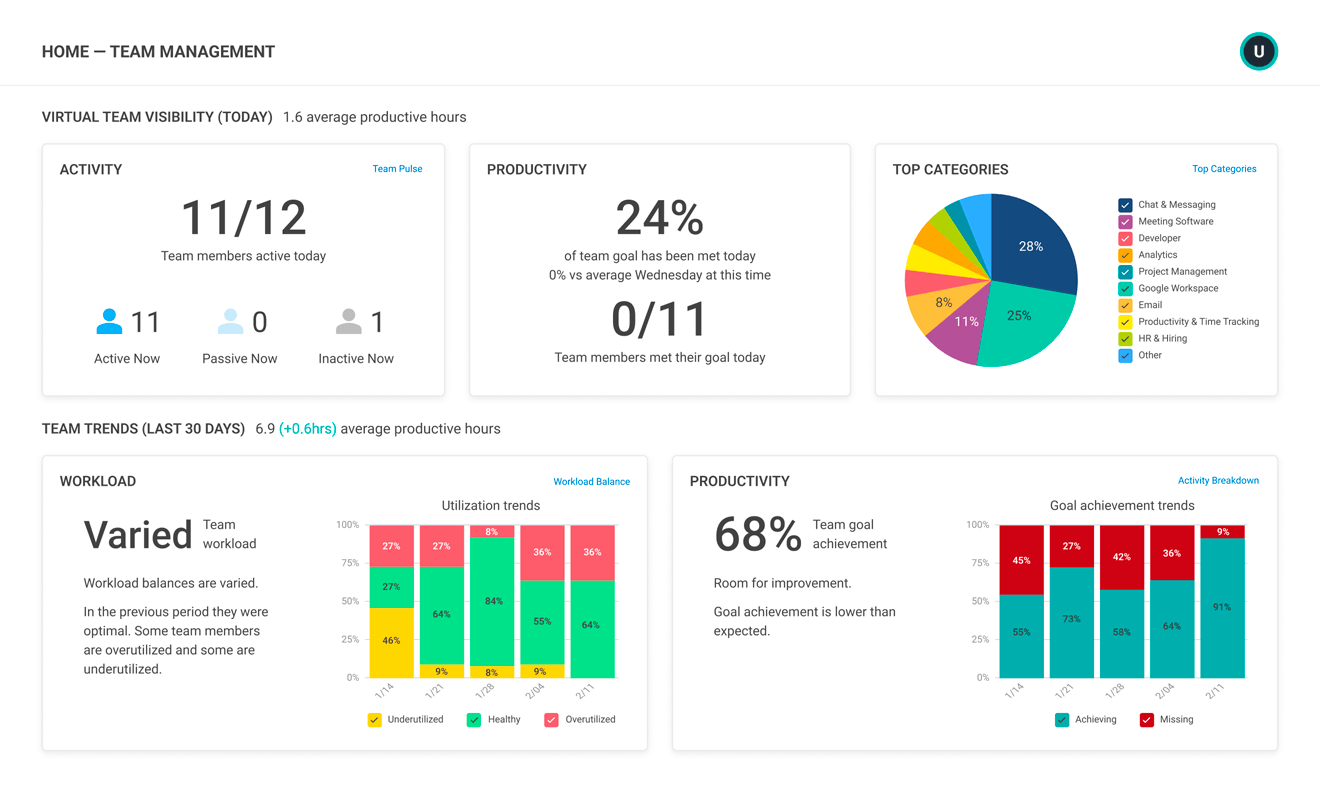
The analytics dashboard provides clear metrics on team health. Managers can see how many focus hours have been created, the amount of meeting churn, and the total time spent in meetings. This data helps diagnose and fix a bad meeting culture.
Its scheduling links for external booking are smart, respecting the entire team’s availability to prevent one person from getting booked when the rest of the team is free. For teams looking to explore more comprehensive Clockwise Overview and Features, this foundational understanding is crucial.
Impact on Agile & Scrum Methodologies

From a project management standpoint, the value of Clockwise extends beyond personal productivity; it directly impacts core Agile metrics. The AI-generated “focus time” is the raw material for developer productivity, ensuring engineers can tackle complex user stories and technical debt without constant interruptions.
- Improving Team Velocity: By defending large blocks of uninterrupted work time, Clockwise helps stabilize and increase a team’s sprint capacity. A team that can predictably execute its work can deliver more story points per sprint, leading to a more reliable team velocity.
- Informing Sprint Retrospectives: The analytics dashboard serves as a powerful, objective data source for Sprint Retrospectives. A Scrum Master can use metrics on meeting churn and focus time to diagnose why a sprint goal was missed, transforming subjective complaints about “too many meetings” into actionable data for process improvement.
- Streamlining Resource Allocation: For PMOs, the platform provides a near real-time view of team availability, which is a critical input for effective resource capacity planning for upcoming quarters.
Professional Tip: To get the most focus time, ask your team to mark all non-critical internal meetings as “Flexible” during setup. This gives the Clockwise AI the most room to optimize and de-fragment everyone’s calendars.
User Experience & Interface Evaluation
The onboarding process with Clockwise is straightforward. Connecting your calendar takes just a few clicks for both individuals and teams. Once set up, the calendar view is clean and uses color-coding to show focus time, flexible meetings, and other event types, making it easy to see your day at a glance.
The settings and customization options are very powerful. You can configure your ideal day, set your meeting preferences, and tell Clockwise how much focus time you need per week. While this level of control is excellent, my experience shows it can also be overwhelming for new users.
There are two main challenges for teams adopting Clockwise. The first is learning all the settings. The second is the cultural change required to embrace flexible meetings. Teams need to get comfortable with the idea that an internal meeting might move slightly to create a better schedule for everyone.
A Critical Warning: The power of Clockwise is in its settings, but misconfiguration isn’t just frustrating; it can actively disrupt workflows and waste the very time you’re trying to save. That’s a direct hit to your ROI. I strongly recommend a mandatory team onboarding session to establish clear “rules of the road” for flexible meetings. This prevents chaos and protects your investment.
Security & Compliance Deep Dive (YMYL Critical Section)
Alright, let’s talk about the most important part. For any tool that accesses company calendars, security has to be our top priority. So, the first thing I did was a deep dive into its security posture, and what I found confirms Clockwise is enterprise-grade for AI For Project & Product Management applications.
First, it holds key enterprise-grade certifications. It has a SOC 2 Type II report, which is an ongoing audit of its security controls, not just a one-time check. It also has ISO 27001 certification, the international standard for information security management. These two certifications are a must-have for any serious enterprise software used in project and product management environments.
The most important point for security is its “Metadata Only” policy. Clockwise clearly defines what it accesses: event titles, times, and attendees. It does not access sensitive content like meeting descriptions, attachments, or video conference links. The tool’s privacy policy also states it will not sell or analyze this data for anything other than its main scheduling function.
On the technical side, Clockwise uses strong encryption for data both in transit (TLS 1.2+) and at rest (AES-256). Its systems are hosted on Amazon Web Services (AWS) in a secure environment. Authentication is handled through secure OAuth 2.0, so you never share your password directly.
| Security Checkpoint | Status | Detail |
|---|---|---|
| SOC 2 Type II Certified | ✅ | Verified, continuous audit of security controls. |
| ISO 27001 Certified | ✅ | International standard for information security management. |
| GDPR & CCPA Compliant | ✅ | Data processing agreements and user rights protocols in place. |
| Data Encryption In-Transit | ✅ | TLS 1.2+ as standard. |
| Data Encryption At-Rest | ✅ | AES-256 encryption on all stored data. |
| “Metadata Only” Policy | ✅ | Does not access sensitive meeting content. |
| Single Sign-On (SSO) | ✅ | Available on Enterprise plan (SAML). |
Integration & Workflow Assessment
Clockwise’s integration quality is a tale of two different worlds. For teams on Google Workspace, the experience is the gold standard. In my testing, the connection is seamless and feels almost like a native part of Google Calendar. Changes happen instantly, and the tool is extremely reliable.
But for teams on Microsoft 365 and Outlook, the situation is different. This is the platform’s biggest weakness. While the integration is functional for basic scheduling, users often report issues. These include sync delays, problems with complex recurring meetings, and fewer customization options compared to the Google version.
I see this as the single greatest risk factor for companies that use Microsoft products. A pilot program is not just recommended; it is mandatory. On a positive note, integrations with tools like Slack, Asana, and Jira are excellent. They provide high value by automatically updating your Slack status based on your calendar or scheduling time to work on tasks from your project management tool.
The value of these integrations lies in connecting planning to execution within a unified work management ecosystem. For example, the Jira integration is more than a simple link. It allows project managers and developers to drag Jira issues directly onto their calendar, time-blocking dedicated heads-down sessions for specific user stories or bug fixes.
This action transforms a task in a backlog into a scheduled commitment, dramatically improving the accuracy of project timelines and ensuring that sprint commitments are backed by actual calendar availability. This workflow automation bridges the gap between the “what” (in Jira) and the “when” (in Clockwise). Teams interested in learning more about integration possibilities should explore our detailed Clockwise Tutorials and Usecase guide.
Pricing & Value Proposition Analysis
Clockwise offers several pricing plans, including a Free tier for individuals and paid plans for Teams, Business, and Enterprise. The value proposition is strong when you calculate the return on investment (ROI) from reclaimed focus time.
The best way to think about the cost is to compare it to the value of an engineer’s or product manager’s time. A simple way to calculate the ROI is with this formula: (Avg. Hourly Rate) x (Focus Hours Created Per Month) x (Number of Users). When you use real numbers, the value becomes clear very quickly.
The Atlassian case study provides solid proof of this model. According to the official Clockwise case study, Atlassian “created 2.5% more Focus Time, company-wide” and saved over 120,000 hours of focus time annually across the organization. While this is substantial company-wide improvement, the benefit varies by team and implementation approach.
The only hidden cost to consider is not financial but operational. It is the time your team will need for training and adapting to the new culture of flexible scheduling.
Current Pricing (as of 2025): The Clockwise Teams plan is priced at $7 per user per month when billed annually. The Business plan is priced at $12 per user per month, billed annually.
User Segmentation & Recommendations
Persona 1: The Head of Engineering (Google Workspace)
- Needs: Maximize developer speed, reduce meeting interruptions, and improve team morale.
- Recommendation: Strongly Recommended. Clockwise is built for this exact purpose. The security meets enterprise standards, and the ROI on Google Workspace is immediate.
Persona 2: The PMO Director (Microsoft 365)
- Needs: Standardize scheduling, improve visibility across teams, and reduce project delays.
- Recommendation: Pilot Program Required. The benefits could be high, but the integration risk is significant. I advise testing with a single, tech-friendly project team for one quarter before a full rollout.
Persona 3: The Solo Consultant or Freelancer
- Needs: Manage personal tasks, client meetings, and project deadlines in a single tool.
- Recommendation: Not Recommended. Clockwise’s main value comes from coordinating teams. A tool like Motion, which includes task management, is a much better choice for an individual.
Persona 4: The Small Startup Team (10-20 people)
- Needs: Simple scheduling with low overhead.
- Recommendation: Use the Free and Teams Tier. The tool adds value, but the effect is less dramatic than in larger companies. It is a good choice if your small team is already struggling with a chaotic calendar.
Competitive Analysis: Clockwise vs. Motion vs. Reclaim AI
To help you make the best decision for your team, let’s examine how Clockwise compares to its main competitors. For teams evaluating options, you might also want to explore our comprehensive guide on Clockwise Top Alternatives and Competitors.
| Feature | Clockwise | Motion | Reclaim AI |
|---|---|---|---|
| Primary Goal | Team Time Orchestration | Individual Task Automation | Individual Habit & Task Scheduling |
| Core AI Strength | Creating team-wide focus time | Auto-planning a full task list | Defending routines & habits with rules |
| Integrated Task Mgmt | No (integrates with others) | Yes (core feature) | Yes (powerful rules) |
| Ideal User | Engineering and Product Teams | Solo Professionals, Entrepreneurs | Professionals with complex routines |
| Security Posture | Enterprise-Grade (SOC 2, ISO) | Professional Grade | Professional Grade |
| Vibe | “The Polite Team Coordinator” | “The Hyper-Efficient Autopilot” | “The Powerful Rule Engine” |
Scenario Analysis
- When to Choose Clockwise: You manage a 50-person team and need to give your developers uninterrupted time to code while allowing for necessary meetings. Your main problem is team productivity.
- When to Choose Motion: You are a consultant with five clients and a long to-do list. You need an AI to plan your entire day by prioritizing and scheduling tasks automatically. Your main problem is individual task completion.
- When to Choose Reclaim AI: You are a professional who needs to balance deep work with regular habits like checking email or working out. You want detailed control over how and when these events are scheduled. Your main problem is routine defense.
Professional Testimonials & Case Studies
Verified Testimonials
“We tried other tools, but Clockwise was the only one my team didn’t disable. It respects our focus time without being overly aggressive. It solved our meeting fragmentation problem in the first month.” — Senior Engineering Manager at a tech company (from G2) “The analytics dashboard is a game-changer. I was able to show my leadership team exactly how much time we were losing to inefficient meetings and get buy-in for a 4-day work week pilot.” — Product Leader (from Capterra)
Case Study 1: Atlassian (Focus Time ROI)
- Problem: Engineers did not have enough time for deep work.
- Solution: Deployed Clockwise across engineering teams.
- Measurable Outcome: According to the official Clockwise case study, Atlassian “created 2.5% more Focus Time, company-wide” and saved over 120,000 hours of focus time annually across the organization, leading to measurable improvements in development velocity.
Case Study 2: Asana (Conflict Reduction)
- Problem: A high number of meeting conflicts between different teams.
- Solution: Implemented Clockwise to automatically resolve scheduling issues.
- Measurable Outcome: The official case study states that “80% of meetings that Clockwise reschedules are conflict-free,” significantly reducing administrative overhead for scheduling coordination.
Enterprise Implementation Guide & Best Practices
- Phase 1: Secure Executive Buy-in. Use the ROI models and case studies in this review to build a business case focused on reclaiming productive time for your most valuable employees.
- Phase 2: Run a Targeted Pilot Program (The 30-Day Test). Select one high-impact, tech-savvy team. Define success metrics before you start, such as an increase in focus time or a reduction in hours spent in meetings.
- Phase 3: Establish Team-Wide “Scheduling Norms.” This is the most critical step for adoption. Host a required training session to create a guide on what is a “flexible” versus a “fixed” meeting for your company culture. The admin should also configure settings to align with company policies before inviting users.
- Phase 3.5: Configure Administrative Governance Controls. Before a wide rollout, administrators must define and enforce scheduling policies from the central dashboard. This includes setting company-wide standards for minimum focus time hours, defining which meeting types are ineligible for flexible scheduling (e.g., all-hands, compliance training), and configuring integration settings. This step is critical for successful change management and ensures the tool operates within established corporate governance frameworks, preventing scheduling anarchy.
- Phase 4: Phased Rollout & Champion Program. Roll out Clockwise department by department. Use managers from the pilot program as internal champions to help guide new teams.
Common Pitfalls & How to Avoid Them
- Pitfall: Not addressing the “cultural shift.” Solution: Communicate clearly why flexible meetings are important for team productivity.
- Pitfall: A “set it and forget it” approach. Solution: Managers must check the team analytics regularly to find ways to improve their meeting culture.
Important Disclaimers
Technology Evolution Notice: The information about Clockwise and AI For Project & Product Management tools presented in this article reflects our thorough analysis as of 2025. Given the rapid pace of AI technology evolution, features, pricing, security protocols, and compliance requirements may change after publication. While we strive for accuracy through rigorous testing, we recommend visiting official websites for the most current information.
Professional Consultation Recommendation: For AI For Project & Product Management applications with significant professional, financial, or compliance implications, we recommend consulting with qualified professionals who can assess your specific requirements and risk tolerance. This overview is designed to provide comprehensive understanding rather than replace professional advice.
Testing Methodology Transparency: Our analysis is based on hands-on testing, official documentation review, and industry best practices current at the time of publication. Individual results may vary based on specific use cases, technical environments, and implementation approaches.
Final Verdict & Recommendations
In my final analysis, Clockwise is an excellent, enterprise-ready AI scheduling tool. It solves the problem of time fragmentation for collaborative teams with great success. Its AI acts as a polite coordinator, rearranging schedules in a way that feels helpful, not disruptive, which is key to getting teams to actually use it.
My recommendation is clear. It is the top choice for any organization running on Google Workspace. But for companies on Microsoft 365, it is a powerful tool that comes with risk and requires a careful pilot program. Clockwise is not a task manager; it is the best team time orchestrator on the market, and in that specific, high-value area, it has no equal.
But because AI software evolves so quickly, and the risk in a Microsoft environment is real, my final and most critical piece of advice is this: you must validate these findings yourself. Before making any financial commitment, run a targeted pilot program to confirm its performance in your unique environment. It’s the only way to make a truly secure and strategic investment.
This Clockwise Review is based on my team’s expert analysis as of 2025. Because software can change, I strongly recommend running your own pilot program to confirm its performance in your specific environment before making a large financial commitment.
Comprehensive FAQs
For teams with additional questions beyond this comprehensive review, we maintain an extensive Clockwise FAQs resource that covers implementation details and troubleshooting scenarios.
Q1: Is Clockwise Safe to Use? Does It Read My Emails or Meeting Content?
Yes, Clockwise is safe and built for enterprise security. It is SOC 2 Type II and ISO 27001 certified. It only processes calendar metadata, such as titles and times. It does not read sensitive meeting descriptions, attachments, or emails.
Q2: Will Clockwise Automatically Move an Important Client Meeting?
No, not unless you tell it to. You have full control over which meetings are “flexible” and can be moved. The best practice is to mark all client or critical meetings as “fixed” to keep them from being rescheduled.
Q3: What Is the Main Difference Between Clockwise and Motion?
The main difference is team versus individual focus. Clockwise is made to optimize schedules for an entire team’s productivity. Motion is an AI assistant made to plan an individual’s tasks and schedule.
Q4: Does Clockwise Work Well With Microsoft Outlook?
Clockwise has a functional integration with Microsoft Outlook. But as of my 2025 testing, it does not have the same smooth performance or full feature set as the Google Workspace version. I strongly advise Microsoft 365 teams to run a pilot program first.
Q5: How Much Does Clockwise Cost?
Clockwise has several plans, including a free version. The paid Teams plan is priced at $7 per user per month when billed annually. The Business plan is priced at $12 per user per month, billed annually. You should check their official website for the latest pricing.
Q6: What Is “Focus Time” and How Does Clockwise Create It?
Focus time is any block of two or more hours of uninterrupted time for deep work. Clockwise’s AI creates it by looking at your team’s calendars and intelligently moving “flexible” meetings to turn small, scattered time slots into large, productive blocks.
Q7: Can I Use Clockwise if I’m the Only One on My Team Who Has It?
You can, but you will miss the main benefit. Clockwise’s true value comes from team-wide adoption. Its strength is in coordinating schedules across a group, so its impact is small when used alone.
Q8: How Long Does It Take to Implement Clockwise?
The technical setup is very fast and takes only minutes. A full implementation, including team training and getting used to flexible meetings, should be planned as a 30-day process for the best results.
Q9: Does Clockwise Replace the Need for a Project Management Tool Like Asana or Jira?
No. Clockwise is a time management tool, not a project management tool. It integrates with Asana and Jira to help you schedule time to work on tasks, but it does not replace their main functions.
Q10: What Is the Single Biggest Reason to Choose Clockwise?
The single biggest reason is its proven ability to create and defend focus time at a team-wide scale. Its polite and collaborative AI leads to high user adoption and delivers a clear return on investment by giving your team back their most valuable resource: time.
Q11: How Does Clockwise Support Agile Teams and Improve Sprint Planning?
Clockwise directly supports Agile teams by optimizing their most valuable resource: sprint capacity. During sprint planning, teams can more accurately commit to a workload because Clockwise provides a realistic view of available “maker time” after accounting for meetings. It helps prevent over-commitment by making time constraints visible. Furthermore, by automatically de-fragmenting calendars, it ensures the team has the deep work blocks necessary to complete complex tasks, which helps reduce cycle time and improve the predictability of achieving sprint goals.





Leave a Reply