
Is Taskade the Right AI Project Management Tool for You?
Take This 2-Minute Quiz to Find Out!
Today, we’re diving deep into Taskade FAQs, providing project management professionals with clear, objective insights into this powerful AI-powered workspace.
As experienced practitioners at Best AI Project Hub, we understand the critical need for tools that genuinely enhance productivity and streamline workflows.
Taskade, a unified platform blending project management, collaboration, and note-taking, is making significant waves in the realm of AI for Planning & Scheduling.

Key Takeaways
- AI-Native Workspace: Taskade transforms high-level goals into detailed project plans with sub-tasks and deadlines in seconds, serving as a comprehensive productivity engine for modern project management.
- Competitive Positioning: Unlike Notion’s wiki-database approach or Asana’s structured hierarchy, Taskade excels at generative planning and flexible all-in-one solutions for agile teams.
- Free Plan Limitations: While excellent for evaluation, professional teams will need paid subscriptions to sustain AI workflows due to 1,000 monthly AI credit restrictions and limited permission controls.
- Enterprise Security: Taskade maintains SOC 2 Type II and ISO 27001 certifications with full GDPR compliance, offering robust security for professional environments with advanced permission settings.
- Human Oversight Required: Taskade’s AI functions best as a fast junior coordinator – strategic prioritization, resource management, and complex dependency handling still require experienced project manager judgment.
In this guide, I’ll address your most pressing questions about Taskade’s AI capabilities, limitations, and real-world application.
We’ll explore how its intelligent task generation and AI Agents can transform complex goals into actionable plans, and crucially, where human oversight remains indispensable.
You’ll gain a comprehensive understanding of its security posture, compare its AI strengths against competitors like Notion and Asana, and learn to calculate the true ROI for your organization.
My goal is to empower you to make informed decisions about integrating Taskade into your project lifecycle, aligning with our mission to cut through the hype and deliver practical value. For more detailed information, explore our comprehensive Taskade Overview and Features guide.
What is Taskade, and how does its AI specifically help project and product managers?
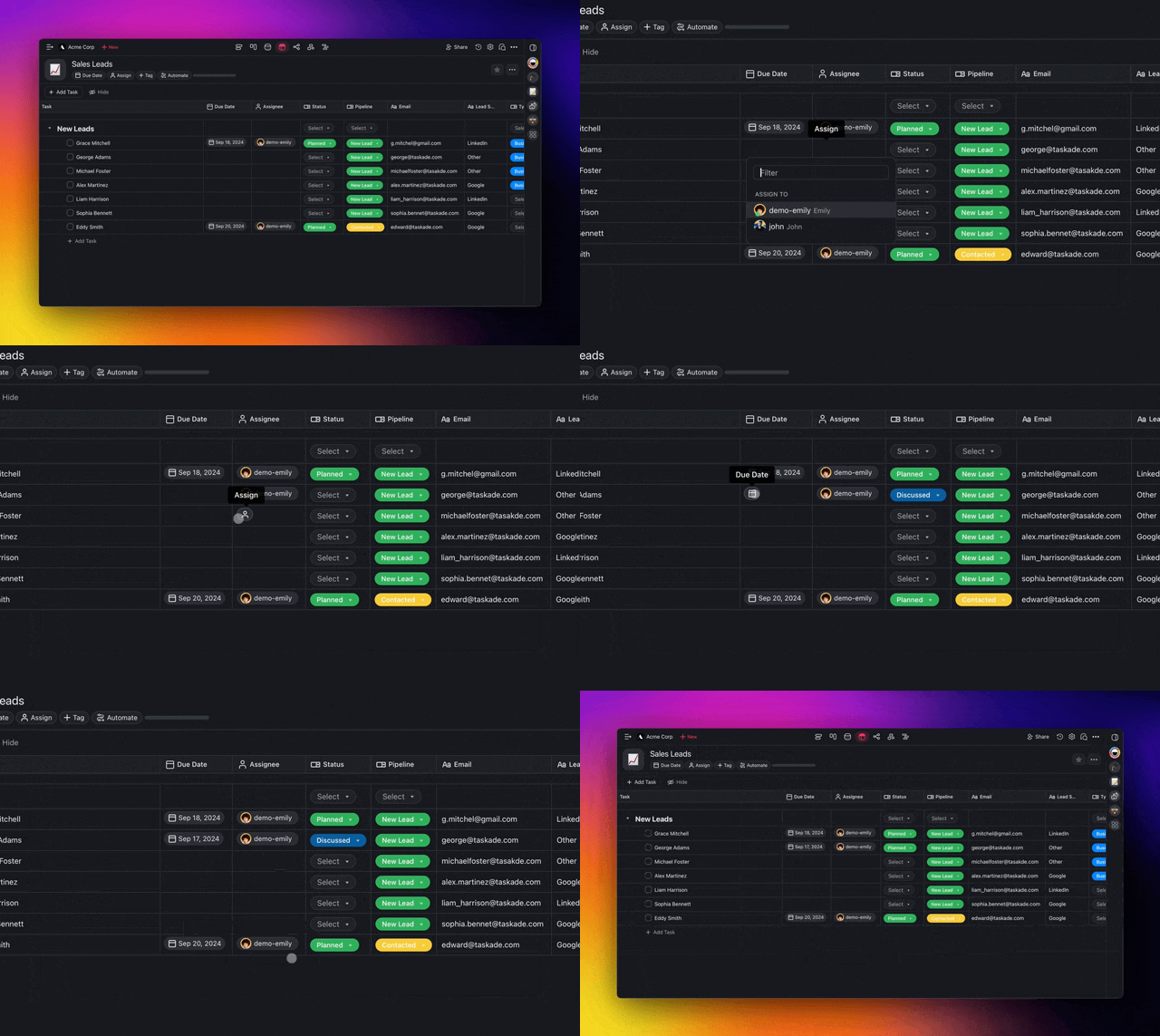
Taskade is a unified, AI-powered workspace that consolidates project management, team collaboration, and note-taking into a single, flexible platform.
Unlike traditional project management tools that often operate in silos with rigid structures, Taskade enables real-time visualization of project data across multiple views including task lists, Kanban boards, calendars, mind maps, and organizational charts.
For project and product managers, Taskade’s AI serves as a comprehensive productivity engine that automates time-intensive planning and execution tasks.
The platform’s intelligent task generation can transform high-level goals like “Launch Q3 marketing campaign” into detailed project plans with sub-tasks, suggested deadlines, and logical groupings within seconds.
The AI Agent functionality allows creation of custom virtual team members specialized for specific functions – an “Agile Sprint Planner” agent can analyze backlogs and suggest sprint tasks based on capacity, while a “Content Marketing” agent can generate comprehensive content plans from briefs.
Dynamic summarization capabilities enable instant condensation of lengthy documents, meeting notes, or discussion threads, allowing managers to quickly grasp project status without manual review.
This AI-driven approach shifts the managerial role from reactive task-tracking to proactive strategy, freeing up valuable time for team leadership and high-impact decision making. To understand how Taskade compares to other solutions, check out our analysis of Taskade Top Alternatives and Competitors.
How does Taskade compare to Notion and Asana for AI-driven project management?

Taskade, Notion, and Asana approach AI-powered project management from fundamentally different architectural philosophies, making each suitable for distinct organizational needs.
Taskade functions as a flexible, AI-native “second brain” built around nested-list structures that can instantly transform simple outlines into multiple project views with deeply integrated generative capabilities.
Notion operates as a powerful “wiki-database” system with AI layered atop its block-based pages and databases, excelling at knowledge synthesis and content creation within complex, interconnected knowledge bases.
Asana maintains a traditional structured task and project hierarchy with AI focused on predictive optimization within its work-graph environment, specializing in risk prediction and resource allocation.
Their AI strengths diverge significantly: Taskade AI excels at generative planning and creating complete project structures from prompts; Notion AI dominates at summarizing existing content and acting as a writing assistant within databases; Asana Intelligence shines in analyzing project data for bottleneck identification and workflow optimization.
Taskade suits agile, fast-moving teams needing flexible all-in-one solutions with strong AI-driven brainstorming, while Notion benefits teams requiring highly customizable knowledge hubs, and Asana serves larger organizations needing robust, structured systems for cross-functional project management with emphasis on process efficiency.
For a deeper comparison, explore our comprehensive Taskade Review and definitive analysis to see how it stacks up in real-world scenarios.
Is Taskade’s free plan sufficient for small project management, or what are its key limitations?
Taskade’s Free Forever plan offers substantial value for individual users, freelancers, and small teams managing basic projects, providing unlimited tasks and projects with real-time collaboration for up to 5 members per workspace.
However, professional project management scenarios reveal three critical limitations that often necessitate upgrading to paid plans.
The free tier includes 1,000 AI credits monthly that reset each month, but active AI usage for plan generation, summarization, or Agent operation quickly consumes these credits, effectively disabling core AI functionality until renewal.
Advanced permission controls are absent in the free version, preventing granular edit/view rights management at project or task levels, creating significant security and operational risks for professional environments requiring controlled access to sensitive information.
Storage constraints include limited file upload capacity problematic for projects involving large design files or documents, coupled with only 1-day version history that severely restricts recovery from accidental deletions or reverting to previous project states – a crucial capability for complex project management.
While excellent for platform evaluation and personal use, teams seriously integrating AI into daily workflows will find the AI credit and permission limitations compelling reasons to upgrade to paid subscriptions for sustained professional operation.
Can Taskade AI generate a complete project plan or a product roadmap from a simple prompt?
Taskade AI demonstrates exceptional capability in generating comprehensive project plans and product roadmaps from single natural language prompts, representing one of its core strengths that moves beyond basic task suggestions to create immediately usable structured outlines.
The output quality directly correlates with prompt specificity – a generic prompt like “Make a project plan for a new app” yields functional but basic templates, while detailed prompts produce significantly customized results.
For example, the prompt “Act as an expert Product Manager. Generate a detailed project plan for launching a new B2B SaaS application helping finance teams automate expense reporting. Include four phases: 1) Research & Discovery, 2) Design & Prototyping, 3) Development Sprints (3 sprints), and 4) Go-to-Market Launch with key tasks and sub-tasks for each phase” generates a multi-level structured list covering competitor analysis, user interviews, MVP feature definition, wireframing, prototype development, user testing, and complete launch preparations.
The generated plan remains dynamic and actionable, allowing immediate task assignment, deadline setting, and visualization through Mind Map views for dependency mapping or Board views for Kanban-style management.
The true power emerges through iterative refinement using multiple AI Agents – after initial generation, employing a “Risk Manager” agent to identify potential risks per phase, then a “QA Lead” agent to add testing requirements transforms a good AI-generated plan into a robust, comprehensive project framework.
Want to master these capabilities? Check out our practical Taskade Tutorials and Usecase guide for step-by-step instructions.
How does Taskade handle data security, privacy, and compliance (e.g., SOC 2, GDPR)?
Taskade implements a multi-layered security and compliance framework validated through independent certifications, though organizations in regulated industries should conduct additional verification.
The platform employs TLS 1.2+ encryption for data in transit and industry-standard AES-256 encryption for data at rest, protecting project information from unauthorized interception or server access.
Compliance certifications include SOC 2 Type II verification confirming effective ongoing controls for security, availability, processing integrity, confidentiality, and privacy of customer data, plus ISO 27001 certification demonstrating formal information security management systems meeting global standards.
Full GDPR compliance supports EU customers with data processing agreements, portability mechanisms, and deletion protocols.
Infrastructure relies on Amazon Web Services with robust physical and network security, offering enterprise customers data residency options specifying US or EU storage locations.
Paid plans provide advanced permission settings enabling workspace owners to define roles and control access at project, task, and comment levels, ensuring team members, contractors, or clients access only relevant information.
While these measures establish strong security posture, achieving compliance for standards like HIPAA remains a shared responsibility requiring organizations handling protected health information to execute Business Associate Agreements and ensure their platform usage meets regulatory requirements.
What are the real-world limitations of Taskade’s AI? Where does it still require manual oversight?
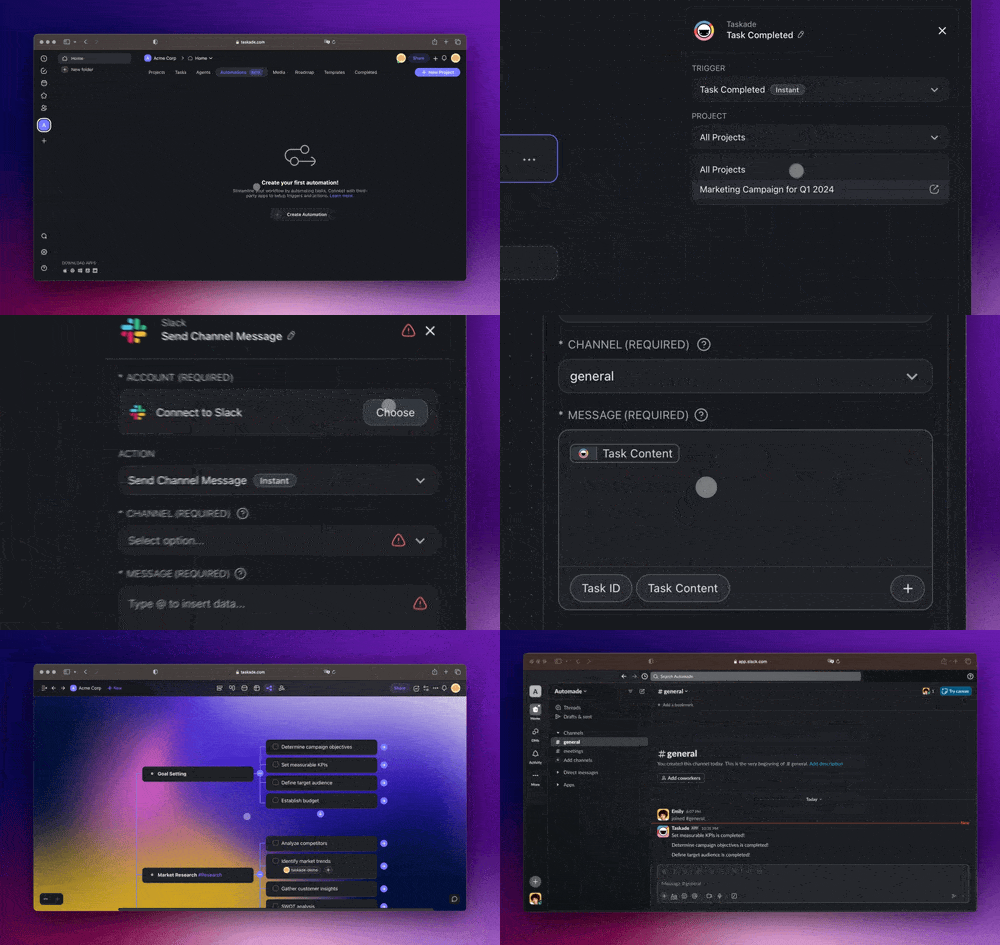
Taskade’s AI demonstrates impressive generative and automation capabilities but faces significant limitations regarding contextual understanding of specific business environments and team dynamics, necessitating experienced project manager oversight.
The platform lacks true resource management functionality – while it can generate tasks and suggest assignments based on roles, it cannot perform actual resource allocation considering team members’ current workloads, individual skills, vacation schedules, or potential burnout risks, making uninformed task assignment potentially detrimental to team capacity and deadlines.
Complex dependency management presents another limitation: the AI can create logical task sequences but cannot establish or manage multi-level dependencies requiring formal Gantt chart linking (finish-to-start, start-to-start relationships), forcing manual management of these critical path relationships.
Content generation risks include potential generic outputs or rare “hallucinations” where the AI might invent non-standard practices or facts, particularly for specialized frameworks, requiring human expertise to validate, refine, and customize generated plans into battle-tested strategies tailored to specific market positions and internal resources.
Strategic prioritization remains exclusively human-driven – while AI agents can apply frameworks like RICE or ICE by creating appropriate fields, they cannot make judgment calls aligning projects with confidential quarterly OKRs or determining which features deliver maximum value to key customers.
Taskade’s AI functions best as an exceptionally fast junior project coordinator handling preparation, research, and structuring, while experienced leaders must provide final strategic decisions, resource commitments, and risk management approvals.
How do I calculate the real ROI of using Taskade’s AI features?
Calculating genuine ROI for Taskade’s AI requires moving beyond subscription costs to quantify time savings, productivity gains, and error reduction through key performance indicators directly impacting team output and business outcomes.
Begin by measuring average hours project managers spend weekly manually creating plans, breaking down epics, and writing tasks (e.g., 5 hours/week), then apply conservative 70% reduction estimate from AI plan generation (3.5 hours saved weekly) multiplied by fully-loaded hourly rates ($75/hour = $262.50 weekly savings).
Quantify administrative overhead reduction by estimating time entire teams spend on status reports, meeting notes, and stakeholder queries – if 10-person team spends 30 minutes weekly each on updates (5 total hours), AI automating 80% frees 4 hours of team capacity weekly for value-creating work.
Factor increased team velocity and throughput: shorter planning cycles and faster handoffs may enable completing extra projects quarterly, with that project’s revenue or strategic value contributing to ROI.
Calculate total value combining cost of time saved, value of redeployed capacity, and increased throughput value, then subtract total cost including subscription and implementation time, with ROI percentage derived from [(Total Value – Total Cost) / Total Cost] * 100.
Successful implementations should demonstrate investment significantly outweighed by combined savings and productivity gains across the organization, including “cost of chaos” savings from prevented miscommunication and project delays that often justify annual subscriptions through single major incident avoidance.
What is the process for migrating a project from Trello or Asana to Taskade?

Taskade provides built-in importers facilitating streamlined migration from popular platforms like Trello and Asana, though complex projects typically require manual cleanup and configuration.
The process begins with data export from source platforms: Trello boards export via Menu > Print and Export > Export as JSON, while Asana projects export through project dropdown > Export > CSV format.
Within Taskade workspace, clicking “Import” and selecting corresponding tool (Trello/Asana) allows uploading exported files for processing into new Taskade projects recreating original structures.
Importers successfully convert Trello lists/cards or Asana sections/tasks into Taskade’s nested list format, including migration of tasks, sub-tasks, descriptions, comments, attachments, embeds, and due dates – contrary to some assumptions, attachments do transfer through the import process.
Post-import review and cleanup focuses on structure verification ensuring correct hierarchy translation, while custom fields from Asana or advanced Trello labels lacking direct equivalents require recreation using Taskade’s #tag system.
Automation workflows (Asana Rules, Trello Butler commands) won’t migrate and must be rebuilt using Taskade’s AI Agents and templates, with dependencies needing manual review and reestablishment.
The importer provides excellent starting points saving significant data re-entry time, but mission-critical projects should allocate project manager time for manual verification and platform-specific configuration reimplementation to ensure complete data integrity and functionality preservation.
For more comprehensive insights and detailed answers to your questions, visit our complete Taskade FAQs resource page.
If you’re exploring other AI-powered project management solutions, don’t miss our curated guide to the Best 10 AI for Planning & Scheduling: The Definitive Professional Guide for 2025.





Leave a Reply