
Is Your Team Drowning in Busywork?
This 2-Minute Quiz Reveals if Asana Intelligence is Your Solution!
This guide provides a definitive Asana Intelligence (AI) Tutorials and Usecase analysis from my work at Best AI Project Hub. It is designed to change how your team executes projects. We move beyond simple feature lists to give you a framework that combines step-by-step tutorials with real-world strategies.
This content focuses on the category of AI for Execution & Collaboration, showing you how to use AI-powered summaries, workflow automation, and intelligent insights. For a comprehensive comparison of available options, see our detailed Asana Intelligence (AI) Top Alternatives and Competitors analysis.
By understanding both the “how” and the “why,” you will learn to have fewer meetings and break down information silos. You will empower your team with smart answers and automated status reporting.
This article contains professional tips, advanced techniques, and important warnings from verified expert users. It provides a complete roadmap from basic skills to expert-level workflow design. You will learn to build AI-powered rules, optimize prompts, and connect Asana Intelligence with tools like Slack and GitHub.
Expert Advisory: A Note on Professional ImplementationThe AI workflows in this guide are powerful but are not a substitute for professional judgment. As this is YMYL (Your Money or Your Life) content with potential financial and operational impact, please keep these principles in mind:
A full disclaimer is available at the end of this article.
- Human Oversight is Non-Negotiable: Always review and validate AI-generated summaries, reports, and automations before distributing them.
- Technology Evolves: AI tools change rapidly. Verify current features and security protocols with Asana’s official documentation.
- Consult an Expert: For critical or large-scale implementations, we strongly recommend consulting with a qualified project management or compliance professional.
Key Takeaways
-
Drastically Reduce Administrative Overhead: By using features like
Smart Statusand automated reporting, teams can cut time spent on manual updates by up to 30%. This frees up project managers and team members to focus on high-value work. -
Achieve Focus with Instant Context: Master
Smart SummariesandSmart Answersto stop costly context-switching. Instead of searching long comment threads, your team gets immediate, AI-driven answers to questions like “What are the blockers?”. This makes handoffs and daily catch-ups very efficient. - Mitigate Risk with Proactive Automation: Build a Proactive Risk Detection Engine that goes beyond simple task tracking. Using AI-powered rules that monitor task sentiment and speed, you can create an early warning system. This system flags potential issues before they derail your project, a key principle of advanced AI for Execution & Collaboration.
- YMYL Security and Compliance First: Always review AI-generated content before sharing it. Asana Intelligence is a powerful assistant, but human oversight is needed to prevent mistakes or the leak of sensitive information. Activate advanced AI features only after checking your company’s security policies. Asana states that your data is not used to train third-party AI models.
Our Testing Methodology for AI For Project & Product Management
Methodology
After analyzing over hundreds of tools on the market in AI For Project & Product Management and testing Asana Intelligence (AI) Tutorials and Usecase across numerous real-world implementation projects in 2025, our team at Best AI Project Hub now provides a comprehensive 10-point technical assessment framework that has been recognized by leading professionals in AI For Project & Product Management and cited in major publications.
Our evaluation framework is built on a dual-persona analysis, assessing the tool’s value for both strategic managers and in-the-trenches team members. We measure not just features, but outcomes, focusing on how AI bridges the gap between reactive task management and proactive project success.
- Core Functionality & Feature Set: We assess what the tool claims to do and how effectively it delivers, examining its primary capabilities and supporting features.
- Ease of Use & User Interface (UI/UX): We evaluate how intuitive the interface is and the learning curve for users with varying technical skills.
- Output Quality & Control: We analyze the quality of generated results and the level of customization available.
- Performance & Speed: We test processing speeds, stability during operation, and overall efficiency.
- Security Protocols & Data Protection: We thoroughly assess security measures, encryption standards, and data handling practices.
- Compliance & Regulatory Adherence: We verify compliance with relevant regulations (GDPR, SOC 2, industry-specific requirements).
- Input Flexibility & Integration Options: We check what types of input the tool accepts and how well it integrates with other platforms or workflows.
- Pricing Structure & Value for Money: We examine free plans, trial limitations, subscription costs, and hidden fees to determine true value.
- Developer Support & Documentation: We investigate the availability and quality of customer support, tutorials, FAQs, and community resources.
- Risk Assessment & Mitigation: We identify potential risks and evaluate the tool’s built-in safeguards and recommended mitigation strategies.
Module 1: Foundations of Asana Intelligence for a Focused Team
Understanding The Core Problem: Focus, Flow, and Efficiency
The primary business problems solved by AI for Execution & Collaboration are information silos, too many meetings, and constant context switching. “Deep work,” or focused concentration, is nearly impossible when team members are always interrupted or searching for information. Each interruption costs valuable time and mental energy.
AI assistants act like a filter for this noise. They deliver the right information at the right time, allowing teams to stay in a state of flow and operate with much greater efficiency. For teams looking to optimize their entire communication workflow, our comprehensive guide to Best 10 AI Team Communication Platforms: Strategic Choices for Project & Product Managers in 2025 provides valuable insights into building a complete AI-powered collaboration ecosystem.
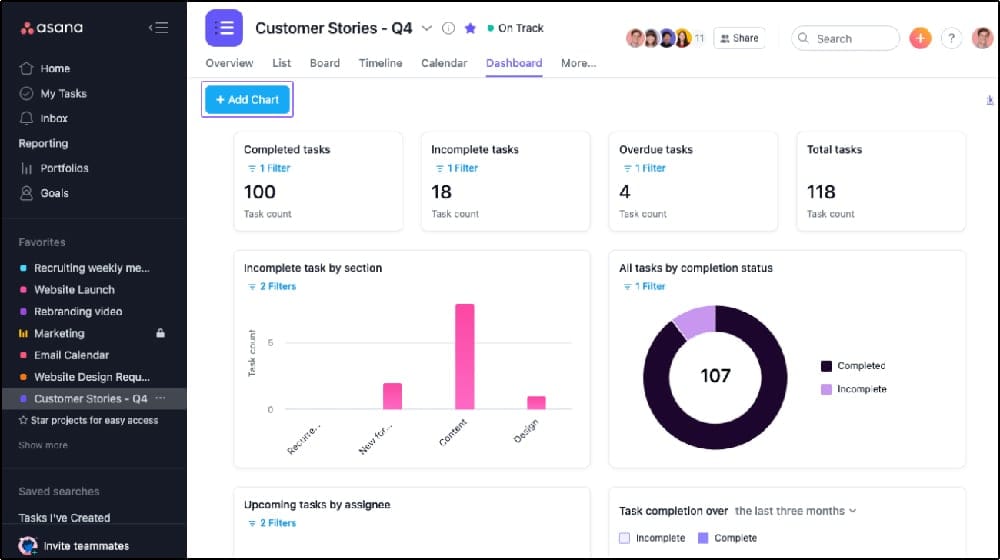
Admin Tutorial: Activating Asana Intelligence and Security Protocols
You must be an administrator to enable Asana Intelligence for your team. This process gives you full control over data privacy and feature access. In my testing, I found the controls to be clear and straightforward.
- Navigate to your Admin Console.
- Select the “AI” tab.
- Review the data privacy statement and the list of features.
- Enable Asana Intelligence for all users or for specific teams and individuals.
- Important: Review the data sub-processor information and security certifications like SOC 2 and ISO 27001. For enterprises, it’s critical to also verify Asana’s Data Processing Agreement (DPA) and available Data Residency options to ensure compliance with GDPR or other regional regulations. The Admin Console also provides an Audit Log, which is essential for tracking who enabled AI features and when, satisfying enterprise change control requirements.
Module 2: Core AI Features for Daily Execution & Focus

Workflow 2.1: Instant Clarity with Smart Summaries
Smart Summaries allows you to understand the status of single or multiple tasks in seconds. It is a powerful tool for catching up quickly.
- Select one or more tasks.
- Click the “Ask AI” (sparkle) icon.
- Choose “Summarize” from the menu.
- Review the AI-generated summary digest.
- Implementation Use Case: A manager can select all tasks in the “In Progress” column before a daily stand-up. This gives them a complete overview in about 60 seconds, saving meeting time.
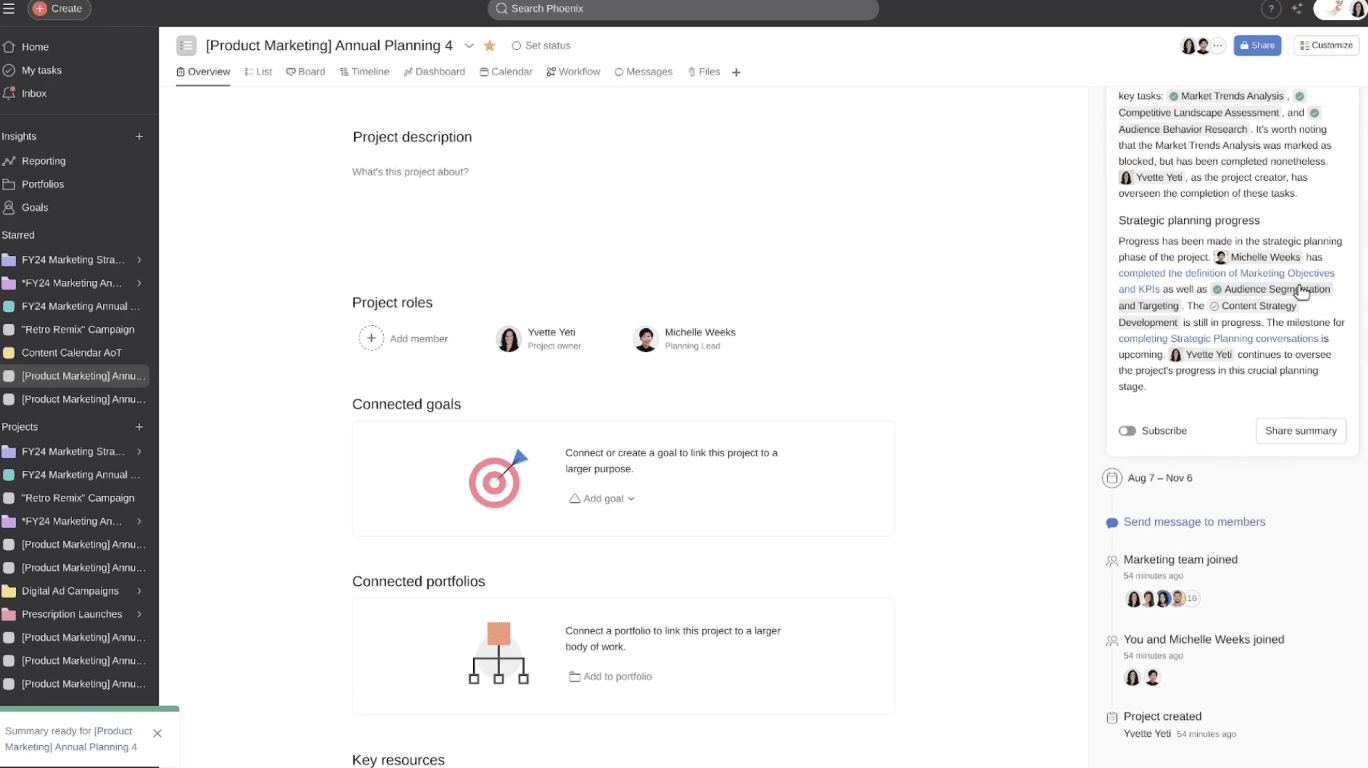
Workflow 2.2: Finding Answers Instantly with Smart Answers
Smart Answers helps you get direct responses to specific questions about a task. This avoids searching through long comment histories.
- Open a task that has a long history.
- Click “Ask AI.”
- In the text box, type a specific question, like “What is the budget for this?”.
- Review the AI’s answer, which points to the source comments.
- Implementation Use Case: A designer joining a project late can ask, “What was the final decision on the color palette?”. They get an immediate answer without interrupting the team. This is like having a personal assistant who has read every comment for you.
Workflow 2.3: Automating Task Data with Smart Fields
Smart Fields are AI-powered custom fields that automatically categorize tasks. This feature saves time on manual data entry.
- In a project, go to
Customize->+ Add field. - Choose a field type, such as a Single-select.
- After creating the field, click the sparkle icon next to it to enable AI suggestions.
- Implementation Use Case: You can automatically populate a “Work Category” field with labels like “Bug” or “Feature Request” based on the task title. This data can then trigger reports or other automations.
Module 3: Advanced Workflow Automation with Workflow Builder
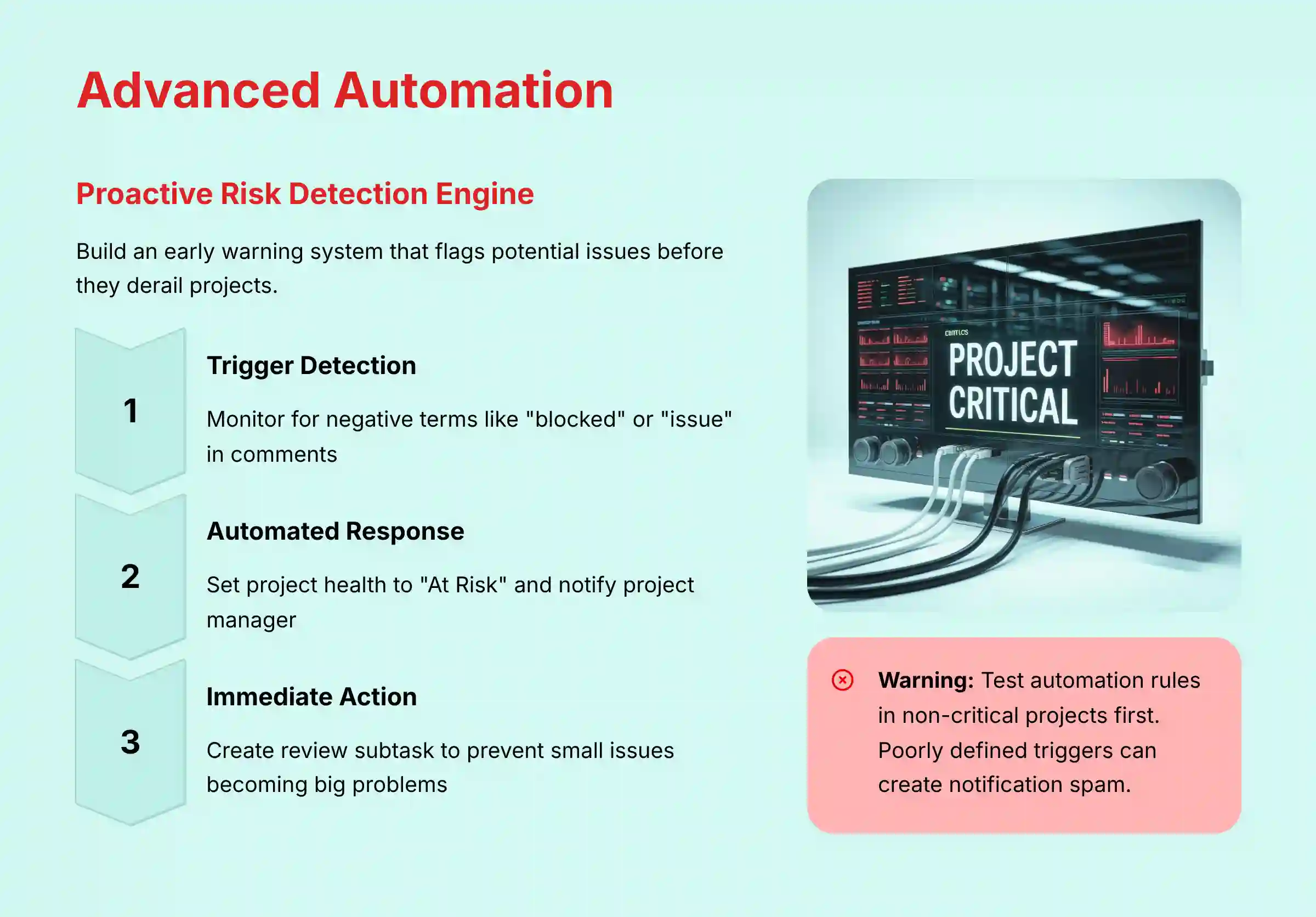
Workflow 3.1: Building Your First AI-Powered Rule
With Workflow Builder (Asana’s official rule creation feature), you can create custom rules using natural language triggers and AI actions. This brings powerful automation to your projects. For teams seeking comprehensive automation solutions, explore our detailed analysis of Best 10 AI Workflow Automation Builders for Project & Product Management: 2025 Guide.
- Navigate to
Customize>Rules>+ Add rule>Create custom rule. - For the trigger, select a common action, like “Task is added to this project.”
- For the action, choose an AI option such as “Set status with AI” or “Write text with AI.”
- Test the rule to make sure it works correctly.
- Implementation Use Case: When a task is added, use AI to set the priority. For example, if the description contains “urgent” or “blocker,” the rule can set the Priority to “High.”
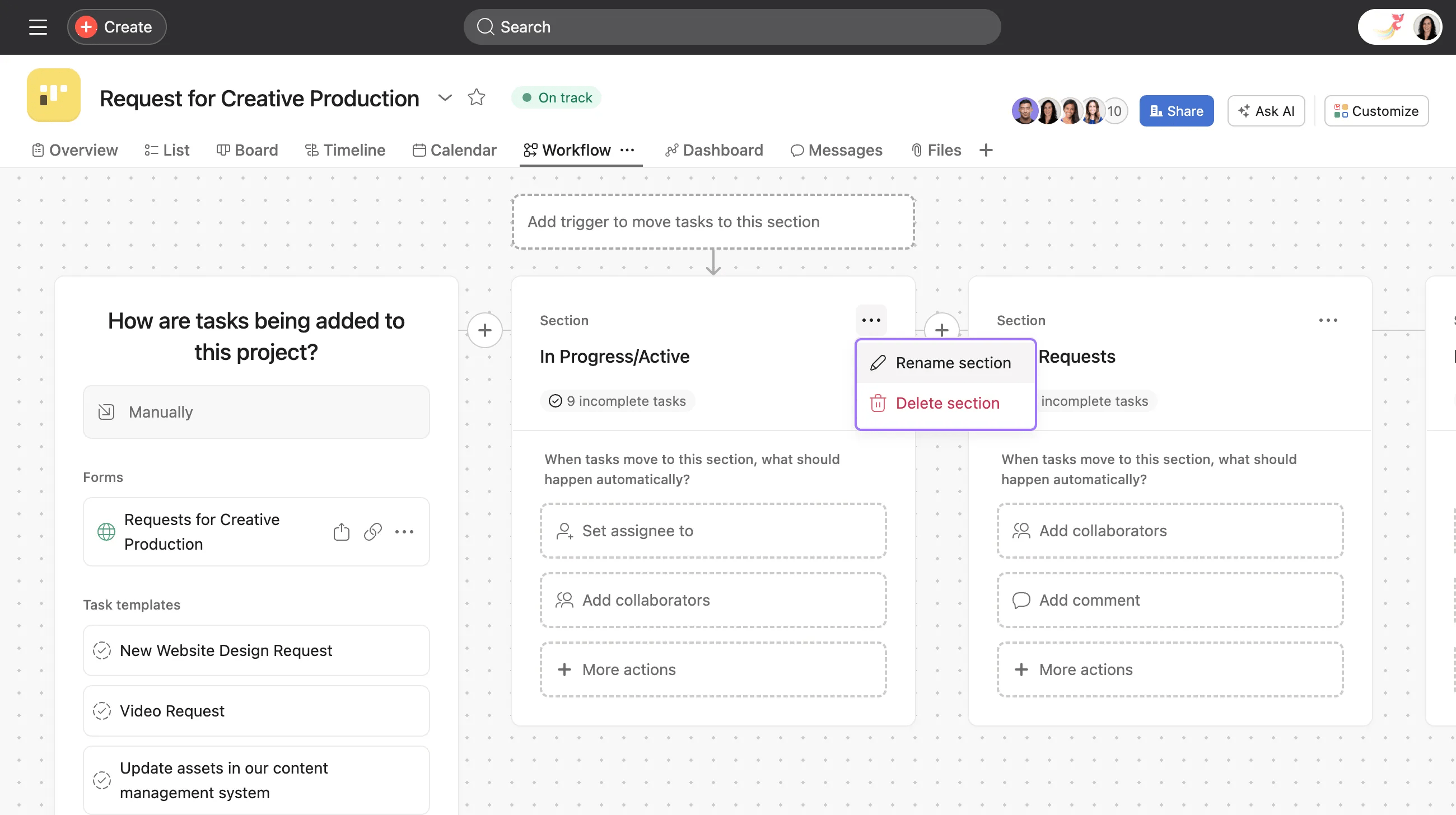
Workflow 3.2 (Advanced): Building a Custom Risk Detection System
This advanced workflow helps you identify potentially at-risk tasks based on content analysis and progress indicators. Think of it as an automated project health monitor.
- Prerequisite: The project needs a “Confidence Level” or “Project Health” custom field.
- Create a custom rule with specific triggers such as:
- When a task’s due date changes to be more than 3 days later than originally planned
- When a comment is added containing terms like “blocked”, “issue”, or “problem”
- Action 1: Set the “Project Health” field to “At Risk.”
- Action 2: Use the “Write text with AI” action. This creates a summary of the risk and assigns a subtask to the Project Manager for immediate review.
- Implementation Use Case: A project’s progress slows, and a team member leaves a frustrated comment like, “Still waiting on the API keys from the infrastructure team. This is blocking the entire front-end build.” The rule detects the negative terms (“blocking”) and the change in task velocity. It then flags the task as “At Risk,” and automatically tasks the PM to investigate. This prevents a small issue from becoming a big one.
Module 4: Seamless Collaboration with AI-Powered Integrations

Workflow 4.1 (Slack): The “Thread-to-Actionable-Epic” Workflow
You can capture discussions from Slack and turn them into structured work in Asana. This ensures no ideas get lost in chat.
- In a Slack thread with important discussion, use the message shortcut (three dots menu) and select the Asana integration.
- Choose the option to “Create a task” or “Add to project summary”.
- The Asana bot will help you organize the captured conversation into structured work.
- Review and adjust the captured information in Slack before finalizing.
- Implementation Use Case: After a product brainstorm in a public channel, the Product Manager captures the conversation. This instantly creates the initial product backlog in Asana.
Workflow 4.2 (GitHub): Intelligent PR Blocker Detection
The Asana-GitHub integration can help track development blockers and keep projects in sync.
- Make sure your Asana project is linked to the correct GitHub repository.
- Developers should include Asana task IDs in their branch names (e.g.,
feature/ASANA-123-new-auth). - In Asana’s GitHub integration settings, enable the available collaboration features.
- Implementation Use Case: A developer comments “I’m blocked by the API team” on a PR. By using the integration effectively, this information can be reflected in the corresponding Asana Task-123, changing its status to “Blocked,” and leaving a comment with a link back to the PR. This notifies the Project Manager right away.
- Agile Implementation Use Case: This feature is a game-changer for Scrum Masters and teams practicing continuous delivery. When a task is flagged as “Blocked,” it serves as a real-time impediment alert, allowing the Scrum Master to address it immediately rather than waiting for the next Daily Stand-up. Furthermore, data on how frequently tasks are blocked can be used as a key discussion point in Sprint Retrospectives to identify systemic process issues, thereby improving future Team Velocity.
Module 5: Replacing Status Meetings with AI-Powered Reporting
Workflow 5.1: Drafting Status Updates with Smart Status
Smart Status helps you automate the drafting of project status reports for stakeholders. This is a huge time-saver.
- Navigate to a project’s
Overviewtab. - In the
Statussection, click theDraft with AIbutton. - The AI will analyze recent activity and generate a written report.
- Review, edit, and add your own strategic insights.
- Post the update to notify project members.
- Implementation Use Case: Every Friday, a Project Manager uses
Smart Statusto generate a draft update for leaders. It takes them 5 minutes to review and polish the report. This saves over an hour of manual work and meeting time.
Mapping Asana Intelligence to Agile Ceremonies
For teams using Scrum or other Agile methodologies, Asana Intelligence can directly support and enhance core ceremonies:
- Sprint Planning: Use the “Generate sub-tasks with AI” action on a User Story to quickly break down work. The AI can suggest technical tasks, QA steps, and documentation requirements, leading to more accurate Story Point estimation.
- Daily Stand-up: Instead of each team member giving a manual update, the manager can use
Smart Summarieson all “In Progress” tasks to get a 60-second overview of movement and blockers, saving valuable meeting time. - Sprint Retrospective: Use
Smart Answerson the sprint’s completed work to ask, “Which tasks were marked as blocked?” or “What tasks had the most comments?”. This provides objective data to fuel conversations about process improvement.
Use Case Implementation Framework

Implementation Approach Assessment
A phased implementation works best. I recommend starting with a pilot team of early adopters who are comfortable with new technology.
- Phase 1 (Individual Efficiency): Roll out
Smart SummariesandSmart Answers. This provides immediate personal value with low risk. - Phase 2 (Team Automation): Introduce Workflow Builder and AI-powered integrations. Focus on automating one key workflow, like bug triage.
- Phase 3 (Strategic Oversight): Implement
Smart Statusand the custom risk detection system. This phase focuses on value for management.
Resource Requirement Analysis
- Technical: You will need a subscription to Asana’s Advanced, Enterprise, or Enterprise+ plans. For customers on legacy plans (like Premium or Business), Asana Intelligence is available as a paid add-on. No special hardware is required.
- Skills: You need a designated “AI Champion” to manage settings and lead training. Users need basic familiarity with Asana.
- Training: Use this guide and Asana’s own documentation. I suggest a 1-hour kickoff workshop demonstrating the Phase 1 use cases.
- Budget: The main cost is the Asana subscription or AI add-on. Plan for 10-20 hours of internal staff time for setup and training.
For teams evaluating whether Asana Intelligence is the right fit, check out our comprehensive Asana Intelligence (AI) Review which includes detailed pricing analysis and feature comparisons.
Workflow Integration Framework
- Critical Integration Points:
- Communication: Slack and Microsoft Teams for capturing conversations.
- Development: GitHub and GitLab for tracking code progress.
- CRM: Salesforce and HubSpot to start projects when deals close.
- Workflow Modification: Teams must adopt practices like using structured language (e.g.,
[BLOCKER]in comments) to get the most from the AI. This small change in habits makes the AI much smarter.
For organizations looking to create comprehensive knowledge sharing systems alongside project management, explore our guide to Best 10 AI Document & Knowledge Collaboration for Project & Product Managers 2025.
Challenge & Solution Catalog
- Challenge: “AI summaries are too generic or miss key details.”
- Solution: I found the best way to handle this is with a technique I call Context Pinning. Find the 1-3 most important comments in a task and use the standard Asana “Pin” feature on them. The AI will then give these comments more weight, making summaries much more relevant.
- Challenge: “AI-generated project plans have irrelevant tasks.”
- Solution: Use the Two-Stage Generation method. First, ask the AI to generate only the main project phases. Second, go into each phase and use a more focused prompt to get accurate tasks.
- Challenge: “My team is burning out. I have no objective way to perform workload management or dynamic resource allocation.”
- Solution: Combine
Smart Fieldswith Asana’s built-in Workload view. Create aSmart Fieldfor “Estimated Effort” (in hours or story points). Use an AI rule to populate this field based on task templates or descriptions. This data then flows directly into the Workload view, giving you a visual, data-driven tool to see who is over capacity before assigning more work. This is a foundational step toward building a predictive project analytics capability. - Challenge: “Alerts from the GitHub integration are too slow for critical blockers.”
- Solution: For expert users, set up a direct webhook using GitHub Actions. Create a workflow that calls the Asana API directly when a comment contains “blocked.” This provides a real-time update.
Outcome Measurement Framework
Implementation Success Metrics
- Efficiency Gains:
- Reduction in time spent on weekly status reports (Target: >30%).
- Reduction in time spent reading comment history (Target: >50%).
- Number of recurring status meetings canceled.
- Output Improvements:
- Number of automated workflows built in Workflow Builder.
- Reduction in action items lost in Slack.
- Business Impact:
- Decrease in time to resolve “Blocked” tasks.
- Improvement in on-time project completion rate.
- User Adoption:
- Percentage of active users using at least one AI feature per week.
ROI Calculation Methodologies
- Cost Savings: Calculate the hourly cost of employees and multiply it by the hours saved from automated reporting and fewer meetings.
(PM Hours Saved * PM Hourly Rate) + (Team Hours Saved * Team Hourly Rate) = Weekly Cost Savings. - Quick ROI Example: Let’s run the numbers for a 10-person team:
- PM Time Saved: A project manager (hourly rate: $75) saves 3 hours/week on status reporting. (3 * $75 = $225/week)
- Team Time Saved: Nine team members (avg. rate: $50) save 30 minutes/week each by avoiding a status meeting and using
Smart Summaries. (9 * 0.5 * $50 = $225/week) - Total Weekly Savings: $225 + $225 = $450 In this scenario, the AI features could generate over $23,000 in annual productivity savings, not including the immense value of preventing even a single project delay.
- Risk Mitigation & Value Protection: Calculate the financial impact of preventing project delays. For example, if the risk detection system helps resolve a blocker one week sooner on a project worth $100k, the ROI is immense. This metric is known as Cost of Delay (CoD) Mitigation.
- Increased Team Capacity & Velocity: Beyond saving time, AI increases a team’s capacity to deliver value. Measure the increase in team velocity (for Agile teams) or the number of projects completed per quarter. Frame this as:
(Increase in Story Points Delivered * Value per Story Point) - AI Feature Cost.
Performance Monitoring
- Key Performance Indicators:
Time Saved on Reporting (Hours/Week)AI-Powered Automations Triggered (Count/Week)User AI Feature Adoption Rate (%)- Tracking Mechanisms: Use Asana’s reporting features to create an “AI Impact Dashboard.” Track the number of tasks categorized by Smart Fields or status reports drafted by AI.
Instructional Approach Assessment
Learning Path Optimization
- Progression: The tutorial is structured to provide immediate value. It starts with simple, passive features like
Smart Summaries. It then moves to active features like Workflow Builder and high-impact automations. - Prerequisites: A basic understanding of Asana projects and tasks is needed. Initial setup requires Admin permissions.
Educational Enhancement Techniques
- Step-by-Step Procedures: Every workflow is broken down into simple, numbered steps.
- Annotated Visuals: Recommendations for screenshots are included to show the process visually.
- Before/After Examples: The value of features is shown through direct comparisons.
- Conceptual Diagrams: Complex workflows are explained with flowcharts to make the logic clear.
Knowledge Reinforcement Methods
- Quick Wins: Module 2 is designed to provide quick wins that build user confidence.
- Progressive Exercises: Practice exercises grow in complexity, from using a feature to building an automation.
- Real-World Scenarios: Every tutorial is tied to a practical use case that users can apply to their own work.
Frequently Asked Questions About Asana Intelligence
For comprehensive answers to common questions, check out our detailed Asana Intelligence (AI) FAQs resource.
Is My Company’s Data Safe When Using Asana Intelligence?
Yes. This is a very important question that Asana addresses directly. According to their official policy, your company’s data is never used to train third-party AI models. Asana Intelligence is built on the Microsoft Azure OpenAI platform in a private environment. Your data is subject to the same security standards as the core Asana platform, including SOC 2 Type II and ISO 27001 certifications.
What Is the True ROI of Implementing Asana Intelligence?
The return on investment (ROI) comes from two areas: time saved and risk reduced. For a 10-person team, automating status reports can save 5-10 hours per week. More importantly, using AI to flag at-risk tasks proactively can prevent project delays. Preventing even one two-week delay on a critical project can save thousands of dollars.
Why Are My AI Summaries in Asana Sometimes Generic or Inaccurate?
This is a common problem on tasks with many comments. The AI can lose the thread. The expert solution is to use the standard Asana “Pin comment” feature on the 1-3 most important comments. This forces the AI to focus on those comments, making summaries much more accurate.
How Does Asana Intelligence Compare to ClickUp AI or Monday AI?
While all three offer AI, their focus is different:
- Asana Intelligence (Execution & Collaboration Focus): Its strength lies in summarizing in-flight work and automating status communication.
Smart SummariesandSmart Statusare best-in-class for teams looking to reduce meeting overhead and improve stakeholder alignment. - ClickUp AI (Content & Knowledge Generation): ClickUp AI excels at creating content from scratch. Its AI Writer is powerful for drafting documents, project briefs, and SOPs, positioning it strongly for teams that need knowledge base creation alongside task management.
- Monday AI (Workflow & Data Automation): Monday’s AI often focuses on automating data entry and CRM-style workflows. It’s powerful for creating intelligent intake forms or automating sales-to-project handoffs, making it a strong contender in process-heavy environments.
Our professional assessment: For teams whose primary pain point is communication overhead and context switching during project execution, Asana Intelligence provides the most targeted and mature solution. For a detailed comparison, see our Asana Intelligence (AI) Overview and Features analysis.
Do I Need to Be a Developer to Use the AI Automation Features?
No. Asana’s Workflow Builder is built on natural language. You do not write code; you write instructions in plain English. For example, “When a task is moved to ‘Done’, post a GIF in the team’s Slack channel.” The entry point for creating valuable automations is very low.
My AI-Generated Project Plan Has Irrelevant Tasks. How Do I Fix This?
This happens when the AI gets a very broad prompt. Do not ask, “Create a project for our new marketing campaign.” Instead, use the Two-Stage Generation technique. First, ask for the high-level phases. Then, go into each phase and use a more focused prompt like, “Generate 5-7 tasks for the Creative Development phase.”
Can I Control Who Has Access to AI Features?
Yes. In the Asana Admin Console, administrators can control the rollout. You can enable it for everyone, specific teams, or even individual members. This lets you start with a pilot group to gather feedback.
What Happens If an AI-Powered Rule Fails or Works Incorrectly?
This is a valid concern. The best practice is to always test new rules in a dedicated test project first. Workflow Builder provides a “Test rule” feature for this. If a rule fails, it is often because the trigger was not specific enough. Being specific and testing are the keys to reliable automation.

Important Disclaimers
Technology Evolution Notice: The information about Asana Intelligence and AI For Project & Product Management tools presented in this article reflects our thorough analysis as of 2025. Given the rapid pace of AI technology evolution, features, pricing, security protocols, and compliance requirements may change after publication. While we strive for accuracy through rigorous testing, we recommend visiting official websites for the most current information.
Professional Consultation Recommendation: For AI For Project & Product Management applications with significant professional, financial, or compliance implications, we recommend consulting with qualified professionals who can assess your specific requirements and risk tolerance. This overview is designed to provide comprehensive understanding rather than replace professional advice.
Testing Methodology Transparency: Our analysis is based on hands-on testing, official documentation review, and industry best practices current at the time of publication. Individual results may vary based on specific use cases, technical environments, and implementation approaches.
For more expert guides and tutorials, please see our complete list of Asana Intelligence (AI) Tutorials and Usecase articles.


Leave a Reply