
Is Reclaim.ai the Right AI Calendar for Your Team?
This 2-Minute Quiz Reveals Your Perfect Scheduling Solution!
Reclaim.ai is revolutionizing how project and product teams manage their time by combining AI-powered calendar optimization with deep project management integrations. This comprehensive guide addresses the most common questions about Reclaim.ai, helping you determine whether this intelligent scheduling platform is the right fit for your team’s productivity needs.
Key Takeaways
- AI-Powered Automation: Reclaim.ai transforms passive calendars into intelligent scheduling systems that automatically optimize time blocks for tasks, habits, and meetings based on your priorities.
- Deep Project Integration: Unlike basic calendar tools, Reclaim integrates with Jira, Asana, ClickUp, and Linear to automatically schedule actual work tasks from your project backlog.
- Enterprise Security: SOC 2 Type II certified with enterprise-grade encryption, OAuth 2.0 authentication, and GDPR compliance for safe team deployment.
- Measurable ROI: Teams report 5-10+ hours of additional focus time per week and 15-25% reduction in meeting overload, translating to $250,000-$500,000 annual value for 10-person teams.
- 30-Day Implementation: Most teams see measurable productivity improvements within 3-4 weeks when following proper onboarding and configuration protocols.
What is Reclaim.ai and how does it differ from a standard calendar tool?

Reclaim.ai is an intelligent calendar assistant that uses AI to automatically find and schedule optimal time blocks for your tasks, habits, and meetings. Unlike standard calendar applications such as Google Calendar or Outlook Calendar, which function as passive scheduling tools requiring manual time allocation, Reclaim.ai operates as a proactive, automated scheduling system that continuously optimizes your schedule based on your priorities and commitments.
For project and product managers, the fundamental difference lies in how Reclaim.ai treats time as a dynamic, flexible resource rather than a static grid. Traditional calendars simply display time blocks and require you to manually drag, drop, and reorganize events whenever conflicts arise. Reclaim.ai understands the context and constraints behind each calendar entry.
When you assign a task like “Draft Product Specification” with a specific deadline and estimated duration, the AI analyzes your entire calendar landscape, identifies the optimal multi-hour focus block, and automatically schedules it. If a scheduling conflict emerges, Reclaim intelligently reshuffles that task to the next best available slot before your deadline—all without manual intervention.
This transformation converts your calendar from a passive record-keeping system into an intelligent, self-optimizing work plan. The AI continuously balances competing priorities, defends focus time from meeting encroachment, and ensures high-priority project work receives dedicated calendar space. This automation eliminates hours of manual scheduling overhead each week and creates a more realistic, achievable daily schedule that aligns with your actual capacity and strategic goals.
Who is the ideal user for Reclaim.ai? Is it for individual users or project teams?
Reclaim.ai is architected to serve both individual professionals and entire teams, but it delivers exponentially greater value when adopted at the team level, particularly within project management, product development, engineering, and marketing organizations. The ideal user is a busy professional whose schedule combines collaborative meetings with essential solo deep work that requires sustained, uninterrupted focus.
For individual contributors, Reclaim excels at defending focus time from meeting creep, automating personal habits like learning or exercise, and eliminating the cognitive overhead of manual task scheduling. However, the platform’s capabilities expand significantly when deployed across an entire team:
Project and Product Managers can leverage deep integrations with tools like Jira, Asana, or Linear to automatically schedule time for their team members to work on specific sprint tasks. This ensures project priorities are directly reflected in each team member’s calendar, creating a realistic view of capacity and preventing over-commitment during sprint planning. For more detailed insights on how these integrations work in practice, explore our comprehensive Reclaim.ai Overview and Features guide.
Engineering and Creative Teams benefit immensely from Reclaim’s ability to protect large, uninterrupted blocks of deep work time. By automatically scheduling and defending these focus periods, the tool reduces costly context-switching and fragmentation, leading to measurable improvements in code quality, design output, and overall productivity.
Leaders and Executives can utilize features like Smart 1:1s to automatically find optimal mutual time slots for team check-ins, and Scheduling Links to offer external stakeholders available meeting times that intelligently work around internal priorities and protected focus blocks.
When an entire team adopts Reclaim.ai, they establish a shared system of understanding around time management principles. This collective adoption leads to fewer scheduling conflicts, more equitable workload distribution, reduced meeting overhead, and significantly more protected time for high-impact project work. The network effect of team-wide adoption transforms individual productivity gains into systemic improvements in project delivery and team health.
Is Reclaim.ai safe? How does it handle data security and privacy?
Reclaim.ai is designed with enterprise-grade security protocols and has achieved SOC 2 Type II certification, a critical industry standard that verifies the company’s systems and processes for securely managing customer data have been independently audited and proven effective over time. This certification is essential for any organization handling sensitive calendar and project data, which often contains strategic information about product roadmaps, confidential initiatives, and internal team structures.
Reclaim.ai’s security framework is built on several foundational pillars:
Data Encryption: All user data is encrypted both in transit (during transmission between your devices and Reclaim’s servers using TLS 1.2 or higher) and at rest (when stored in their database systems using AES-256 encryption). This ensures that even in the unlikely event of a data breach, the information remains unreadable without the proper decryption keys.
Principle of Least Privilege: The system requests only the minimum necessary permissions to your Google or Microsoft account required for core functionality. Reclaim primarily needs to read your calendar to identify available time slots and create or edit calendar events for scheduling tasks and meetings. The platform does not access email content, documents, or other unrelated account data.
Secure Authentication: Reclaim utilizes the OAuth 2.0 protocol for authentication, meaning you sign in through your trusted Google or Microsoft accounts. Reclaim never sees or stores your actual account password, eliminating a significant security vulnerability.
GDPR Compliance: For users in the European Union and organizations with EU data subjects, Reclaim maintains compliance with the General Data Protection Regulation (GDPR), ensuring adherence to strict data privacy standards, user consent requirements, and individual data rights including the right to access, correct, and delete personal information.
Infrastructure Security: The platform runs on enterprise-grade cloud infrastructure with regular security audits, intrusion detection systems, and 24/7 monitoring for suspicious activity.
For project and product managers evaluating Reclaim.ai, it’s essential to verify these security credentials align with your organization’s internal IT and compliance policies. Many enterprises require a formal security review before adopting new SaaS tools. Reclaim provides detailed security documentation and can facilitate security assessments through their enterprise support channels.
Before rollout, establish clear team guidelines about calendar transparency and ensure team members understand that while private calendar event details remain private, task titles synced from project management tools may be visible on calendars, so confidential information should never be placed in task titles.
Reclaim.ai vs. Clockwise: What are the key differences for a product development team?

Reclaim.ai and Clockwise represent two distinct approaches to AI-powered calendar optimization, and understanding their philosophical differences is crucial for selecting the right tool for your product development team’s specific needs.
Clockwise is primarily designed for organization-wide meeting optimization and focus time creation. Its core strength lies in analyzing calendar patterns across an entire company and automatically rescheduling “flexible” meetings to consolidate fragmented time into larger blocks of uninterrupted focus time. Clockwise excels at large-scale, top-down schedule optimization, making it particularly effective for organizations where excessive meetings are the primary productivity challenge. The platform’s strength is in creating team-wide “no-meeting” blocks and reducing calendar fragmentation at scale.
Reclaim.ai takes a fundamentally different “task-up” approach. While it also optimizes meeting schedules, its core differentiator is deep integration with project management systems like Jira, Asana, ClickUp, and Linear. Reclaim treats individual tasks as first-class calendar citizens, automatically scheduling dedicated work time for each task from your project backlog.
For product development teams, this means you can connect your sprint backlog directly to Reclaim, and the AI will intelligently schedule time for each engineer to work on their assigned tickets before their respective deadlines. This granular, task-level scheduling ensures project work receives concrete calendar commitments rather than being relegated to undefined “free time.” For a detailed analysis of how these approaches differ in practice, check out our comprehensive guide to Reclaim.ai Top Alternatives and Competitors.
For a product development team, the decision criteria are:
Choose Clockwise if your biggest pain point is excessive, fragmented meetings that constantly interrupt maker schedules, and your primary goal is creating more consolidated, team-wide focus blocks. Clockwise is excellent for protecting maker schedules at a high level but doesn’t directly connect to your project backlog.
Choose Reclaim.ai if your biggest pain point is tasks from your project backlog not getting scheduled into team members’ calendars, leading to missed deadlines, sprint overcommitment, and a persistent disconnect between your project plan in Jira and your team’s actual daily capacity.
In essence, Clockwise defends time from meetings, while Reclaim actively schedules project tasks into the defended time. Both tools can improve team productivity, but Reclaim’s task-level integration with project management systems typically provides more direct value for product managers focused on execution, delivery, and connecting strategic project plans to daily team capacity.
How deeply does Reclaim.ai integrate with project management tools like Jira, Asana, and ClickUp?
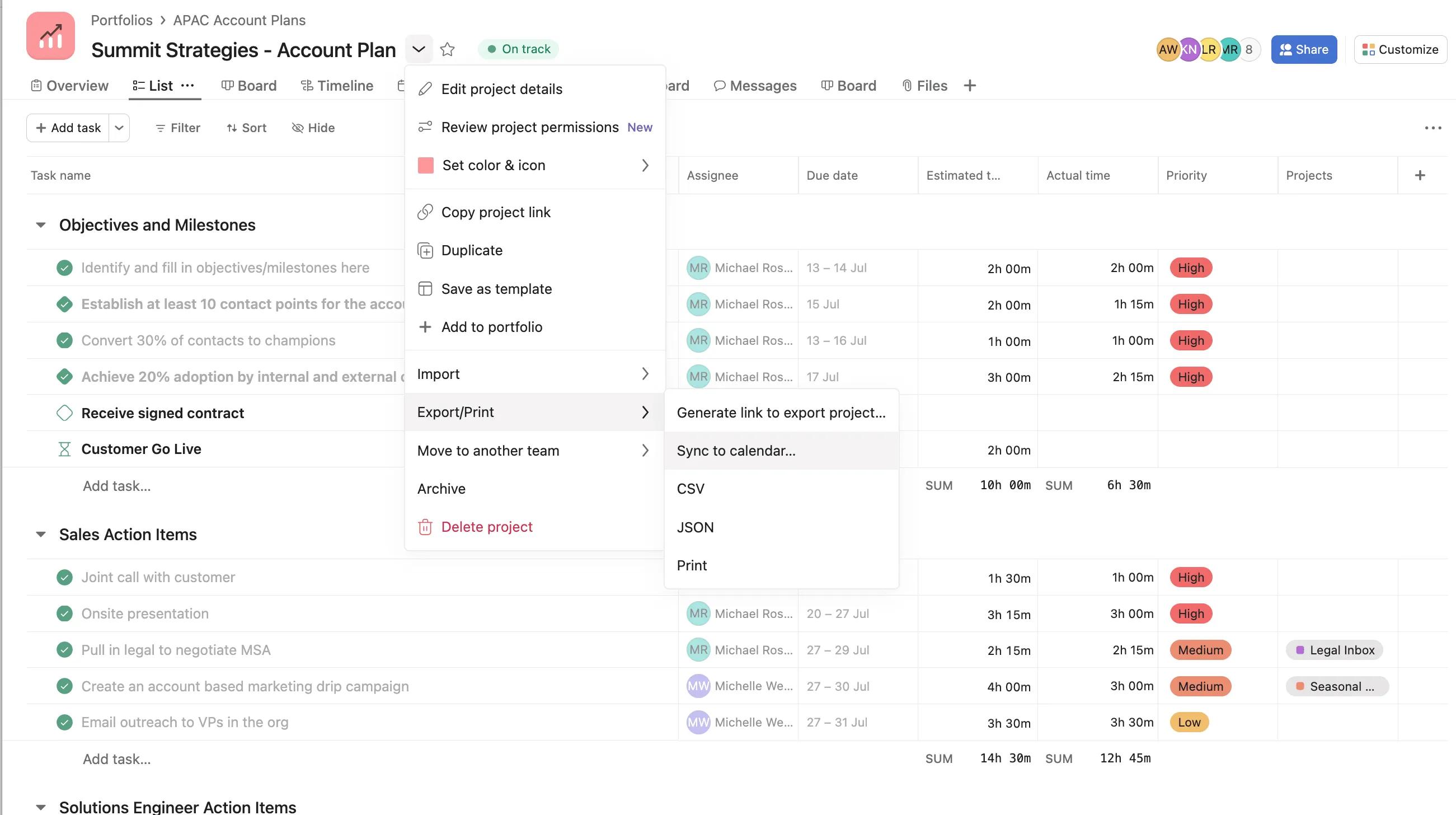
Reclaim.ai’s integration with project management platforms like Jira, Asana, ClickUp, Linear, and Todoist represents its most powerful capability for project and product teams. These integrations go far beyond simple notification systems, creating a sophisticated, bi-directional connection between your project plan and your team’s actual calendar capacity.
The integration architecture operates at multiple levels:
Intelligent Task Syncing: When you connect a project management tool, Reclaim automatically syncs tasks assigned to each team member. The system provides granular control over which projects, boards, lists, or sprints to sync, preventing calendar clutter. For example, in Jira, you might configure Reclaim to only sync tasks from the current sprint that are in “In Progress” or “To Do” status, ensuring completed work doesn’t continue occupying calendar space.
Context-Aware Scheduling: Reclaim reads critical metadata from each task, including due dates, time estimates, priority levels, and dependencies. Using this information, the AI automatically blocks appropriate amounts of time on team members’ calendars to complete the work before deadlines. These scheduled blocks are marked as “flexible” and will automatically move if higher-priority conflicts arise, but they ensure the work has dedicated time rather than being an abstract item on an endless to-do list.
Priority Mapping and Intelligent Sequencing: The AI interprets priority signals from your project management system. A P0 or “Critical” task in Jira or a “High Priority” task in Asana receives preferential treatment in the scheduling algorithm, using up premium time slots that you define (such as morning focus hours). Lower-priority tasks are scheduled around higher-priority commitments and can be automatically rescheduled when urgent work emerges.
Bi-Directional Status Updates: As scheduled time for a task passes on your calendar, some integrations allow Reclaim to update the task’s status in the source system, automating progress tracking and reducing manual status reporting overhead.
Workload Visibility: For managers, the integration provides unprecedented visibility into team capacity. When every task from the sprint backlog is represented as a calendar commitment, it becomes immediately obvious if a team member is overcommitted or if a new high-priority task has no available calendar space before its deadline.
This deep integration fundamentally transforms how teams plan and execute projects. Tasks evolve from abstract backlog items into concrete time commitments, creating a realistic, capacity-based view of what the team can actually accomplish. For managers, this closes the critical gap between the aspirational project plan and the daily reality of team capacity, leading to more accurate sprint planning, fewer missed deadlines, and better workload distribution across the team. To learn practical implementation strategies, explore our detailed Reclaim.ai Tutorials and Usecase guide.
How does Reclaim.ai’s AI handle unexpected, high-priority tasks?
Reclaim.ai’s AI is specifically designed for dynamic rescheduling, making it particularly effective at handling unexpected, high-priority tasks—a common reality in agile project and product management environments. When an urgent task emerges, such as a critical bug fix or a last-minute executive request, the system uses a combination of task attributes and personalized user settings to intelligently and automatically adjust schedules.
The typical workflow for handling an urgent, high-priority task follows this pattern:
Task Creation and Prioritization: You create the urgent task either in your connected project management tool (marking it as P0 in Jira, for example) or directly within Reclaim. You assign it a critical priority level, a realistic due date (such as end-of-day), and an estimated duration (for instance, 3 hours for “Fix critical login bug”).
Immediate Calendar Analysis: The moment the high-priority task is synced, Reclaim’s AI immediately scans the affected team member’s calendar for available time slots that can accommodate the required duration. The AI prioritizes scheduling during the user’s defined high-priority work hours and seeks to minimize disruption to other critical commitments.
Intelligent Rescheduling Logic: If no single 3-hour block is immediately available, Reclaim employs sophisticated rescheduling logic. It will automatically move lower-priority tasks, habits, or flexible events to later time slots. The AI respects your configured priority hierarchy—tasks you’ve designated as “can always reschedule” will be moved first, while “locked” or high-priority items remain protected. The system will never automatically reschedule hard commitments like external meetings or items you’ve marked as immovable.
Defensive Time Blocking: Once the optimal time slot is identified and cleared, Reclaim blocks the urgent task on the calendar and marks it as busy to prevent other scheduling conflicts. If you’ve configured the task as “locked,” this time block becomes highly resistant to further automated changes, effectively defending it from being bumped by less critical work.
Continuous Re-optimization: If circumstances change—for example, if an emergency meeting is manually added that conflicts with the scheduled urgent task—Reclaim will automatically attempt to find the next best available time slot and reschedule the task accordingly, ensuring it still receives the necessary time before its deadline.
This automated process replicates the mental work a skilled project manager performs manually—evaluating priorities, shuffling commitments, and making strategic trade-offs—but executes it in seconds rather than minutes or hours. The key to making this automation feel intelligent rather than disruptive is investing time upfront to configure your task and habit priority settings, teaching the AI which items are flexible and which are immovable. When properly configured, the AI’s automated decisions align seamlessly with your own judgment, creating a scheduling system that feels proactive and intuitive rather than intrusive.
Can Reclaim.ai be used for team capacity planning and resource management?
Reclaim.ai serves as a valuable component of team capacity planning and resource management strategies, though it’s important to understand both its capabilities and limitations in this domain. While Reclaim is not a dedicated capacity planning platform in the traditional sense—it doesn’t manage project budgets, track skill matrices across an organization, or provide long-term resource forecasting—it excels at providing an accurate, real-time view of individual and team availability by translating abstract project plans into concrete calendar commitments.
How Reclaim Supports Capacity Planning:
Reveals True Calendar Capacity: By scheduling not only meetings but also actual work tasks synced from Jira or Asana, Reclaim eliminates the dangerous illusion of “free time” on a calendar. A calendar that appears to have three open hours may actually be committed to two high-priority tasks that simply weren’t scheduled. Reclaim makes these invisible commitments visible, providing a realistic picture of when team members are actually available for new work.
Prevents Sprint Over-commitment: During sprint planning, managers can view each team member’s Reclaim calendar to see if they have sufficient unallocated time to take on additional work. If an engineer’s calendar is already fully scheduled with existing high-priority tasks, meeting commitments, and protected focus time blocks, there’s literally no capacity to add a new 10-hour task before the sprint deadline. This provides objective, visual evidence to support capacity-based planning decisions.
Identifies Workload Imbalances: Reclaim’s analytics dashboard shows how time is distributed across different activities for each team member—meetings, focus work, breaks, and administrative tasks. Managers can identify individuals who are consistently over-scheduled with meetings and at risk of burnout, or team members who have significantly more focus time available and could potentially take on additional project work.
Improves Estimation Accuracy: Over time, by comparing estimated task durations to actual calendar time spent, teams can improve their estimation accuracy, leading to more realistic sprint planning and capacity forecasting.
Limitations to Understand:
Reclaim operates primarily at the tactical, week-to-week level rather than strategic, quarter-over-quarter level. It doesn’t forecast long-term resource needs, manage cross-functional dependencies across multiple projects, or allocate resources based on specialized skills. For these needs, dedicated resource management platforms or portfolio management tools remain necessary.
The optimal way to leverage Reclaim for capacity planning is as a ground-truth data source: your project plan lives in Jira and defines what work needs to be done, but Reclaim’s calendar view tells you whether that plan is actually feasible given your team’s current time commitments and capacity constraints. This combination creates a reality-based planning approach that significantly reduces the risk of over-commitment and missed deadlines.
What are the most common limitations or complaints about Reclaim.ai?
While Reclaim.ai delivers significant value for many teams, understanding its limitations and common user challenges is essential for setting realistic expectations and ensuring successful adoption. User feedback across community forums, product reviews, and support channels reveals several recurring themes:
The AI’s Learning Curve and Configuration Requirements: The most frequently cited initial frustration is that the AI can feel overly aggressive or unpredictable, moving calendar events more frequently than users expect or making scheduling decisions that seem counterintuitive. This typically occurs when users haven’t invested sufficient time in configuring their personal settings.
If you don’t explicitly define which tasks and habits are high versus low priority, specify your ideal working hours, or set boundaries around which items the AI can automatically reschedule, the system lacks the context needed to make intelligent decisions aligned with your preferences. The solution requires an upfront investment of 30-60 minutes per user to properly configure priorities, working hours, and scheduling rules, but users who skip this critical setup phase often experience frustration.
Not a Standalone Project Management Tool: Users migrating from all-in-one platforms like Motion sometimes expect Reclaim to include comprehensive project management features such as complex dependency management, Gantt charts, detailed project timelines, or built-in time tracking. Reclaim is intentionally designed as an intelligent scheduling layer that integrates with dedicated project management systems rather than replacing them. This focused approach is a strength for teams with established PM workflows, but can feel limiting for users seeking a single application to handle both project management and calendar optimization.
Calendar Visual Clutter Without Proper Configuration: When first connecting a project management tool with a large backlog, users can experience overwhelming calendar clutter as dozens or hundreds of tasks suddenly populate their calendar. While these are marked as flexible events, the visual density can be disorienting.
The solution is learning to use Reclaim’s filtering and sync settings strategically—for example, syncing only tasks in the current sprint, tasks assigned directly to you, or tasks with approaching deadlines, rather than your entire backlog. This requires understanding which configuration options control calendar visibility.
Limited Offline Functionality: As a cloud-based service deeply integrated with calendar and project management systems, Reclaim requires consistent internet connectivity to function optimally. Users in environments with unreliable internet access may experience delays or synchronization issues.
Dependency on External System Integration Quality: The effectiveness of Reclaim’s task scheduling is partially dependent on the quality and consistency of data in your source project management system. If tasks in Jira lack time estimates, have unrealistic deadlines, or are poorly prioritized, Reclaim will schedule them based on this incomplete or inaccurate information, potentially leading to suboptimal schedules.
Most of these limitations can be effectively addressed through proper onboarding, configuration, and setting appropriate expectations about what Reclaim is designed to do. Teams that invest in structured onboarding, create clear configuration guidelines, and approach Reclaim as a specialized scheduling tool rather than an all-in-one solution typically report high satisfaction and measurable productivity improvements within 3-4 weeks of adoption. For comprehensive guidance on addressing common issues, consult our detailed Reclaim.ai FAQs resource.
How does Reclaim.ai protect and schedule deep work time for creative and technical teams?

Reclaim.ai protects and schedules deep work time through a powerful feature called “Habits,” specifically designed to defend large, uninterrupted blocks of time essential for cognitively demanding work such as coding, strategic analysis, design, writing, or complex problem-solving. This feature treats focus time as a recurring, high-priority calendar commitment with the same importance as critical meetings, ensuring it receives protected calendar space rather than being perpetually displaced by less important activities.
The Deep Work Protection Mechanism:
Creating Focus Time Habits: Team members or team leads create recurring Habits in Reclaim, such as “Deep Work,” “Coding Block,” or “Strategic Thinking Time.” Each Habit is configured with specific parameters: desired duration (for example, 3-hour blocks), frequency (such as three times per week), ideal time windows (for instance, only mornings between 9 AM and noon), and priority level (high priority ensures these blocks are defended aggressively).
AI-Powered Optimal Scheduling: Reclaim’s AI analyzes each user’s calendar and automatically identifies the best possible time slots to schedule these deep work sessions. The algorithm seeks periods with the fewest existing meetings, minimal external interruptions, and alignment with the user’s specified preferences. This removes the friction and awkwardness of manually blocking time on your calendar and hoping colleagues respect it.
Dynamic Defense and Automatic Rescheduling: Deep work Habits are marked as “busy” on the calendar, making the time appear unavailable to colleagues and preventing automated scheduling tools (like Calendly, Scheduling Links, or other calendar booking systems) from placing meetings during these protected blocks. If a critical, manually-scheduled meeting must occur during a deep work block, Reclaim automatically searches for the next best available time slot and reschedules the focus session, ensuring the time commitment isn’t simply lost but rather moved to maintain the intended weekly total of focus time.
Team-Wide Cultural Benefits: When an entire team adopts the Habits feature for deep work protection, it creates a shared cultural understanding and respect for focus time. Team members can see when colleagues are in deep work blocks and are less likely to interrupt via Slack or email, knowing that person is engaged in high-concentration work.
Measurable Impact: Reclaim’s analytics dashboard tracks the total hours of deep work time protected each week, providing concrete data on productivity improvements. Many teams report increases of 5-10+ hours of protected focus time per person per week after implementing deep work Habits, directly translating to improved code quality, faster feature completion, and reduced cognitive load.
For managers, implementing team-wide deep work Habits provides a mechanism to institutionalize a culture that values focused, uninterrupted work. This is particularly critical for technical and creative teams where sustained concentration directly correlates with output quality and innovation. By automating both the scheduling and defense of this time, Reclaim removes the individual burden of negotiating for focus time and creates systemic protection against the meeting creep and constant context-switching that plague modern knowledge work environments.
What is the real ROI of using Reclaim.ai for a project team?
The Return on Investment for using Reclaim.ai on a project team can be measured through both quantitative productivity gains and qualitative improvements in team satisfaction and retention. The fundamental value proposition is reclaiming expensive, high-skill employee time from low-value administrative overhead and redirecting it toward high-impact project work that directly advances strategic goals.
Quantifiable ROI Metrics:
Increased Focus Time: Reclaim users consistently report gaining 5-10+ additional hours of protected focus time per team member per week. For a team of 10 engineers with an average fully-loaded cost of $100 per hour, this represents $5,000-$10,000 in reclaimed productive capacity per week, or approximately $250,000-$500,000 annually. This time is redirected from fragmented, low-productivity periods into consolidated blocks suitable for deep, complex work like architecture design, feature development, or strategic planning.
Reduced Scheduling Overhead: Research indicates knowledge workers spend 2-3 hours per week on scheduling-related activities—finding meeting times, coordinating calendars, and organizing daily work. Reclaim automates this entirely, eliminating back-and-forth email threads for meeting coordination and the mental overhead of manually prioritizing and scheduling tasks. For a 10-person team, this represents 20-30 hours per week, or approximately $100,000-$150,000 in annual cost savings.
Improved Project Predictability and On-Time Delivery: By ensuring tasks from the project backlog are actually scheduled with dedicated time, Reclaim increases the probability of completing work before deadlines. While harder to quantify precisely, reducing project delays and last-minute crisis mode has significant financial impact—avoiding delayed product launches, reducing overtime costs, and maintaining customer satisfaction and revenue timelines.
Reduced Meeting Overload: By automatically optimizing meeting schedules and protecting focus time, teams report 15-25% reductions in total meeting time. This has dual benefits: more time for execution and reduced meeting fatigue, which directly correlates with improved decision quality and creative problem-solving.
Qualitative ROI Factors:
Decreased Burnout and Improved Retention: A primary benefit cited by users is a significant reduction in feeling overwhelmed and perpetually behind. By creating more manageable, realistic schedules and protecting time for actual work completion, Reclaim helps prevent employee burnout. Given that replacing a skilled technical professional costs 6-9 months of their salary plus productivity loss during the search and onboarding period, even modest improvements in retention deliver substantial ROI.
Enhanced Team Morale and Autonomy: Team members report feeling more in control of their schedule and work, leading to improved job satisfaction. This autonomy and reduced scheduling chaos contributes to a healthier, more sustainable work culture.
Calculating Your Team’s Specific ROI:
To build a compelling business case, benchmark your team’s current state before implementation: measure average weekly focus time, time spent on scheduling coordination, and sprint completion rates. After a 30-day trial period, use Reclaim’s built-in analytics to present concrete data on improvements in these metrics. Frame the ROI in terms your leadership team cares about: capacity unlocked, project velocity improvements, and reduction in scheduling-related friction, all quantified with Reclaim’s data alongside the per-user cost of the platform.
How does Reclaim.ai’s pricing work for teams and what are the key differences between the plans?
Reclaim.ai uses a freemium pricing model with tiered plans designed to scale from individual users to large enterprise teams. The platform is priced on a per-user, per-month basis, with discounts available for annual billing commitments. While specific pricing should always be verified on Reclaim’s official website (as SaaS pricing can change), the structure consists of four main tiers: Free, Starter, Business, and Enterprise.
Plan Structure and Key Differentiators:
Free Plan: The Free plan is designed for individual users exploring Reclaim’s core functionality. It includes basic features such as calendar synchronization, Habits for personal routines, limited task scheduling, and basic Scheduling Links. However, it has significant constraints for team use, including limits on the number of active tasks and habits, restricted access to advanced features, and most critically, no access to project management integrations like Jira or Asana. The Free plan is suitable for personal productivity exploration but insufficient for professional project management workflows.
Starter Plan: The Starter plan is the entry-level paid tier and represents the minimum viable option for professionals integrating Reclaim into their project management workflow. The critical differentiator is that the Starter plan includes full access to the suite of project management integrations, including Jira, Asana, ClickUp, Linear, and Todoist. This plan unlocks higher limits on active tasks and habits, advanced scheduling customization, and more sophisticated Habits features. For individual contributors or very small teams who need task-level calendar integration but don’t require team-wide features, the Starter plan provides substantial value.
Business Plan: The Business plan is designed for teams and organizations requiring collaborative features, advanced analytics, and enhanced security. The key differentiators are team-centric capabilities: Team Productivity Stats (providing visibility into team-wide focus time and scheduling patterns), Team Sync & Policies (allowing managers to set team-wide scheduling rules), priority support with faster response times, and enhanced security features including Single Sign-On (SSO) and SAML authentication. For any project or product team adopting Reclaim as a collaborative tool, the Business plan is effectively the starting point, as the team features and analytics are essential for realizing the platform’s full value in a multi-person context.
Enterprise Plan: The Enterprise plan is tailored for large organizations with complex security, compliance, and support requirements. It includes all Business plan features plus dedicated account management, custom contract terms, advanced security and compliance certifications, customized onboarding and training programs, and Service Level Agreements (SLAs) for uptime and support response. Pricing for Enterprise plans is typically custom-quoted based on organization size and specific requirements.
Critical Pricing Clarification:
Important fact-check correction: The full suite of primary project management integrations (Jira, Asana, ClickUp, Linear, Todoist) is available starting with the Starter plan, not exclusively with the Business or Enterprise plans. The primary differentiators of the Business plan are the team collaboration features, advanced analytics, and enterprise security capabilities (SSO/SAML), not the integrations themselves. This is a crucial distinction for budget planning—individual contributors or small teams can access powerful task integration at the Starter tier without needing to purchase the more expensive Business plan unless they specifically require team-wide features or enhanced security.
Recommendation for Evaluation: Before making a purchasing decision, always verify current pricing, plan names, and feature availability directly on Reclaim’s official pricing page. SaaS companies frequently adjust pricing structures and feature packaging. For organizations with specific security, compliance, or integration requirements, engage with Reclaim’s sales team to ensure the selected plan meets all organizational policies and technical needs.
How long does it take to onboard a project team and see measurable results with Reclaim.ai?
The onboarding timeline for Reclaim.ai involves both technical setup and behavioral adoption, with measurable results typically emerging within a 3-4 week period. Understanding this timeline helps set realistic expectations and ensures teams commit to the process long enough to realize the full value of the platform.
Week 1: Technical Setup and Initial Configuration (Days 1-7)
The technical onboarding is straightforward and typically takes 30-60 minutes per team member. Each person connects their primary calendar (Google Calendar or Outlook), defines their standard working hours and availability preferences, and connects their project management tool integration (such as Jira or Asana). During this week, team members should configure their initial Habits for deep work, set up basic task priorities, and familiarize themselves with the interface. The goal is to get the system operational and begin experiencing automated scheduling.
During Week 1, the primary focus is learning rather than optimization. Team members observe how the AI schedules tasks and moves calendar events, gaining initial comfort with the system’s behavior. Some friction is normal as the AI is still learning individual preferences and users are still learning which settings to adjust.
Weeks 2-3: Habituation, Trust Building, and Refinement (Days 8-21)
This is the most critical adoption phase. Team members must resist the urge to manually manage their calendar and instead commit to letting Reclaim control scheduling. This requires a fundamental behavioral shift and trust that the AI will make appropriate decisions. During this period, users should:
- Refine their task and habit priority settings based on observed AI behavior
- Add or adjust scheduling rules to align with their work patterns
- Feed all new tasks through their project management tool or Reclaim rather than manually blocking calendar time
- Participate in brief team check-ins to share learnings and troubleshoot configuration issues
Managers should actively monitor team adoption during this phase, reviewing the team Stats page to track focus time trends, identifying team members who may need additional configuration support, and addressing any confusion or frustration before it leads to abandonment. This is when users either commit to the new workflow or revert to old manual habits.
Week 4 and Beyond: Optimization and Measurable Results (Day 22+)
By the end of the first month, results should become clearly measurable. The team should experience:
- Noticeable reduction in time spent on scheduling coordination and calendar management
- 15-30% increase in protected focus time compared to baseline measurements
- Improved clarity on actual team capacity during sprint planning
- Reduced meeting overload as the AI optimizes meeting schedules
- Decreased feeling of being overwhelmed as schedules become more realistic and achievable
Managers can now leverage Reclaim’s analytics dashboard to present concrete data: average weekly focus time per team member, reduction in meeting time, percentage of tasks completed before deadlines, and team-wide scheduling efficiency improvements. Sprint planning becomes more accurate because the calendar reflects true capacity rather than aspirational availability.
Critical Success Factors:
The difference between successful adoption and abandonment typically hinges on commitment during Weeks 2-3. Teams that treat Reclaim as optional or continue manually managing calendars fail to experience the full benefits. Teams that commit to the new workflow, invest time in proper configuration, and persist through the initial learning curve consistently report transformative improvements in productivity, work-life balance, and project delivery predictability within the 30-day mark.
For organizations looking to compare Reclaim.ai with other AI planning solutions in the market, explore our comprehensive guide to the Best 10 AI for Planning & Scheduling: The Definitive Professional Guide for 2025 to understand how Reclaim fits within the broader landscape of intelligent productivity tools.
Ready to transform your team’s productivity with AI-powered scheduling? Reclaim.ai offers a comprehensive solution that bridges the gap between project planning and actual execution, ensuring your team’s capacity is protected, optimized, and aligned with strategic priorities. For additional insights and expert analysis, explore our detailed Reclaim.ai Review to understand how this tool performs in real-world project management scenarios.




Leave a Reply