
Is Pipefy the Right Workflow Tool for Your Team?
Take This 2-Minute Quiz to Find Out!
Key Takeaways
- AI-Powered Platform: Pipefy combines no-code workflow management with AI features for intelligent automation, data extraction, and process optimization
- Structured Process Management: Unlike traditional task-focused tools, Pipefy excels at managing repeatable, standardized workflows with conditional logic and mandatory fields
- Enterprise Security: SOC 2 Type II, ISO 27001 certified with GDPR compliance and advanced encryption for sensitive business data protection
- Comprehensive Integration: 300+ app integrations via Zapier, native API, and seamless connections with popular business tools for unified operations
- Implementation Timeline: Typical deployment takes 3-6 weeks with proper process mapping, training, and gradual rollout for maximum team adoption success
What exactly is Pipefy, and how does it use AI for execution and collaboration?

Pipefy is a no-code/low-code workflow management platform that helps teams streamline and automate their business processes through AI-powered execution and collaboration features. Unlike traditional project management tools that often focus solely on tasks and deadlines, Pipefy is built around customizable workflows, making it ideal for managing structured processes like client onboarding, bug tracking, and content pipelines.
The platform is designed to standardize and advance business workflow processes, allowing users to create custom workflows, generate reports to find process bottlenecks, centralize communications, and improve overall productivity. Its AI capabilities, branded as Pipefy AI features, are integrated directly into these workflows to enhance execution and collaboration in several key ways:
The AI automates information processing and reduces manual work through intelligent summarization of long email threads, task comment histories, or complex project descriptions, allowing team members to get up to speed in seconds without manual reading. It can extract and structure data from unstructured text like emails or service requests and auto-populate fields within a task card, ensuring data is standardized and instantly usable in automations. Additionally, the AI assists in drafting clearer project updates, responses to requests, or task handoffs, saving time and improving communication quality.
By embedding AI into the core workflow, Pipefy helps teams reduce administrative overhead, minimize context switching, and focus on high-value work, directly aligning with the principles of efficient execution and collaboration in modern project management.
Risk Disclaimer: While AI features enhance productivity, teams should understand that AI-powered summaries and automated data extraction require human oversight to ensure accuracy and context are maintained for critical business decisions.
How does Pipefy differ from a traditional project management tool like Asana or a developer-focused tool like Jira?

Pipefy’s core difference lies in its process-driven approach versus the task-centric or issue-centric models of tools like Asana and Jira. It functions as a workflow automation platform that also manages projects, rather than a traditional project management tool with automation features.
When comparing Pipefy to Asana or monday.com, the distinction becomes clear in structure and use cases. While Asana and monday.com excel at managing projects with flexible task lists, timelines, and collaborative spaces, Pipefy excels at managing structured, repeatable processes. If your “project” follows a consistent workflow such as employee onboarding, purchase approvals, or marketing content production, Pipefy provides a more robust framework with conditional logic, mandatory fields, and clear stage-to-stage handoffs. Asana offers more flexibility for creative or less-structured projects, while Pipefy brings discipline and automation to standardized ones.
Regarding Jira, this tool is purpose-built for software development teams using Agile methodologies like Scrum and Kanban. Its deep integration with the developer ecosystem including code repositories and CI/CD tools, plus its focus on concepts like sprints, story points, and bug tracking, remain unparalleled for engineering teams. Pipefy, while capable of running Agile-like processes, serves as a more general-purpose tool.
The most powerful implementation combines both platforms. Pipefy acts as the “front door” for all internal and external requests such as feature requests and bug reports, where business teams operate within Pipefy’s user-friendly interface. When a request is approved and triaged, a Pipefy automation rule instantly creates a linked issue in the engineering team’s Jira project with all necessary information. This integration keeps non-technical users out of Jira while giving engineers the structured data they need. For a deeper understanding of how to leverage these capabilities, explore our comprehensive Pipefy Review.
Is Pipefy suitable for Agile methodologies like Scrum and Kanban?

Pipefy is highly suitable for Agile methodologies, particularly Kanban, due to its visual and process-oriented nature. Its core “pipe” interface functions essentially as a powerful Kanban board, making it a natural fit for teams following Agile principles.
For Kanban implementation, Pipefy excels through its visual workflow management. Teams can create boards with columns representing stages of their workflow such as To Do, In Progress, Review, and Done. Work in Progress (WIP) limits can be enforced through a combination of reporting dashboards and team discipline. The visual nature of cards moving through the pipe provides excellent transparency into workflow bottlenecks and helps teams identify areas for continuous improvement.
For Scrum methodology, Pipefy can be effectively adapted, though it requires more configuration than specialized tools like Jira. Scrum implementation typically involves creating a Backlog Pipe to manage the product backlog, where each card represents a user story. Sprint management can be handled by creating “sprint planning” phases and moving selected cards into an active “Sprint Pipe.” Teams can track progress using Pipefy’s dashboards and reports to create burndown charts and track velocity, although this may require more manual setup than in purpose-built Scrum tools.
The key advantage of using Pipefy for Agile lies in its ability to connect the development workflow to other business processes such as customer feedback collection or marketing launches on the same platform. This creates a unified operational view that extends beyond development teams to encompass the entire product lifecycle.
Pipefy offers integration with 300+ applications via Zapier, enabling seamless connections with developer tools and maintaining the collaborative ecosystem that Agile teams require for effective cross-functional work. For practical implementation guidance, check out our detailed Pipefy Tutorials and Usecase.
How does Pipefy ensure data security and privacy with sensitive project information?

Pipefy treats data security as a mission-critical component, especially with the integration of AI features that process sensitive project and business information. Its security framework is built on several key pillars essential for organizations handling confidential project data, strategic plans, or customer information.
The platform maintains SOC 2 Type II and ISO 27001 certifications, which represent rigorous, third-party audits verifying that the company has implemented and consistently follows strict security policies and controls for managing customer data. Additionally, Pipefy is GDPR compliant, ensuring adherence to data protection and privacy regulations for users in the European Union and beyond.
Technical security measures include comprehensive data encryption using industry-standard protocols. All data is encrypted both in transit (moving between user devices and Pipefy’s servers) using TLS 1.2+ and at rest (stored on servers) using AES-256 encryption. For AI-specific privacy concerns, Pipefy has implemented policies ensuring that customer data processed by AI features is not used to train large language models (LLMs). The AI features process data to perform specific tasks like summaries or data extraction but do not retain information for future model training, preventing confidential project information from being exposed to other customers.
Access control operates through granular permissions systems, allowing administrators to set detailed controls over who can see what information. Permissions can be configured at the pipe, phase, and even individual field level. This ensures that team members in one department cannot access sensitive financial data in another department’s workflow, even within the same company account.
Risk Warning: Organizations must carefully review their data classification policies and ensure that highly sensitive information is properly categorized and access-controlled within Pipefy’s permission system. Regular security audits of user permissions and data access patterns are recommended to maintain compliance with internal security policies.
What are Pipefy’s key integration capabilities with a modern work ecosystem?

A workflow management tool’s effectiveness multiplies through its ability to connect with existing systems where work actually happens. Pipefy offers robust integration capabilities through three main approaches: native integrations, a comprehensive connector marketplace, and a public API for custom development.
Pipefy provides a developer platform that uses GraphQL API to extend Pipefy features and build custom integrations. The platform supports native communication hub integrations with Slack and Microsoft Teams, enabling teams to create automated rules that send notifications to specific channels when cards move to new phases, such as “Legal Review Needed.” More importantly, users can take action on tasks directly from within chat interfaces, reducing context switching and keeping teams informed without requiring constant monitoring of the Pipefy application.
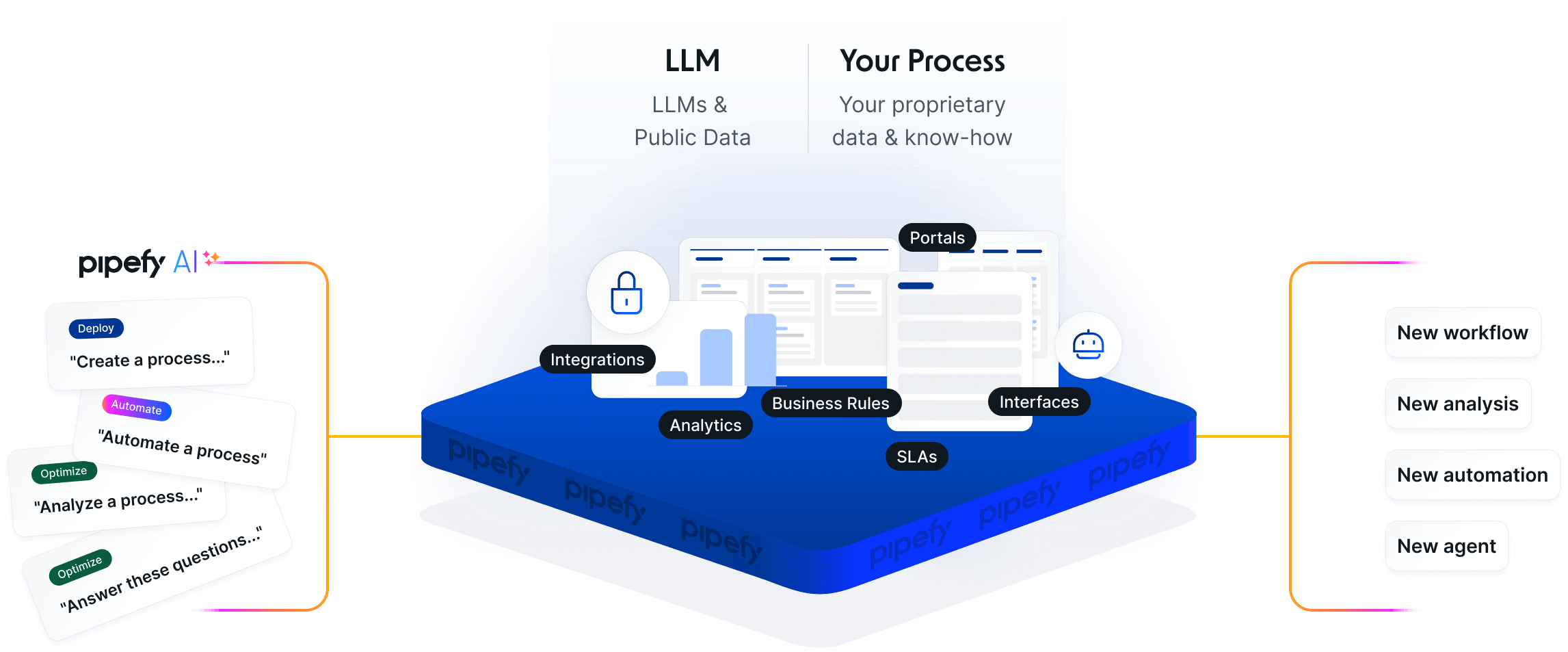
Core system connectivity includes integrations with essential business tools across multiple categories. For developer workflows, teams can connect with GitHub or GitLab to automatically create branches when developers start tasks or link commits and pull requests back to Pipefy cards. CRM integrations with Salesforce or HubSpot enable automatic triggering of “New Client Onboarding” workflows in Pipefy the moment deals are marked “Closed-Won” in the CRM. Document storage integrations with Google Drive or OneDrive automatically create project folders and attach relevant documents to cards.
The platform integrates with 300+ applications via Zapier, providing extensive connectivity options for teams using diverse tool stacks. For organizations requiring deeper customization, Pipefy’s API can integrate with internal or third-party systems that have public APIs and accept CORS requests.
The automation capabilities function like an embedded workflow automation tool, allowing users to create complex, multi-app workflows using natural language without coding expertise. Examples include automatically creating invoices in QuickBooks and sending Slack notifications to finance channels when cards enter the “Invoice” phase. To compare integration capabilities with other solutions, explore our comprehensive Pipefy Top Alternatives and Competitors guide.
Risk Disclaimer: Integration failures can occur when connected tools experience downtime or API changes. Organizations should implement monitoring processes for critical integrations and maintain backup procedures for essential workflows.
What are the limits and common challenges when using Pipefy workflow automation?
While Pipefy’s no-code automation provides powerful capabilities for streamlining execution, understanding its limitations and common implementation challenges is crucial for maximizing value and avoiding operational disruptions.
The primary limitation relates to automation job allowances per pricing plan. Pipefy differentiates between “automation rules” (the “if-this-then-that” logic users create) and “automation jobs” (the number of times those rules actually execute). Plans include monthly job allowances, and heavy automation usage can require upgrading to higher tiers or purchasing additional job packs. This distinction is critical when calculating total cost of ownership and planning automation strategies.
Common implementation challenges include overly complex logic design, where teams attempt to build entire departmental processes into single, monolithic pipes with dozens of conditional paths. This approach becomes difficult to manage, troubleshoot, and modify over time. The recommended practice involves breaking complex processes into smaller, connected pipes that maintain clarity and manageable scope.
Integration errors present another frequent challenge, occurring when connected external tools experience downtime or API credential changes. While Pipefy provides error logs for troubleshooting, teams must establish monitoring processes for critical integrations and maintain backup procedures for essential workflows.
Recursive loop creation, though uncommon, can rapidly consume monthly automation job allowances. This typically happens when conflicting rules create circular logic, such as Rule A moving a card from Phase 1 to Phase 2, while Rule B moves it back from Phase 2 to Phase 1. Proper testing and logical workflow design prevent these scenarios.
Risk Warning: Insufficient automation job allocation can cause critical business processes to halt mid-workflow, potentially impacting customer experience and operational continuity. Organizations should monitor automation usage patterns and maintain buffer capacity for unexpected spikes in workflow volume.
Process mapping before implementation is essential. Teams should clearly define every stage, responsible parties, required data collection points, mandatory fields, and handoff procedures before building pipes and automations. This planning phase prevents costly rebuilding of inefficient workflows and ensures the tool enforces good processes rather than automating poor ones.
What is Pipefy’s pricing model, and how do the AI features factor in?

Pipefy offers three main editions: Basic, Advanced, and Enterprise, with the Basic edition being free and offering core workflow features. The platform uses a tiered pricing model primarily based on the number of users and feature access levels, with specific considerations for AI capabilities and automation usage.
The Starter plan (Pipefy’s official free tier) is designed for individuals and small teams to explore basic functionality. This plan typically includes significant limitations on features, users, and the number of pipes that can be created, making it suitable for evaluation purposes rather than production use.
The Business plan serves as the standard tier for most teams, offering the full suite of workflow management features, expanded automation capabilities, and access to key integrations. This plan typically includes AI features as part of the standard offering, though usage may be subject to monthly limits for AI-powered summaries, data extractions, and other intelligent features.
The Enterprise plan is designed for larger organizations requiring advanced security features including single sign-on (SSO), premium support with defined Service Level Agreements (SLAs), and dedicated onboarding assistance. Contrary to some sources, the standard Enterprise plan includes 50,000 automation jobs per month, not unlimited automations. This distinction is crucial for organizations with extensive automation requirements.
The Unlimited plan represents a separate, higher-tier offering that provides custom limits and may include unlimited automations for qualifying organizations with specific volume and compliance requirements.
AI features are typically included in paid plans (Business and above), but their usage is often metered. Plans may include specific monthly allowances for AI-powered summaries, data extractions, or other intelligent processing features. Heavy reliance on AI capabilities could necessitate upgrading to higher tiers or purchasing additional AI processing capacity.
Risk Warning: Organizations forecasting extensive automation or AI usage must carefully estimate monthly requirements to avoid unexpected usage caps, overage fees, or forced upgrades that could significantly impact budget projections and operational continuity.
The most critical pricing factor for execution-focused teams is the automation job allowance, as automation represents Pipefy’s core value proposition. Teams must accurately estimate monthly automated task processing to ensure cost-effective plan selection that won’t create operational bottlenecks.
What is the real ROI of implementing Pipefy, and are there documented case studies?

The Return on Investment (ROI) from implementing Pipefy is measured through quantifiable business outcomes including efficiency gains, error reduction, and improved team capacity. This analysis moves beyond subjective organizational improvement feelings to focus on measurable business impact that justifies software investment.
ROI typically manifests in three primary areas. Time savings through automation provides the most direct ROI measurement. Teams can calculate hours saved per week by automating repetitive administrative tasks. For example, if Pipefy automates weekly progress report generation that previously required 3 hours of project manager time, the time savings provide clear metrics. For teams of 10, if AI summaries save each member 30 minutes daily otherwise spent catching up on conversation threads, that represents 5 hours of recovered productive time daily.
Cost reduction from error prevention offers significant ROI through structured workflows with mandatory fields and conditional logic that prevent costly mistakes. A sales-to-finance workflow ensuring contract attachment and valid PO number verification before invoice creation can prevent weeks of back-and-forth communication and payment delays. This ROI is measured in fewer missed deadlines, reduced rework cycles, and improved cash flow management.
Increased team capacity and throughput represents the ROI of “doing more with the same team” through automation of low-value work, enabling team members to handle additional high-value projects. Marketing teams automating content pipelines from request to publication might increase content output by 25% without additional hiring.
Pipefy provides official customer case studies demonstrating these results, with companies reporting outcomes such as “reducing client onboarding time by 50%” or “processing 30% more service requests with the same headcount.” These examples should be mapped to specific team pain points and potential efficiency gains when building internal business cases.
Risk Disclaimer: ROI calculations should include implementation time, training costs, and potential productivity dips during transition periods. Organizations should establish baseline metrics before implementation to accurately measure improvement and ensure claimed benefits materialize in their specific operational context.
When evaluating ROI, teams should consider both hard savings (reduced labor costs, faster processing times) and soft benefits (improved team satisfaction, better customer experience) to present comprehensive value justification to stakeholders. For deeper insights into maximizing ROI potential, explore our comprehensive collection of workflow automation tools in our Best 10 AI Workflow Automation Builders for Project & Product Management: 2025 Guide.
How long does it take to implement Pipefy and effectively train a team?
The implementation timeline for Pipefy varies based on process complexity and team size, but follows a predictable three-phase structure that organizations can plan around for successful deployment.
Phase 1 involves initial setup and pilot implementation, typically requiring 1-2 weeks for a single, well-defined workflow. A dedicated team lead can generally map processes, build pipes, configure core automations, and run pilots with selected users within this timeframe. The no-code nature of the platform accelerates technical setup, with the majority of time spent on process mapping and stakeholder agreement rather than technical configuration. This phase focuses on proving concept viability and identifying potential issues before full deployment.
Phase 2 encompasses team training and onboarding, spanning 2-4 weeks or 1-2 sprint cycles. Training extends beyond feature demonstration to include teaching the reasoning behind new processes and ensuring team adoption. Effective training includes hands-on workshops where team members run test scenarios through configured pipes. Organizations should expect learning curves as teams adapt to more structured working methods and budget time for feedback collection and iterative workflow improvements during this phase.
Phase 3 represents expansion and optimization, which continues ongoing as teams identify additional automation opportunities. A common strategy involves establishing a “Center of Excellence” or designating “Pipefy Champions” within the organization to help other departments build their own workflows. This phase includes continuous optimization and integration expansion as teams discover new efficiency opportunities.
For a single team with moderately complex processes, realistic end-to-end implementation from planning to full team adoption typically requires 3 to 6 weeks. Enterprise-wide rollouts can extend several months depending on the number of departments, process complexity, and change management requirements.
Risk Warning: Rushing implementation without adequate process mapping and team training can result in poorly designed workflows that create more administrative burden than they eliminate. Organizations should prioritize proper planning and user buy-in over speed of deployment to ensure long-term success and user adoption.
Success factors include executive sponsorship, clear communication of benefits to end users, and gradual rollout allowing teams to adapt to new processes without overwhelming operational disruption. For comprehensive implementation support and best practices, visit our detailed Pipefy FAQs resource guide.


Leave a Reply