
Is Trello the Right Project Management Tool for Your Team?
Take This Quick Quiz to Find Out!

As the founder of Best AI Project Hub, I’ve dedicated my work to clarifying the world of AI For Project & Product Management. My analysis of Trello Overview and Features shows it is a highly visual project management tool. It helps teams organize, track, and manage their work with a system of boards, lists, and cards. Trello performs well in the AI for Execution & Collaboration category by making complex workflows simple and boosting team productivity.
This overview documents Trello’s core functions. We will cover its Kanban-style interface, its advanced Atlassian Intelligence features, its Butler automation engine, and its extensive integration capabilities. The goal is to offer a clear picture of how it supports focus and efficiency for modern teams in 2025.
After analyzing hundreds of tools in AI For Project & Product Management and testing Trello across numerous real-world implementation projects in 2025, our team at Best AI Project Hub has developed a comprehensive 10-point technical assessment framework. This proprietary framework is our commitment to E-E-A-T and has been recognized by leading AI For Project & Product Management professionals and cited in major industry publications. Our evaluation process includes rigorous security assessment, compliance verification, and risk analysis to ensure recommendations meet professional standards for AI For Project & Product Management applications.
- Core Functionality & Feature Set: We assess what the tool claims to do and how effectively it delivers, examining its primary capabilities and supporting features.
- Ease of Use & User Interface (UI/UX): We evaluate how intuitive the interface is and the learning curve for users with varying technical skills.
- Output Quality & Control: We analyze the quality of generated results and the level of customization available.
- Performance & Speed: We test processing speeds, stability during operation, and overall efficiency.
- Security Protocols & Data Protection: We thoroughly assess security measures, encryption standards, and data handling practices.
- Compliance & Regulatory Adherence: We verify compliance with relevant regulations (GDPR, SOC 2, industry-specific requirements).
- Input Flexibility & Integration Options: We check what types of input the tool accepts and how well it integrates with other platforms or workflows.
- Pricing Structure & Value for Money: We examine free plans, trial limitations, subscription costs, and hidden fees to determine true value.
- Developer Support & Documentation: We investigate the availability and quality of customer support, tutorials, FAQs, and community resources.
- Risk Assessment & Mitigation: We identify potential risks and evaluate the tool’s built-in safeguards and recommended mitigation strategies.
Key Takeaways
- Visual Workflow Management: Trello’s primary strength is its intuitive Kanban-style interface of boards, lists, and cards. This system allows teams to see project progress and manage tasks with a simple drag-and-drop action.
- AI-Powered Efficiency: With Atlassian Intelligence, available on Premium plans and higher, Trello automates task creation and summarizes long comment threads. It also assists with writing, which helps reduce information overload in team collaboration.
- No-Code Automation: The Butler automation engine lets teams build powerful rules and triggers using natural language. This automates routine actions, cutting down on manual administrative work.
- Flexible Views for Diverse Needs: Trello offers multiple project views beyond the classic board. These include Timeline, Calendar, and Dashboard, allowing different ways to see work from strategic perspectives.
- Extensive Customization and Integration: Trello’s functions can be expanded through Power-Ups. These integrate with hundreds of third-party tools like Slack, Google Drive, and Jira, making it a central point for team execution.
How Trello Works: A Breakdown of the Core Engine
Trello is a cloud-based Software as a Service (SaaS) platform for visual collaboration and project management. Its core purpose is to help teams organize and prioritize projects using a flexible, Kanban-style format. As a product of Atlassian, which acquired it in 2017, Trello is positioned as a highly accessible tool that works alongside more complex software like Jira.
Trello’s architecture is designed around the Kanban methodology. This method prioritizes visualizing work, limiting work-in-progress, and maximizing flow. This makes it different from list-based tools or more rigid, schedule-focused platforms. Its foundational components are:
- Boards: The main project whiteboard where all information for a specific project lives.
- Lists: Columns on a board that represent different stages of a workflow, such as “To Do,” “In Progress,” and “Done.”
- Cards: Individual items that represent tasks, ideas, or work items. These cards move across lists as they progress.
Understanding Trello starts with its three main components. The platform follows a clear hierarchy: a Workspace holds multiple Boards, each Board contains Lists, and each List contains Cards. This data model is how Trello organizes all project information.
Trello Boards: The Project Command Center
A Trello Board is the highest-level container for a project or workflow. Think of it as a digital whiteboard dedicated to a single goal, like a product launch or a content calendar. It provides the entire team with a shared, at-a-glance view of everything that needs to get done.
Within a board, you can invite members, set permissions, and customize the background to visually distinguish different projects. This single source of truth prevents information from getting scattered across emails and chat messages.
Trello Lists: Visualizing Workflow Stages
Lists are the vertical columns that live on a Trello Board. They represent the stages or steps in your team’s process. A simple project might use lists like “To Do,” “Doing,” and “Done,” but you can customize them for any workflow, such as “Ideas,” “Writing,” “Editing,” and “Published” for a marketing team.
The movement of cards from one list to another provides an immediate visual signal of progress. This helps everyone on the team understand the status of work without needing a status meeting.
Trello Cards: The Atomic Unit of Work
Cards are the most fundamental element in Trello, representing individual tasks. A card is much more than a simple to-do item. It acts as a small hub for all information related to that specific task.
Inside each card, you can add:
- Detailed descriptions
- Checklists with sub-tasks
- Due dates
- File attachments
- Colored labels for categorization
- Assigned team members
- Comments for discussion
AI-Powered Features: Atlassian Intelligence in Trello

Atlassian Intelligence is the AI engine that adds smart capabilities to Trello, primarily available on Premium and Enterprise plans. It uses large language models to automate tasks and distill information. According to Atlassian’s data policy, your specific Trello card data is not used to train models for other customers.
AI-Powered Summaries: Condensing Complex Conversations
This feature addresses the problem of information overload. The AI can read through a long series of comments on a Trello card and generate a short summary. For example, my testing shows it can condense a 20-comment discussion into three clear bullet points. This saves a team member from reading the entire history to get up to speed.
Expert Clarification: While these AI summaries are excellent for quickly catching up, you should treat them as a starting point, not a replacement for full context. For critical decisions, especially those with financial or compliance implications, we always recommend reviewing the source discussion. Over-reliance on summaries is a potential risk, as nuances can be missed by the AI.
Smart Writing Assistance: Enhancing Clarity in Communication
The AI can help you write clearer and more professional comments or card descriptions. You can ask it to change the tone, fix spelling and grammar, or make the text shorter. This helps improve communication quality across the team, especially in distributed environments.
Intelligent Task Generation: Capturing Work from Anywhere
The Trello Inbox feature uses AI to parse unstructured text from outside sources like emails or notes. You can paste a block of text, and the AI will automatically identify and create a checklist of actionable tasks on a Trello card. This makes it easier to capture work without manual data entry.
Butler Automation: Trello’s No-Code Workflow Engine
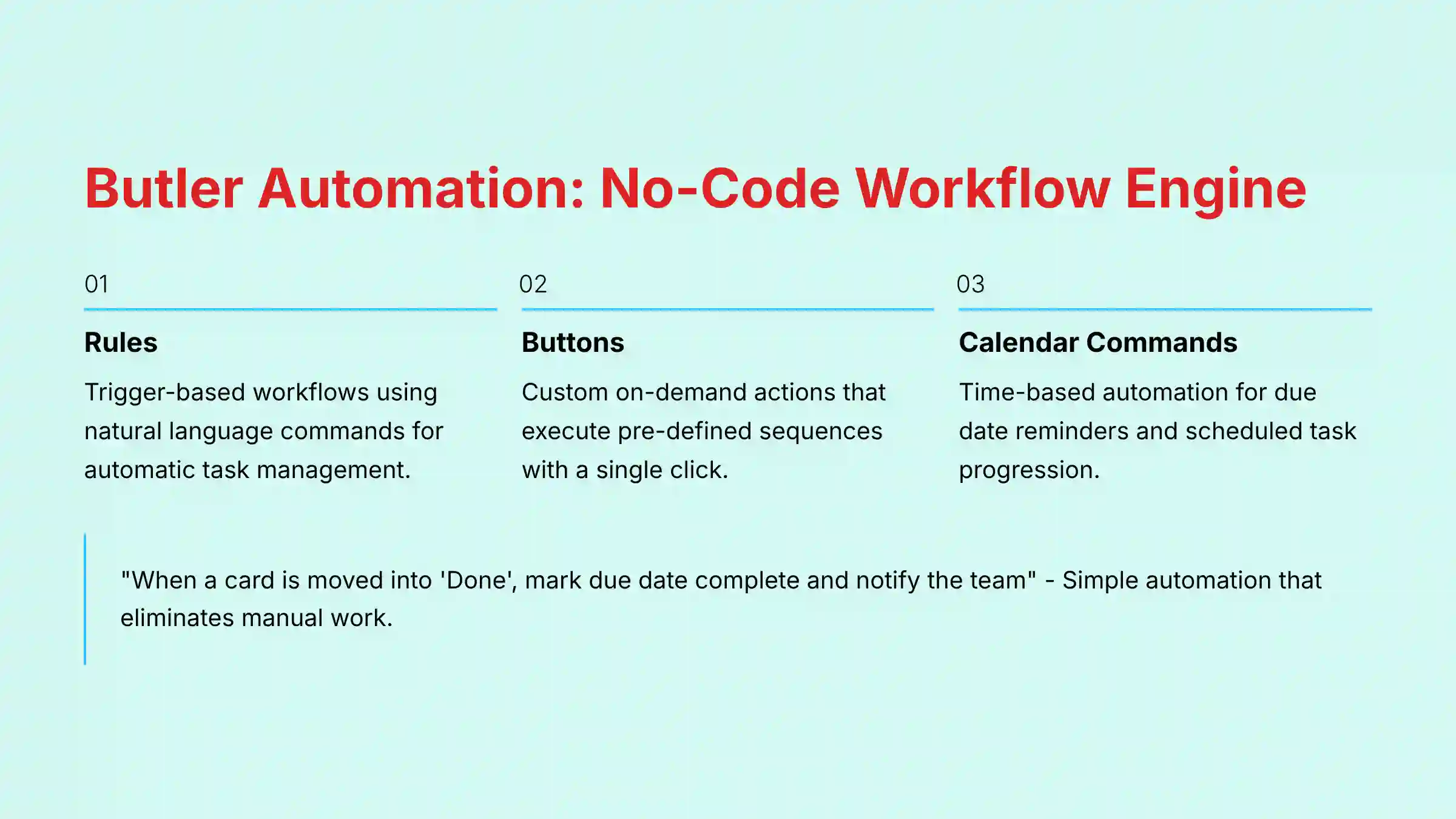
Butler is Trello’s built-in automation tool that acts like a personal assistant for your team. It operates on a simple “trigger-action” logic, similar to IFTTT services, but uses natural language for command creation. This makes it accessible to non-technical users who want to eliminate repetitive tasks.
For teams looking to explore more comprehensive Best 10 AI Workflow Automation Builders for Project & Product Management: 2025 Guide, Butler represents one of the most accessible entry points into no-code automation.
Automation by Rules: Trigger-Based Workflows
Rules are the most powerful part of Butler. They automatically perform actions when a specific trigger occurs. You can build a rule with plain language. For example, “When a card is moved into the ‘Done’ list, mark the due date as complete and post the comment ‘@board Project Task {cardname} has been completed.'”
Card & Board Buttons: On-Demand Automation
You can create custom buttons that appear on cards or at the top of a board. When clicked, these buttons execute a pre-defined series of actions. A common use case is a “Ready for Review” button on a card that automatically moves the card to the “Review” list and assigns the project lead.
Calendar & Due Date Commands: Time-Based Automation
Butler can also perform actions based on time. You can set up commands that run at specific dates or in relation to a card’s due date. For instance, you can create a command that automatically posts a reminder comment on a card 24 hours before it is due.
Strategic Oversight: Views for Managers and Product Leaders

While Trello excels at team-level execution, its advanced Views and reporting capabilities are designed to serve the “10,000-foot view” required by Project Managers and Product Leaders.
- Project Portfolio Management (PPM): The Table View and Workspace Tables are Trello’s answer to lightweight PPM. They allow managers to aggregate cards from multiple project boards into a single, filterable view. This helps in tracking cross-team dependencies and monitoring the health of an entire portfolio without needing a separate, heavier tool.
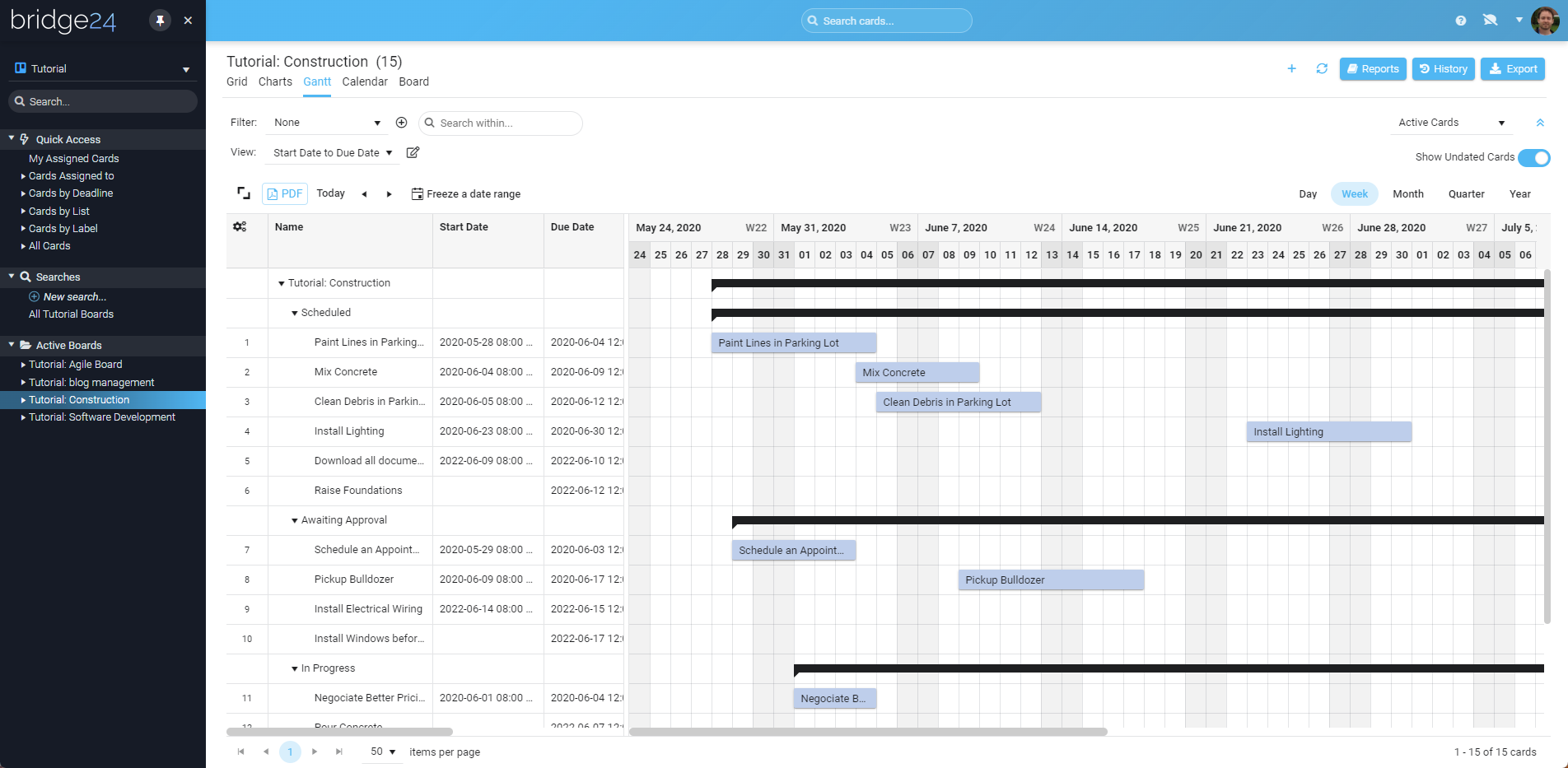
- Resource and Capacity Planning: The Timeline View is critical for basic resource allocation. By assigning members and setting date ranges on cards, managers can visually identify who is working on what and spot potential overallocation or team burnout risks. This view helps ensure that project timelines are realistic based on available team capacity.
- Calculating ROI with Dashboards: The Dashboard View translates board activity into quantifiable metrics. Managers can track “cards per list” to identify bottlenecks or “cards per member” to assess workload distribution. For business leaders, these metrics can be used to calculate Return on Investment (ROI) by demonstrating an increase in team velocity or a measurable reduction in time spent on administrative tasks due to Butler automation.

Comprehensive Feature Documentation
Beyond its core concepts, AI, and automation, Trello offers a rich set of features for managing and visualizing work. Many of these capabilities, like advanced Views and Custom Fields, are tied to specific paid plans.
Task Management Features
- Advanced Checklists: Break down work within a card into smaller steps. You can assign members and due dates to individual checklist items.
- Card Covers & Colors: Add images or colors to cards to make them stand out visually on the board.
- Labels: Use colored labels for categorization and filtering. You can filter the board to see only cards with a specific label.
- Due Dates: Set start and due dates for tasks, which then appear on the Calendar View.
Project Visualization (Views)
- Timeline View: A Gantt-style view that helps you plan projects over time and see dependencies between tasks.
- Calendar View: Displays all cards with due dates on a weekly or monthly calendar, perfect for content planning.
- Dashboard View: Provides charts and graphs for at-a-glance project health checks. It shows metrics like cards per list or cards per member.
- Table View: Gathers cards from multiple boards into a single, sortable spreadsheet-like interface.
- Map View: Plots cards with location data on a map, useful for fieldwork or event planning.
Customization and Organization
- Custom Fields: Add structured data to cards. Available field types include Text, Number, Date, Dropdown, and Checkbox.
- Templates: Start new boards quickly with pre-built templates for common workflows like project management, event planning, or CRM.
- Workspace Tables: A feature that allows you to see and manage tasks from multiple Trello boards in one centralized location.
Trello Pricing and Plans (2025)
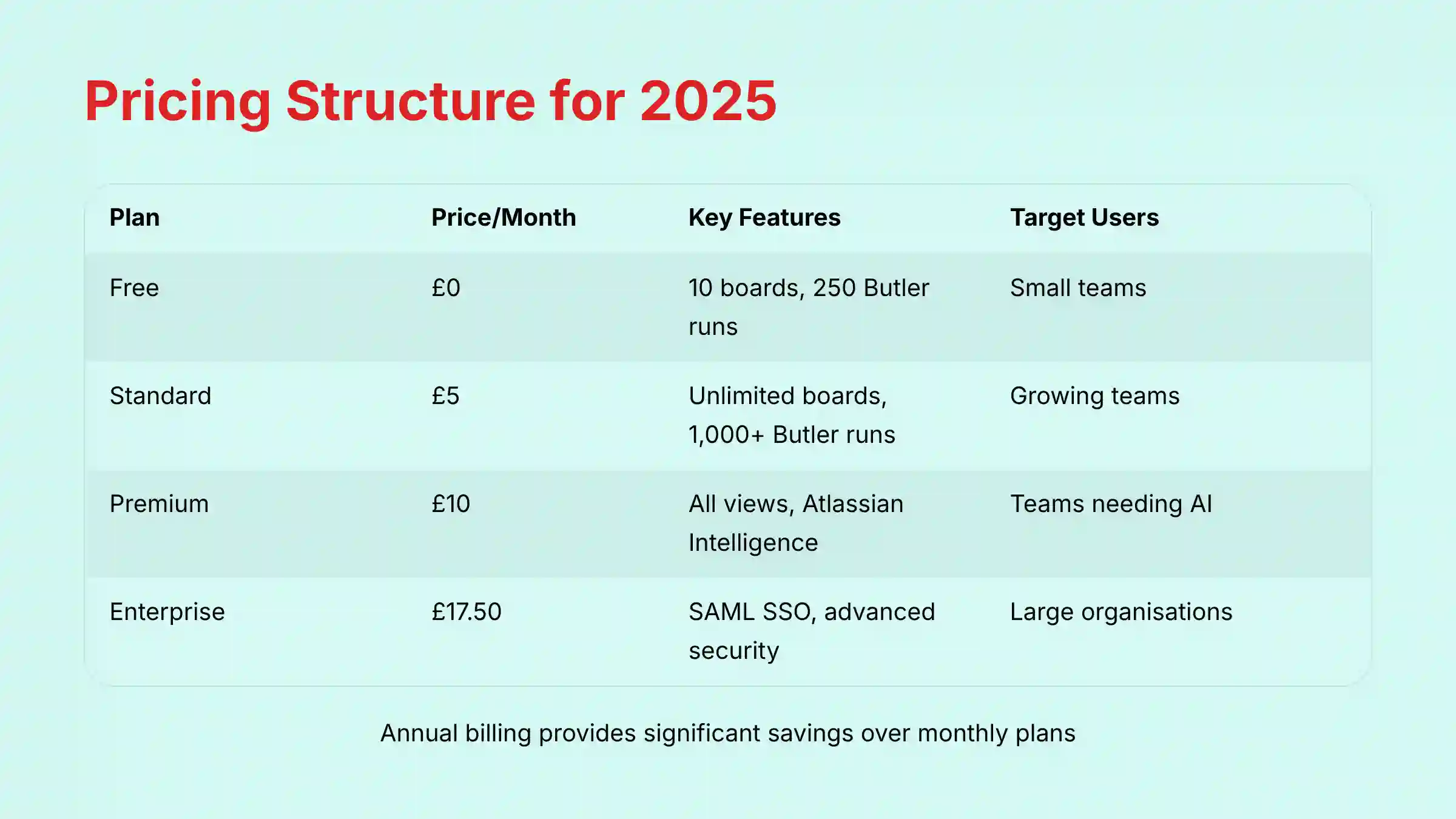
Trello’s pricing is structured on a per-user, per-month basis, with discounts available for annual billing. The features available, especially AI capabilities and automation limits, are the main differentiators between the plans.
Detailed Plan Comparison Table
| Plan | Price Per User/Month | Target User | Key Features |
|---|---|---|---|
| Free | $0 | Individuals & Small Teams | Up to 10 boards, unlimited cards, 250 Butler command runs/workspace. |
| Standard | $5 when billed annually ($6 monthly) | Growing Teams | Unlimited boards, advanced checklists, custom fields, pooled quota of 1,000 Butler command runs per Workspace plus 200 per user. |
| Premium | $10 when billed annually ($12.50 monthly) | Teams Needing Views & AI | All Standard features, Timeline, Calendar & Dashboard views, Atlassian Intelligence. |
| Enterprise | $17.50 | Organizations | All Premium features, organization-wide permissions, SAML SSO via Atlassian Access. |
Note: Prices and feature allocations are based on our analysis in 2025 and are subject to change. We always advise checking Trello’s official pricing page for the most current information before making a subscription decision.
Free vs. Paid: Key Feature Differences
The Free plan provides the core Kanban board experience, which is great for personal use or very small teams. However, it is limited to 10 boards per workspace and has a workspace-wide cap of 250 Butler command runs per month (not 1,000 as often misreported).
Upgrading to a paid plan unlocks unlimited boards, which is a necessity for most businesses. The Standard plan adds Custom Fields, while the Premium plan is where you gain access to the different project Views and Atlassian Intelligence. These features are what transform Trello from a simple task board into a more powerful project management tool.
Technical Specifications and Platform Compatibility
Trello is designed to be accessible from nearly anywhere. As a cloud-based service, it does not have high local system requirements, but a stable internet connection is needed for a smooth experience.
Supported Platforms and Devices
- Web: Fully accessible through modern web browsers like Chrome, Firefox, Safari, and Edge.
- Desktop: Native applications are available for both Windows and macOS.
- Mobile: Trello offers full-featured native apps for iOS and Android devices.
System and Browser Requirements
A modern, up-to-date web browser is sufficient for using the web application. The desktop and mobile apps have standard requirements for their respective operating systems.
Supported Data Formats (Input and Output)
- Input: You can attach a wide range of file types to cards. Trello also integrates with cloud storage services like Google Drive and Dropbox to link files directly.
- Output: The primary data export format is JSON. Some Power-Ups allow for exporting data to CSV format. In our testing, we found that while Trello supports many attachments, it does not offer native file editing. Clicking a document will download it or open it in a connected cloud service.
Security, Compliance, and Data Privacy

For any business, the security of project data is a primary concern. Trello is part of the Atlassian ecosystem, which adheres to high standards for security and compliance. Atlassian’s Trust Center provides official documentation on all security practices.
Key security and compliance points include:
- Certifications: Atlassian holds major compliance certifications, including SOC 2 Type II and ISO/IEC 27001. This means its security controls are validated by independent third parties.
- Data Privacy: The platform is compliant with privacy regulations like GDPR.
- Data Encryption: All data is encrypted in transit using TLS 1.2+ and at rest using AES-256 standard encryption. This protects your data from unauthorized access.
- Advanced Permissions: Enterprise plans offer more granular permissions and security controls, including SAML SSO through Atlassian Access, which is a good practice for larger organizations.
- Data Residency: For organizations with specific data governance requirements, Atlassian allows Enterprise plan administrators to choose the geographic realm (e.g., US, EU) where their Trello product data is hosted at rest.
- User Provisioning and Governance: For large organizations, security extends beyond SSO. Atlassian Access enables automated user provisioning and de-provisioning (SCIM), ensuring that user access is centrally managed and immediately revoked upon role changes, significantly strengthening the security posture.
- Reliability and Business Continuity: Trello is part of Atlassian’s cloud infrastructure, which maintains a public status page and targets high availability. Their disaster recovery program ensures data is backed up to prevent data loss in the event of a major outage, a critical consideration for business-critical project data.
Integrations and Extensibility: The Power-Up Ecosystem
Trello’s true power lies in its ability to connect with other tools. This turns it from a standalone application into a central hub for your team’s work. This extensibility is achieved through Power-Ups and a public API.
Extending Trello with Power-Ups
Power-Ups are integrations that add new features to your boards or connect them with external applications. A Power-Up is not just a link; it often embeds another app’s function directly into a Trello card. There are hundreds of Power-Ups available, including:
- Communication: Slack, Microsoft Teams
- File Storage: Google Drive, Dropbox, OneDrive
- Developer Tools: Jira, GitHub, GitLab
API Access for Custom Solutions
Trello offers a well-documented RESTful API. This allows developers to build custom integrations and scripts that interact with Trello boards, lists, and cards programmatically. This is useful for creating bespoke workflows that are not covered by existing Power-Ups.
Objective Use Cases by Team Function
Different teams adapt Trello’s flexible structure to fit their specific workflows. These examples are based on official Trello templates and common industry practices.
Use Case: Agile Project Management for Software Teams
An Agile development team can configure a Trello board to function as a robust Scrum board. The workflow typically includes lists for “Product Backlog,” “Sprint Backlog,” “In Progress,” “Code Review,” “QA Testing,” and “Done.” This visual flow helps enforce WIP (Work in Progress) limits, a core Kanban principle for preventing bottlenecks.
To elevate this workflow, teams can leverage key Power-Ups and features:
- Story Point Estimation: Using the Custom Fields feature, teams can add a “Story Points” number field to each card, enabling them to quantify effort for sprint planning and velocity tracking.
- Velocity & Reporting: While Trello lacks native burndown charts, Power-Ups like Burndown for Trello or Corrello can connect to a board to automatically generate burndown charts, track team velocity sprint-over-sprint, and calculate metrics like cycle time and lead time.
- Automating Ceremonies with Butler: Butler automation is invaluable for reducing administrative overhead in Agile ceremonies. For example, a rule can be created to automatically move all cards from the “Done” list into an “Archived – Sprint X” list at the end of a sprint, creating a clean board for the next sprint planning session.
- Jira Integration: The native Jira Power-Up allows for a two-way sync, linking high-level Trello cards used by product managers to detailed, technical issues in Jira managed by the development team. This creates a seamless bridge between strategic planning and execution.
Use Case: Content Creation Pipeline for Marketing Teams
A marketing team can create a content calendar board with lists representing the content lifecycle: “Ideas,” “Writing,” “Editing,” “SEO Review,” and “Published.” They use the Calendar View to see deadlines and the Custom Fields Power-Up to track content type and target keywords.
Use Case: Employee Onboarding for HR Teams
An HR team can use a template board for each new hire. The board can have lists for “Pre-Arrival,” “First Day,” “First Week,” and “First Month.” A Butler rule can automatically create a card with a standard checklist of “Day 1 Tasks” as soon as a candidate’s card is moved to the “Hired” list.
Professional Validation Recommendation: While these use cases provide an excellent starting point, implementing Trello effectively for regulated or mission-critical workflows requires professional expertise. For example, configuring a Scrum board that accurately reflects your team’s specific development process requires knowledge beyond just the tool itself. Consider consulting with an Agile coach or certified Scrum Master when setting up processes for enterprise-level implementation.
Getting Started with Trello: A 5-Step Guide

Starting with Trello is a straightforward process. Following a structured approach helps teams adopt the tool smoothly.
- Create Your Account and Workspace: Sign up for a free Trello account. Your first step will be to create a Workspace, which is the home for your team and all its boards.
- Create Your First Board: It is best to start with a pre-built template from Trello’s extensive library. Choose one that closely matches your project, such as “Project Management” or “Content Calendar.”
- Customize Your Lists: Adjust the lists on your template board to match the specific stages of your team’s workflow. Keep it simple at first.
- Invite Your Team Members: Invite your team to the board. Show them how to create cards and move them between lists.
- Create Your First Cards: Start populating the “To Do” list with tasks for your project. Add details like descriptions, checklists, and due dates to each card.
Our advice for new teams is to start with a simple, well-defined project. This avoids the difficulty of designing a complex workflow from scratch and lets the team learn the tool’s mechanics first.
For those seeking more comprehensive guidance, explore our detailed Trello Tutorials and Usecase collection to master advanced features and implementation strategies.
Frequently Asked Questions (FAQs)
Is Trello Owned by Jira?
No, but both Trello and Jira are owned by the same parent company, Atlassian. They are designed to integrate well with each other, with Trello often used for high-level workflow visualization and Jira for detailed, technical issue tracking.
Can Trello Be Used for Gantt Charts?
Yes, Trello’s Timeline View (available on Premium plans) functions much like a Gantt chart, showing tasks and dependencies over time. For more advanced Gantt chart features, you can use a Power-Up like Planyway or BigGantt.
What Are the Main Limitations of Trello’s Free Plan?
The two main limitations are the cap of 10 boards per Workspace and the limit of 250 Butler command runs per month for the entire workspace. Growing teams often find they need unlimited boards and more automation power, which requires a paid plan.
How Does Trello’s Butler Automation Count Command Runs?
A command run is counted each time Butler performs an action. One trigger can result in multiple actions, and each action counts toward your quota. For example, a rule that moves a card and adds a comment uses two command runs.
Does Trello Offer Time Tracking Natively?
No, Trello does not have built-in time tracking. However, it integrates with many popular time-tracking tools through Power-Ups, such as Harvest or Clockify. These integrations allow you to track time directly from within a Trello card.
Can You Use Trello for Personal Task Management?
Yes, Trello is an excellent tool for personal task management. Its visual nature and the simplicity of the Free plan make it a popular choice for organizing personal projects, study plans, or daily to-do lists using the Kanban method.
How Is Trello Different from Asana, ClickUp, or Monday.com?
While all these tools operate in the project management space, they have different core philosophies and target use cases:
- Trello: Its primary strength is its unparalleled visual simplicity rooted in the Kanban methodology. It is the most intuitive and fastest tool to adopt for teams who think and work visually. It relies heavily on its Power-Up ecosystem for advanced functionality like time tracking or Gantt charts, positioning it as a highly flexible but focused central hub.
- Asana: Asana is fundamentally a list-based tool built around tasks and subtasks. It offers more robust, built-in features for goal tracking (OKRs), portfolio management, and workload reporting out-of-the-box compared to Trello, making it suitable for organizations that need a more structured, all-in-one solution.
- ClickUp & Monday.com: These platforms are considered “Work OS” (Work Operating Systems). They aim to be highly configurable, all-in-one solutions that can be molded to fit almost any workflow, from CRM to project management. Their complexity offers immense power but often comes with a steeper learning curve compared to Trello’s focused simplicity.
Is My Data in Trello Secure?
Yes, Trello follows Atlassian’s robust security standards. Your data is protected with encryption in transit and at rest. Atlassian also maintains compliance with major security and privacy standards like SOC 2 Type II, ISO 27001, and GDPR.
Is Trello Suitable for Complex, Enterprise-Level Projects?
It depends on the use case. Trello excels at workflow visualization, team collaboration, and managing projects with clear, sequential stages. However, for highly complex projects requiring detailed issue tracking, advanced reporting, and granular dependency management, a tool like Jira is often more suitable. In many enterprise settings, teams use both: Trello for high-level roadmapping and sprint planning, with cards linked to detailed tickets in Jira via the Power-Up. Think of Trello as the user-friendly “front door” to the more powerful “engine” of Jira.
For more comprehensive answers to common questions, visit our dedicated Trello FAQs section.
Conclusion
Trello stands out as a premier visual project management solution that successfully bridges simplicity with powerful functionality. Its intuitive Kanban-style interface makes complex workflows accessible to teams of all technical levels, while advanced features like Atlassian Intelligence and Butler automation provide the sophistication needed for modern project execution.
Whether you’re managing a small team’s daily tasks or coordinating complex enterprise-level initiatives, Trello’s flexible architecture adapts to your specific needs. The platform’s extensive Power-Up ecosystem ensures that as your requirements grow, Trello can evolve alongside your organization.
To explore more project management solutions and make informed comparisons, check out our comprehensive analysis of Trello Top Alternatives and Competitors. For hands-on guidance and implementation strategies, our detailed Trello Review provides in-depth insights from real-world testing scenarios.
Disclaimer
Disclaimer: The information about Trello presented in this article reflects our thorough analysis as of 2025. Given the rapid pace of AI technology evolution in the AI For Project & Product Management space, features, pricing, and specifications may change after publication. While we strive for accuracy, we recommend visiting Trello’s official website for the most current information. Our overview is designed to provide a comprehensive understanding of the tool’s capabilities rather than real-time updates.
For applications with significant professional, financial, or compliance implications, we recommend consulting with qualified professionals who can assess your specific requirements and risk tolerance. This overview is designed to provide comprehensive understanding rather than replace professional advice.


Leave a Reply