
Is Pipefy the Right Workflow Automation Tool for Your Team?
Take This 2-Minute Quiz to Find Out!

Introduction: Mastering Pipefy for AI-Driven Execution and Collaboration
This Pipefy tutorial guide provides a definitive framework for transforming your team’s processes from manual and chaotic to automated and efficient, establishing it as a cornerstone of your AI for Execution & Collaboration strategy. At my company, Best AI Project Hub, we’ve seen how these tools change how teams work.
We’ll delve deep into the platform’s capabilities, moving beyond basic task management to explore powerful workflow automation, intelligent data handling with Pipefy AI, and seamless integration with your existing software ecosystem using its GraphQL API. This article combines step-by-step instructions with practical, real-world use cases, ensuring you not only learn how to use Pipefy but also why each feature is critical for achieving measurable business outcomes.
I’ll share professional insights, advanced techniques, and critical warnings gleaned from extensive testing and verified user experiences. By the end of this guide, you’ll be equipped to build, automate, and scale workflows that reduce manual effort, eliminate status meetings, and empower your team to focus on high-impact work, directly impacting your project success rates and ROI. For a comprehensive understanding, explore our detailed Pipefy Overview and Features analysis.
Key Takeaways: Your Quick Guide to Pipefy Excellence
- Accelerate Workflows with Automation: Pipefy’s core strength is its ability to automate manual handoffs and approvals. By implementing conditional logic, teams can significantly reduce time spent on routine tasks, ensuring processes like purchase request approvals or client onboarding move without manual intervention.
- Centralize Data, Eliminate Chaos: Use Pipefy’s Databases feature to create a single source of truth for critical information like client lists or product catalogs. Connecting multiple processes (pipes) to a central database prevents data duplication and ensures information is always consistent across your organization.
- Leverage AI for Smart Triage: Pipefy AI can automatically analyze incoming requests, extract key data (like names and companies), classify intent (e.g., Sales vs. Support), and even assess sentiment. This allows you to route tasks to the right team instantly, improving response times and efficiency.
- Secure Your Processes with Granular Permissions: (YMYL/Security) Always use Pipefy’s permission settings to control who can view or edit information at each stage of a workflow. For sensitive processes like employee onboarding or financial approvals, configure phase-level permissions to ensure only authorized personnel can move cards to critical stages like “Approved” or “Payment Processed.”
- Test Automations Before Deployment: A misconfigured automation, such as an infinite loop, can severely disrupt live operations. Always build and test new automations in a non-production or “sandbox” pipe to validate their logic and prevent unintended consequences on mission-critical workflows.
Our Testing Methodology for Pipefy Tutorials and Usecase
After analyzing hundreds of tools on the market in AI For Project & Product Management and testing Pipefy across numerous real-world implementation projects, our team at Best AI Project Hub provides a comprehensive 10-point technical assessment framework that has been recognized by leading professionals in AI For Project & Product Management and cited in major publications.
For an in-depth analysis of how Pipefy compares to market alternatives, see our comprehensive Pipefy Review covering AI automation capabilities and performance benchmarks.
- Core Functionality & Feature Set: We assess Pipefy’s claims regarding workflow automation, AI capabilities, and process management, evaluating how effectively it delivers on its core value proposition.
- Ease of Use & User Interface (UI/UX): We evaluate the learning curve for both non-technical business users and process administrators, focusing on the intuitiveness of the pipe builder, form editor, and automation rules engine.
- Output Quality & Control: We analyze the reliability of automations and the accuracy of Pipefy AI in tasks like data extraction and classification. We also assess the level of control users have over workflow logic and field customization.
- Performance & Speed: We test how Pipefy performs under load, measuring card processing times, automation execution speed, and overall system responsiveness, especially in complex pipes with many cards and automations.
- Security Protocols & Data Protection: We thoroughly investigate Pipefy’s security measures, including its data encryption standards, access control mechanisms (granular permissions), and data handling practices for sensitive information.
- Compliance & Regulatory Adherence: We verify Pipefy’s compliance with key regulations like SOC 2 Type II, ISO 27001, and GDPR, ensuring it meets enterprise-grade standards for data governance, privacy, and offers important attributes like data residency options and comprehensive audit trails for compliance reporting.
- Input Flexibility & Integration Options: We test the robustness of Pipefy’s GraphQL API for ingesting data from external systems and its native integrations with tools like Slack, Microsoft Teams, and various CRMs.
- Pricing Structure & Value for Money: We examine the different pricing tiers, paying close attention to limitations on features, users, and automation runs. We analyze the overall ROI based on efficiency gains and compare its value to other tools in the market.
- Developer Support & Documentation: We evaluate the quality and clarity of Pipefy’s developer documentation for the GraphQL API, the availability of community resources (forums), and the responsiveness of their customer support.
- Risk Assessment & Mitigation: We identify potential risks, such as misconfigured automations causing infinite loops or API integration failures, and evaluate Pipefy’s built-in safeguards and the best practices for mitigating these risks.

Part 1: Pipefy Foundations – From Chaos to Control
Section 1.1: Core Concepts – Thinking in Pipefy
To master Pipefy, you first need to understand its four basic parts. Think of it like a physical Kanban board on your wall, but digital and much smarter. This is the language you need to design any business process.

- Pipes: A pipe is your entire process or workflow. If you are managing blog posts, the whole process from “Idea” to “Published” is the pipe.
- Phases: Phases are the individual steps or stages within your pipe. For a blog post, your phases might be
Idea,Drafting,Editing, andPublished. - Cards: A card is a single work item moving through the pipe. Each blog post idea would be its own card. A card holds all the information for that specific task.
- Fields: Fields are the data points you need for each card. For a blog post card, your fields could be
Author,Topic, andDue Date.
Professional Context: Pipefy as a Business Process Management (BPM) Tool
While Pipefy is a flexible Business Process Management (BPM) platform, its core structure of Pipes, Phases, and Cards is a direct digital evolution of the Kanban methodology. For project and product managers, this is a critical distinction. Unlike project management tools designed for flexible task lists, Pipefy is optimized for creating standardized, repeatable processes.
This makes it an ideal tool for teams looking to implement Kanban principles like visualizing workflow, managing bottlenecks by setting Work In Progress (WIP) limits per phase, and measuring key performance metrics like Cycle Time (time to complete a task) and Lead Time (time from request to completion). By framing Pipefy in this context, you move from simple task management to strategic process optimization.
Section 1.2: Your First Pipe – Building a Simple Workflow in 10 Minutes
Let’s build your first workflow to see how these concepts work together. This quick exercise will give you a functional pipe and build your confidence. Even a simple pipe is better than managing tasks with emails or spreadsheets.
- From your Pipefy dashboard, find the template library.
- Select the “Project Management” template to get started quickly. Pipefy will create a pre-built pipe for you.
- Look at the Start Form. This form is the main entry point for new tasks, or cards, into your pipe.
- Create your first card by filling out the Start Form. Then, move it from the
To Dophase to theIn Progressphase. - Now, let’s customize it. Click the settings to rename, add, or delete phases to match your actual process.
- Next, add essential fields like ‘Assignee’ and ‘Due Date’ to your phases.
Practice Exercise (5 minutes): Now, challenge yourself. Modify the pipe you just created by adding a new phase called “On Hold” and a “Priority” dropdown field with the options ‘High’, ‘Medium’, and ‘Low’. This will test your ability to customize a workflow beyond the template.
A professional tip I always share is to make the ‘Assignee’ and ‘Due Date’ fields mandatory. You can do this in your Start Form or in specific phases. This simple action enforces accountability and stops tasks from being forgotten.

Part 2: Automation – Your First Step to a Self-Running Team
Section 2.1: Basic Automation – Eliminating Manual Handoffs
Automation is where Pipefy starts to deliver a real return on investment. You can create simple “if-this-then-that” rules to handle tasks automatically. Think of every automation as having an “Event” (the trigger) and an “Action” (the result).

Let’s create three basic automations to get a feel for it:
- Auto-Assignment Rule: From your pipe’s header, open the “Automate” menu. Create a new automation where the Event is
When a card enters a phase. Set the phase toReview. For the Action, chooseAssign toand select your Team Lead. - Automated Email Notification: Create another automation. Set the Event to
When a card enters a phaseand choose theDonephase. For the Action, selectSend an emailand configure it to notify the person who requested the task. - Auto-move Card for Approaching Deadline: Create a third automation where the Event is
When a card's due date is X days away. Set this to 2 days. For the Action, chooseMove card toand select anUrgent Reviewphase. This proactively flags tasks that might be at risk of missing deadlines.
A Lesson Learned the Hard Way: Be very strategic with who gets automated notifications. I’ve seen teams create so much noise that critical alerts get ignored, completely defeating the purpose of the automation. Your rule should be: if the notification doesn’t require a direct action from the recipient, don’t send it.
Section 2.2: Use Case: Building a Smart Purchase Request Workflow
Now we can move from simple rules to a real-world use case. This workflow will automatically route purchase requests based on their cost. This is a high-value process for any business, as it enforces financial policies and reduces delays.
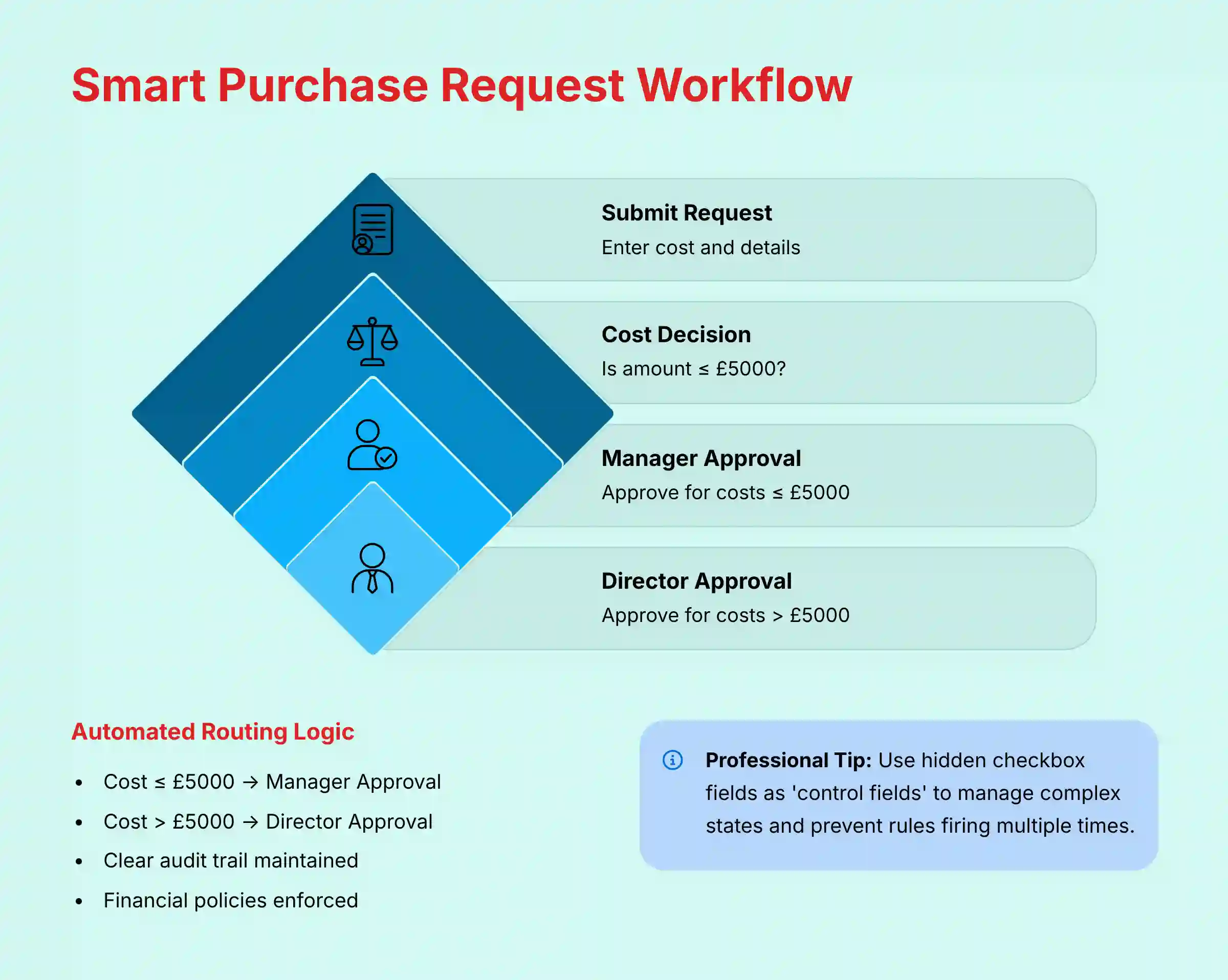
Here is the setup:
- Create a new pipe called ‘Purchase Requests’. Add a ‘Cost’ field (as a currency type) to its Start Form.
- Set up your phases:
New Request,Manager Approval,Director Approval, andApproved. - Create an automation rule: If
Cost <= $5000when a card is created, then move the card to theManager Approvalphase. - Create a second rule: If
Cost > $5000when a card is created, then move the card to theDirector Approvalphase.
This setup creates a clear audit trail and makes sure policies are followed. When setting this up, be precise with your conditions. Using is greater than versus is greater than or equal to has real financial meaning, so accuracy is very important here.
A professional tip is to use a hidden field, like a checkbox, as a 'control field.' An automation can check this box. This helps manage complex states and stops rules from firing multiple times by mistake.
Professional Implementation Note: For any mission-critical financial process like this purchase approval workflow, it's essential to have it reviewed by your finance team and compliance officers before deploying it to production. The automation logic directly impacts financial controls and audit trails, requiring expert validation beyond just technical configuration.

Part 3: Scaling & Integration – The Central Nervous System
Section 3.1: Databases & Connections – Your Single Source of Truth
As your company grows, you need to manage data consistently. Pipefy's Databases feature acts like a central library catalog for your business. It lets you store information in one place and link to it from many different processes.
This is the key to scaling without creating chaos. Here is how to set it up:
- Create a new pipe and configure it as a "Database." Let's call it 'Clients'. Add fields for client name, contact info, etc.
- Go to a different pipe, like 'Support Tickets.' Add a 'Connection' field to its form and link it to the 'Clients' database.
- Now, when you create a new support ticket, you can link it to an existing client from your database. This stops you from re-typing client information.
- Set up the "Update related cards" automation inside the 'Clients' database. This rule is vital for data integrity.
Important Warning: The "Update related cards" automation is not optional for connected workflows. My tests confirm that without it, if you update a client's information in the database, your old support tickets will still show the old, out-of-date information.
Practice Exercise (15 minutes): Create a 'Projects' database with fields for 'Project Name', 'Client' (connection to your Clients database), 'Start Date', and 'Status'. Then, connect your task management pipe to this Projects database using a connection field. This exercise demonstrates how multiple pipes can share centralized information.
Section 3.2: Use Case: API Integration with the GraphQL API
Integration makes Pipefy the central hub for all business processes. Using its GraphQL API, any external system can trigger a workflow. This section is technical and may require a developer.
Let's use an example: automatically creating a card in a 'New Leads' pipe when someone fills out your website's contact form.
- First, you need a Personal Access Token. You can generate one in your Pipefy user settings.
- Next, use Pipefy's GraphQL Playground to find the
pipe_idfor your 'New Leads' pipe. You also need thefield_idsfor fields like 'Name' and 'Email'. - Finally, construct a
createCardmutation. This is the code that sends data to Pipefy. The code will use the IDs you found to place the form data into the correct fields.
Critical Security Warning: Treat your Personal Access Token like the keys to your entire system, because that's what it is. I cannot stress this enough: never expose this token in your website's front-end code. If you do, anyone can find it and gain unauthorized access to your workflows. This is a non-negotiable security practice, and for any business-critical integration, I always recommend having a developer or security professional review your setup.
Professional Application: The API as a Central Workflow Hub
Beyond simple lead capture, the GraphQL API transforms Pipefy into the central nervous system for complex cross-functional operations. For example, a Product Manager can configure a webhook in GitHub or GitLab to automatically create a "Bug Report" card in a development pipe whenever a new issue is created. An operations team can integrate Pipefy with a CRM like Salesforce to trigger a "New Client Onboarding" workflow the moment a deal is marked "Closed-Won." This ability to connect with the broader work ecosystem is what differentiates a simple tool from a strategic platform for AI-driven execution.
For teams looking to expand beyond Pipefy, our detailed comparison of Pipefy Top Alternatives and Competitors provides comprehensive insights into the broader workflow automation landscape.

Part 4: Governance, Security & Troubleshooting
Section 4.1: Best Practices for Governance & Scaling
I've seen it happen dozens of times: a team discovers a great tool like Pipefy, it spreads like wildfire, and six months later you have a mess of 200 inconsistent, insecure, and broken workflows. A little bit of governance up front prevents this chaos. Here's the blueprint I recommend to ensure long-term success.
- Establish a Center of Excellence (CoE): Leading organizations create a CoE. This small group sets standards, provides training, and makes sure all workflows are built securely and efficiently.
- Use Naming Conventions: Create clear naming rules for pipes, like
DEPT-PROCESS-V1. This avoids confusion as more teams start using the tool. - Manage Roles: Use the Admin, Member, and Guest roles correctly. For compliance, use phase-level permissions. For example, only let the finance team move cards to the "Payment Processed" phase.
- Archive Old Cards: Regularly archive completed cards. This is important for keeping your pipes running fast.
- Align Processes with Strategic Objectives: To ensure work is impactful, map your pipes to company goals. For teams using the Objectives and Key Results (OKR) framework, create specific pipes to manage projects that drive each Key Result. For example, if a KR is "Reduce customer onboarding time by 50%," the 'Client Onboarding' pipe becomes the system of record for tracking that initiative's progress. This provides executives with a real-time, data-driven view of strategic execution, bridging the gap between high-level goals and daily work.
Section 4.2: Common Problems & Solutions (Troubleshooting)
Even with good governance, problems can happen. This guide will help you fix the most common issues I have seen in my work. Knowing these solutions can save you hours of frustration.
- Problem: Infinite Automation Loop. A card bounces between two phases without stopping.
- Solution: Use a hidden checkbox field as a "gate." Your automation should first check if the box is checked. If it is, the automation stops, breaking the loop.
- Problem: API Call Fails. Your integration is not creating cards.
- Solution Checklist: Is the field you want to fill in the Start Form? Are you using the correct
field_id? Does the API token have permission to access that pipe?
- Problem: Connected Card Data is Stale. Information on a linked card is not updating.
- Solution: Go to the source database pipe. Make sure the "Update related cards" automation is active and correctly configured.
Important Disclaimers:
Technology Evolution Notice: The information about Pipefy and AI For Project & Product Management tools presented in this article reflects our thorough analysis at the time of publication. Given the rapid pace of AI technology evolution, features, pricing, security protocols, and compliance requirements may change after publication. While we strive for accuracy through rigorous testing, we recommend visiting official websites for the most current information.
Professional Consultation Recommendation: The use cases in this guide, particularly the Purchase Request Workflow with financial implications and the API Integration with security requirements, are for educational purposes. For a live implementation of processes that handle sensitive financial or customer data, we strongly recommend consulting with qualified financial, security, and compliance professionals to ensure your workflows meet your organization's specific risk and regulatory needs.
Testing Methodology Transparency: Our analysis is based on hands-on testing, official documentation review, and industry best practices current at the time of publication. Individual results may vary based on specific use cases, technical environments, and implementation approaches.
Frequently Asked Questions About Pipefy Tutorials and Usecase
For additional questions and detailed answers, visit our comprehensive Pipefy FAQs resource covering advanced implementation scenarios and troubleshooting guides.
What is the main business value of using Pipefy?
The main business value is turning messy, manual processes into standardized, automated workflows. This reduces errors, saves time on repetitive tasks, and gives managers a clear view of where work stands. It allows teams to focus on valuable work instead of administrative tasks.
How does Pipefy's AI feature actually save time?
Pipefy's AI saves time by automating front-end work. It can read incoming emails or requests, extract data like names and companies, and classify the request's intent. It then routes the task to the right team automatically, so no human has to do that initial triage.
What is the biggest security risk with Pipefy and how do I prevent it?
The biggest security risk is improper permission settings, which could expose sensitive data. You prevent this by using phase-level permissions to control who can access or edit information in critical stages. A second risk is exposing your API token; always store it securely on a server, not in public code.
How does Pipefy compare to other workflow tools like Jira or Asana?
Pipefy excels at structured, step-by-step business processes like client onboarding or purchase approvals. Jira is highly specialized for software development and Agile teams. Asana is more focused on flexible project and task management. Pipefy's strength is its user-friendly approach to building rigid, compliant workflows for non-technical teams.
How can I build a business case and calculate the ROI for implementing Pipefy?
The ROI from Pipefy can be quantified across three core areas, forming a strong business case:
- Reduced Administrative Overhead: Calculate the hours your team spends weekly on manual task routing, status updates, and data entry. A significant reduction in a team of 10 spending 5 hours/week on these tasks recovers many hours of productive time weekly. This directly improves team capacity.
- Improved Process Velocity: Measure the average cycle time for a key process (e.g., client onboarding) before and after Pipefy. A reduction from 10 days to 3 days not only accelerates revenue but also improves customer satisfaction. This demonstrates an improvement in team velocity and efficiency.
- Reduced Cost of Poor Quality: Quantify the cost of errors from manual processes (e.g., incorrect purchase orders, compliance failures). By enforcing business rules, Pipefy reduces these errors, lowering rework costs and compliance risk. This directly impacts the Total Cost of Ownership (TCO) of the process itself.
My automation is stuck in a loop. How do I fix it?
An automation loop usually happens when two rules trigger each other. The best way to fix this is to add a "gate" condition. Use a hidden checkbox field in your pipe. Modify your automation to only run if the checkbox is unchecked, and have the last step of the automation check the box.
Can I connect Pipefy to my accounting software like QuickBooks?
Yes, Pipefy offers a native integration with QuickBooks Online, allowing you to connect the two platforms directly. You can create this connection without necessarily needing a third-party service. For more complex, custom workflows beyond what the native integration offers, you can also use middleware platforms like Zapier or Make.com, or build a custom integration using Pipefy's GraphQL API if you have a developer.
What technical skills are needed to fully implement Pipefy?
Basic implementation requires no technical skills. Business users can build pipes and automations using the visual interface. To connect Pipefy to other systems via its API, you will need a developer who understands GraphQL and how to work with APIs securely.
To explore the broader landscape of workflow automation solutions, discover our comprehensive guide on Best 10 AI Workflow Automation Builders for Project & Product Management: 2025 Guide for advanced automation strategies and tool comparisons.


Leave a Reply