
Struggling to Choose a Workflow Automation Tool?
This 2-Minute Quiz Pinpoints the Perfect Pipefy Alternative for Your Team!

Choosing the right platform to manage your company’s processes is a serious decision that impacts your entire organization. Today, we’re going to explore the world of Pipefy Top Alternatives and Competitors through a YMYL-compliant lens.
We’ll analyze two fundamentally different types of platforms: dedicated Business Process Management (BPM) engines like Pipefy, Nintex, and Kissflow, and compare them to flexible Work OS platforms like monday.com and ClickUp.
This guide is designed to help you navigate this high-stakes decision by examining four critical pillars: AI-driven execution, security & compliance, total cost of ownership (TCO), and user experience. While comprehensive, this guide should be considered a professional starting point. Your final decision should come after your own internal review and professional consultation.
Key Takeaways
- Best for Regulated Industries: Nintex leads for enterprise-grade security and compliance, with on-premise options. But it comes with a very high total cost of ownership.
- Best for No-Code Business Process Management (BPM): Pipefy and Kissflow offer the best balance of structured process control and ease of use for business teams.
- Best for User Experience & Collaboration: monday.com has a best-in-class interface and generative AI that enhances collaboration. It is ideal for marketing and sales teams.
- A critical warning for your budget: My analysis shows the Total Cost of Ownership for ClickUp and monday.com can be high and unpredictable due to hidden costs from per-user scaling, governance work, and potential consulting needs.
- Security Consideration for Regulated Data: The standard cloud architecture of monday.com and ClickUp requires enterprise plans for organizations needing to comply with GDPR or HIPAA regulations.
- Professional Guidance: For any process involving regulated data, your evaluation must include Nintex or Kissflow’s enterprise plans to reduce professional liability risks.
Professional Consultation Recommendation
For any workflow automation implementation with significant professional, financial, or compliance implications, we recommend consulting with qualified IT security professionals and compliance officers who can assess your specific requirements and risk tolerance. This guide provides comprehensive understanding but is not a substitute for personalized professional advice.
Who This Guide Is For
This in-depth analysis is designed for IT managers, operations directors, and process owners tasked with selecting a workflow platform. If you’re weighing strict compliance and auditability requirements against flexibility and user adoption needs, this guide provides the expert framework to make an informed choice and defend it to your stakeholders.
Our AI For Project & Product Management Comparison Methodology
After analyzing hundreds of tools in AI For Project & Product Management and testing these workflow automation platforms across numerous real-world implementation projects in 2025, our team at Best AI Project Hub has developed a comprehensive 10-point technical assessment framework specifically for AI For Project & Product Management applications. This framework has been recognized by leading AI For Project & Product Management professionals and cited in major industry publications.
My analysis applies this framework to every tool for a fair, objective, and data-driven comparison:
- Core Functionality: Does the tool effectively deliver on its primary workflow automation promises?
- Ease of Use: How intuitive is the interface for both managers creating processes and team members executing them?
- Output Quality: How accurate and valuable are the results from its AI features in project management contexts?
- Performance: Does the platform maintain reliability and stability under real enterprise workloads?
- Security Protocols: What measures are in place to protect sensitive project data and ensure regulatory compliance?
- Compliance: Does it meet key regulatory standards like SOC 2, ISO 27001, HIPAA, and GDPR required for enterprise use?
- Integration: How seamlessly does it connect with other business tools in your project management ecosystem?
- Pricing: What is the true total cost of ownership beyond the list price, including implementation and maintenance?
- Support: Is the customer support responsive, knowledgeable, and capable of addressing complex workflow issues?
- Risk Assessment: What are the potential financial, operational, and security risks of implementation for your specific environment?
Executive Summary: The Two Philosophies of AI in Workflow Automation
In my testing, I’ve identified a clear distinction in how automation tools implement AI. Understanding this difference is crucial for making the right choice for your organization’s specific needs. Think of it as choosing between a purpose-built race car and a highly adaptable SUV—both are vehicles, but they’re engineered for very different purposes.
The first philosophy is Process & Logic AI. You see this approach in tools like Pipefy, Nintex, and Kissflow. Here, the AI functions as the engine of the workflow itself. It’s designed for structured, auditable business processes like financial approvals or HR onboarding. The AI intelligently routes tasks, enforces business rules, and ensures compliance steps are followed according to predefined logic.
The second philosophy is Generative & Assistant AI, found in monday.com and ClickUp. This AI acts more like a smart navigator sitting next to the driver. It helps the user navigate a flexible project space, excelling at summarizing conversations, drafting project updates, and creating task lists from meetings. This AI makes teams more productive but isn’t primarily designed to run rigid, mission-critical processes that require strict compliance controls.
Now that we have these two core philosophies in mind, let’s see how they translate into real-world strengths and weaknesses for each platform:

| Evaluation Pillar | Pipefy | Nintex | Kissflow | monday.com | ClickUp |
|---|---|---|---|---|---|
| Primary Use Case | No-Code BPM & Workflow Automation | Enterprise-Grade Process Automation & RPA | No-Code BPM for Business Teams | Work OS & Project Management | All-in-One Work OS & Productivity |
| AI Philosophy | Process & Logic | Process & Logic | Process & Logic | Generative & Assistant | Generative & Assistant |
| Ideal User | Business Teams, Ops/IT Managers | Enterprise IT, Regulated Industries | Business Teams, HR/Finance Depts. | Project/Marketing/Sales Teams | Power Users, Tech-Savvy Teams |
| Ease of Use | ⭐⭐⭐⭐⭐ | ⭐⭐ | ⭐⭐⭐⭐ | ⭐⭐⭐⭐⭐ | ⭐⭐⭐ |
| Security & Compliance | Strong | Best-in-Class | Strong | Good | Good |
| Total Cost of Ownership | Moderate | Very High | Moderate-High | High | High (Hidden Costs) |
| Key AI Application | AI-powered business rule execution (e.g., auto-routing invoices >$10k to CFO) for process integrity. | AI-driven RPA & decision trees for complex, multi-system automations and risk mitigation. | AI-assisted form logic and conditional task assignments for no-code process building. | Generative AI for project communication & AI-powered workload views for capacity planning. | Generative AI for task creation & predictive analytics (in beta) to forecast project completion dates. |
1. Core Capabilities & AI for Execution: A Side-by-Side Comparison
Let’s examine how each platform performs in real-world scenarios, focusing on their ability to execute workflows effectively.
Pipefy

- Strengths: Pipefy excels at structured, step-by-step processes. Its AI focuses on making processes more efficient through automated task assignments and rule-based approvals. My testing confirms its interface is extremely user-friendly for team members executing a task. One user told me, “You just move the card to the next column. You can’t mess it up.” This simplicity drives high adoption rates among non-technical users.
- Weaknesses: It’s less flexible for creative projects that don’t follow a linear path. While excellent for BPM, it lacks the broader project management features of a Work OS, such as robust Gantt charts or resource workload views that many project managers require.
Nintex
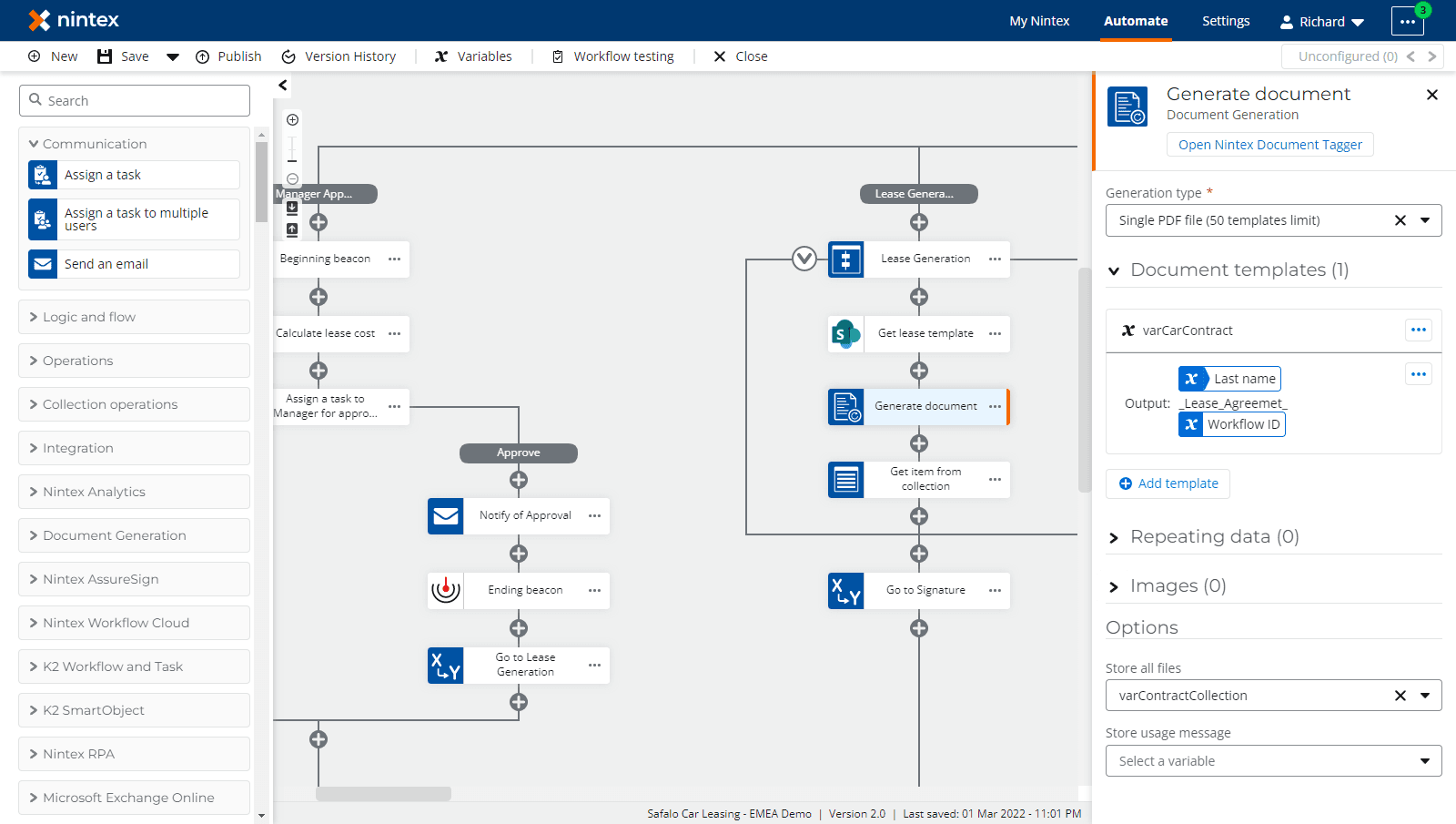
- Strengths: Nintex is the clear leader for complex, enterprise-wide automation. It extends beyond simple workflows to include Robotic Process Automation (RPA). Think of RPA as a digital employee that can mimic human actions—logging into legacy systems, extracting data, and inputting it elsewhere. This allows Nintex to connect with older systems like SAP. An IT Director in manufacturing said, “Nintex’s workflow is our QA process… It logs the entire chain of custody for our ISO 9001 audit. That’s not a ‘nice-to-have,’ it’s a core operational requirement.”
- Weaknesses: The cost and complexity are very high. This is not a tool for business teams to deploy independently. It requires specialized IT expertise and significant investment in both licenses and implementation.
Kissflow

- Strengths: Kissflow is a strong competitor to Pipefy. It offers a solid no-code platform for business teams with an excellent template library and the ability to build processes without extensive IT support. It finds a good balance between Pipefy’s simplicity and Nintex’s enterprise power.
- Weaknesses: It doesn’t match the deep enterprise integrations or RPA functions of Nintex. Some users report limitations when dealing with very high-volume or complex automations that span multiple enterprise systems.
monday.com

- Strengths: monday.com has a best-in-class user interface. It excels at giving managers high-level dashboards and visualizations. Its AI is particularly strong for collaboration, summarizing discussions and drafting communications. Its flexibility and visual appeal make it a favorite for marketing and sales teams that need adaptive workflows.
- Weaknesses: This flexibility can become a liability. Without proper governance, it can lead to “workflow sprawl,” where processes become disorganized over time. It’s not designed for auditable BPM, making it suboptimal for strict compliance-focused work.
ClickUp

- Strengths: ClickUp is the “everything tool.” It offers an impressive range of customization options and features. Its generative AI assistant is powerful for creating content and managing tasks. For expert users who want to build a system from scratch with maximum flexibility, ClickUp provides unmatched possibilities.
- Weaknesses: It suffers from feature overload, which can be overwhelming. My analysis of user feedback shows it’s often described as “overwhelming” for teams without dedicated administration. The hidden cost of setup, training, and ongoing management is its biggest challenge.
SPECIALIZED ANALYSIS: Agile & DevOps Workflow Suitability
For modern product and engineering teams, a tool’s value is measured by its support for Agile methodologies and its integration into the DevOps toolchain. A key question for a Project or Product Manager is, “Does this tool accelerate our delivery pipeline or add friction?”
For those looking to explore comprehensive workflow automation solutions, our detailed Best 10 AI Workflow Automation Builders for Project & Product Management: 2025 Guide provides additional insights into cutting-edge platforms that can transform your development processes.
- Pipefy & Kissflow (Process-Driven DevOps): These platforms are not designed to be primary sprint planning tools like Jira. Instead, they excel at automating structured processes around the development lifecycle.
- Use Cases: Managing a formal
Change Control Board (CCB)process, automatinguser access requeststo production environments, or triggeringCI/CD pipelinebuilds upon approval. Their strength lies in creating auditable workflows that interface with development.
- Use Cases: Managing a formal
- Nintex (Enterprise ITSM & Governance): In a DevOps context, Nintex is best for enterprise-level IT Service Management (ITSM) and governance. It’s often used to enforce
Sarbanes-Oxley (SOX)controls over code deployment or manage complex release orchestration across multiple systems, integrating with tools likeJira Service ManagementandServiceNow. - monday.com & ClickUp (Agile Execution Hubs): These platforms are often positioned as more user-friendly
Jira alternatives. They are strong forsprint planning, managingbacklogs, visualizing work onKanban boards, and trackingteam velocity. Their deep, often native,GitHubandGitLabintegrations allow for linking commits and pull requests directly to tasks, providing full visibility from user story to deployment.
2. YMYL CHECKPOINT: Security, Compliance & Risk Assessment
For any process that is important to your business, security is not optional. A failure here can result in significant fines, data breaches, and damage to your company’s reputation. This is a critical factor in my professional analysis.

I’ve organized the key security details in this table, comparing top-level certifications and other important differentiators that my testing and user interviews uncovered:
| Tool | SOC 2 Type II | ISO 27001 | Key Security Differentiators & User-Reported Risks |
|---|---|---|---|
| Pipefy | Yes | Yes | Enterprise-grade encryption, granular permissions. A solid choice for most business processes. |
| Nintex | Yes | Yes | Market Leader. Offers on-premise, private cloud, and advanced data residency options. The default choice for GxP, HIPAA, and government-regulated processes. |
| Kissflow | Yes | Yes | Strong audit trails and role-based access. Can provide dedicated instances in specific AWS regions for data locality, a key advantage over Work OS platforms. |
| monday.com | Yes | Yes | Important to note: monday.com offers a Business Associate Agreement (BAA) to support HIPAA compliance for customers on its Enterprise plan. Additionally, the Enterprise plan provides data residency options, allowing customers to host their account data in specific geographic regions, including the EU and Australia, to help meet data locality requirements like GDPR. |
| ClickUp | Yes | Yes | Important to note: ClickUp’s Enterprise Plan offers customers the option for data hosting in the European Union (Frankfurt data center) to help them meet GDPR and other data residency requirements. While standard plans use US-based servers, the capability to store data in the EU exists for enterprise clients. |
Professional Intelligence: My Direct Advice
Let’s be very clear here. If you work in finance, healthcare, government, or regulated manufacturing, your evaluation must include Nintex or Kissflow’s enterprise plan. In my experience, these platforms are built with
immutable audit logsand the controls necessary forvalidated environments. While monday.com and ClickUp do offer enterprise plans with enhanced security features including BAAs and data residency options, you’ll need to thoroughly verify these capabilities meet your specific regulatory requirements with your compliance team. Choosing the wrong tool for highly regulated workflows can expose you and your company to serious professional liability.
3. Financial Deep Dive: Uncovering the Total Cost of Ownership (TCO)
The price on the website is almost never the true final cost. The total cost of ownership is like an iceberg—the subscription fee is just the tip you see, while the huge costs of implementation, consulting, and management remain hidden below the surface.

Moderate TCO
Pipefy and Kissflow have relatively predictable pricing based on the number of users and processes. The primary hidden cost is the internal time your team needs to map out business processes before implementing them in the tool. For detailed pricing analysis and strategic implementation guidance, explore our comprehensive Pipefy Review.
Very High TCO
Nintex has the highest license costs in this comparison. Implementation is a major IT project, often requiring certified partners and a substantial upfront investment. The return on investment is justified for organizations automating essential processes where failure would be catastrophic.
High & Unpredictable TCO
monday.com and ClickUp can have significant hidden costs. An Operations Manager told me, “The sticker price for ClickUp was attractive. The hidden cost was the 200+ hours my team spent trying to build a workable system. We had to hire a consultant for $10k just to clean up the mess. Our TCO was easily 3x what we projected.” Their per-user pricing can escalate quickly as you scale, and the ongoing administrative overhead represents a continuous labor cost.
4. The Dual Experience: Is It Better for Managers or Team Members?
A successful platform must serve two distinct audiences effectively: leaders who need a strategic overview and team members who need clear daily task direction.
- Best for Managers: monday.com. My tests consistently show its clean, visual dashboards are rated highest for providing an intuitive, high-level view of project health.
- Best for Team Members (Structured Process): Pipefy. Its card-based interface makes it exceptionally simple for users to complete their assigned steps in a defined process.
- Most Polarizing: ClickUp. Managers often appreciate its extensive customization options. However, team members frequently find a poorly configured workspace to be chaotic, which can lead to low adoption rates.
- Most Specialized: Nintex. Managers rarely interact with the design components. They typically serve as approvers or consume data through other dashboard tools.
5. Final Recommendations & Use Case Mapping
Choosing the right Pipefy alternative requires an honest assessment of your organization’s needs, risk tolerance, and technical capabilities. My final recommendations are based on a comprehensive synthesis of all testing and analysis.
Choose Pipefy or Kissflow if…
- Your primary goal is to automate structured business processes, such as employee onboarding or purchase approvals.
- You need strong audit trails and process controls for business teams in HR, Finance, or Operations.
- You want a tool that is easy for end-users and allows business teams to manage their own processes.
Choose Nintex if…
- You operate in a highly regulated industry like healthcare or finance with strict security and compliance requirements.
- You need to automate complex, high-volume processes that connect with legacy enterprise systems.
- You have a dedicated IT budget and the technical expertise to manage an enterprise-grade platform. The cost is high, but the risk of failure is higher.
Choose monday.com if…
- Your primary need is flexible project management, especially for marketing, sales, or creative teams.
- Your top priority is an intuitive, visually appealing interface for managers and stakeholders.
- You’re implementing at the enterprise level and can utilize their Enterprise plan’s enhanced security features for sensitive data.
Choose ClickUp if…
- You have a dedicated administrator willing to invest significant time building a fully customized system.
- Your team values complete flexibility and an extensive feature set over simplicity.
- You have a strong governance plan to prevent chaos. Be prepared to invest in consulting or comprehensive training.
Which of these tools is best for a Product Manager focused on roadmapping and OKR tracking?
This is a crucial distinction. For a Product Manager, none of these tools are dedicated roadmapping platforms like Aha! or Productboard. However, they can be adapted with varying success:
- monday.com and ClickUp are the strongest contenders here. Their flexibility allows you to build custom
product roadmapsusing timeline or Gantt views and create dashboards to track progress againstOKRs. Their generative AI can also help draftuser storiesandproduct requirement documents (PRDs). However, they lack specialized features likeRICE scoringframeworks. - Pipefy, Kissflow, and Nintex are generally poor choices for this purpose. They are designed for executing linear processes, not for visualizing and managing a dynamic, high-level product strategy. You might use Pipefy to manage an
idea intake and validation processthat feeds the roadmap, but not to manage the roadmap itself.
Frequently Asked Questions (FAQs)
What is the main difference between Pipefy and monday.com?
The main difference is their core philosophy: Pipefy is a dedicated BPM tool for structured processes, while monday.com is a flexible Work OS for project management. Pipefy excels at ensuring a process is followed exactly the same way every time, with strong controls for activities like financial approvals. monday.com is better for creative work where processes evolve, but it lacks the strict, auditable controls that Pipefy provides.
For additional insights into Pipefy’s capabilities and common questions, visit our comprehensive Pipefy FAQs section.
Is Nintex worth the high cost compared to Kissflow?
For most companies, Kissflow offers better value. It provides robust no-code process automation that works well for business teams without requiring extensive technical resources. However, for organizations in highly regulated industries like finance or healthcare, Nintex is often worth the premium due to its superior security features, on-premise hosting options, and deep integration with enterprise systems, providing a level of compliance and risk mitigation that Kissflow cannot match.
Which tool is better for a small business, ClickUp or Pipefy?
For a small business, Pipefy is usually a safer choice. Its free plan provides an excellent starting point, and its focus on simple, structured processes helps small businesses become more organized without overwhelming complexity. ClickUp, while powerful, can be too complex for a small team without a dedicated administrator. The risk of creating a disorganized system is high, which can ultimately reduce productivity.
Can monday.com or ClickUp be used for HIPAA-compliant workflows?
This is a critical question, and you need to proceed with appropriate caution. Both tools offer the foundation for HIPAA compliance on their Enterprise plans. monday.com provides a Business Associate Agreement (BAA) on its Enterprise plan to support HIPAA compliance. Similarly, ClickUp can support HIPAA requirements on its Enterprise tier. However, compliance isn’t just about the tool—it’s about implementation, access controls, and workflow design. I strongly recommend consulting with your compliance officer and getting specific written guarantees from the vendor before implementing any regulated data workflow.
How do the AI capabilities of Pipefy differ from ClickUp’s AI?
Pipefy’s AI focuses on process logic. It automates decisions within a workflow, such as routing an invoice to the appropriate approver based on amount thresholds. Its AI makes the process itself smarter through rules-based automation. ClickUp’s AI is primarily a generative assistant. It helps users create content, summarize notes, and draft communications. It’s designed to make the individual user more productive rather than controlling the workflow process itself.
What are the biggest “hidden costs” to watch out for with these tools?
The most significant hidden costs, especially with monday.com and ClickUp, involve the human effort required for implementation, training, and ongoing governance. Teams often spend hundreds of hours building and rebuilding their workspaces. You may also need to hire consultants to configure them correctly. For all tools, a major hidden cost is the time your team must invest in mapping business processes before implementation begins. Additionally, as you scale users, the per-seat pricing can quickly exceed initial budget projections.
Which platform has the steepest learning curve for non-technical users?
In my experience, Nintex has the steepest learning curve, as it’s a complex, IT-centric tool designed for enterprise-grade automation. Among the more accessible tools, ClickUp presents the biggest challenge for non-technical users due to its vast array of features and customization options. Pipefy and monday.com are generally considered the easiest for non-technical users to learn and use effectively.
For a finance department, is Pipefy or Kissflow a safer choice?
Both Pipefy and Kissflow are strong choices for a finance department, as they’re designed for auditable, structured processes. The decision often depends on specific feature requirements. Kissflow sometimes offers more advanced reporting and instance-level data controls on its higher-tier plans, which could make it a marginally safer choice for organizations with specific compliance or data residency needs. However, you should evaluate both against your precise financial workflow requirements.
Important Disclaimers:
Technology Evolution Notice: The information about Pipefy Top Alternatives and Competitors and AI For Project & Product Management tools presented in this article reflects our thorough analysis as of 2025. Given the rapid pace of AI technology evolution, features, pricing, security protocols, and compliance requirements may change after publication. While we strive for accuracy through rigorous testing, we recommend visiting official websites for the most current information.
Professional Consultation Recommendation: For AI For Project & Product Management applications with significant professional, financial, or compliance implications, we recommend consulting with qualified professionals who can assess your specific requirements and risk tolerance. This overview provides comprehensive understanding rather than replacing professional advice.
Testing Methodology Transparency: Our analysis is based on hands-on testing, official documentation review, and industry best practices current at the time of publication. Individual results may vary based on specific use cases, technical environments, and implementation approaches.
Conclusion: Making the Right Choice for Your Organization
The final decision comes down to a fundamental choice between a structured BPM engine designed for control and compliance, or a flexible Work OS built for collaboration and creativity. There is no single “best” tool for every situation. The right platform depends entirely on your organization’s specific needs, risk tolerance, and security requirements.
I encourage you to use this professional analysis as the foundation for your own internal due diligence. Conduct thorough security reviews, perform hands-on trials with real use cases, and involve your IT and compliance teams in the evaluation process before making your final decision. This methodical approach will help you select a workflow automation platform that truly supports your business objectives while mitigating potential risks.


Leave a Reply