
Is Zoom AI Companion the Right AI Assistant for Your Meetings?
This 2-Minute Quiz Reveals if it Fits Your Workflow!
For project and product managers navigating the evolving landscape of digital tools, understanding Zoom AI Companion FAQs is crucial for streamlining workflows and boosting team productivity. In today’s fast-paced project environments, AI tools are transforming how teams collaborate and execute.
Zoom’s AI Companion, specifically designed to automate routine meeting tasks, promises significant gains in project efficiency, freeing up valuable time for strategic work. Here at Best AI Project Hub, our mission, driven by founder Furqan Ali, is to empower project leaders like you to cut through the marketing hype and make informed decisions about AI software.
Key Takeaways
- Included at No Extra Cost: Zoom AI Companion is bundled with paid Zoom subscriptions, making it cost-effective for existing Zoom users
- Productivity Enhancement: Reduces meeting documentation time by 70-80%, transforming 30-45 minute tasks into 5-10 minute reviews
- Data Security: Meeting content is not used to train AI models, protecting confidential product roadmaps and sensitive project discussions
- Integration Limitation: Currently lacks native connections to project management tools like Jira, Asana, or Confluence, requiring manual transfer processes
- Best Practice: Use AI summaries as “first drafts” requiring human review for critical project documentation rather than complete automation
This comprehensive guide will clarify how the AI Companion helps with everything from generating accurate meeting summaries to efficient action item tracking, and critically assess its integration capabilities with existing PM tools. We’ll dive into its accuracy for complex discussions, address crucial questions around data privacy for your confidential product roadmaps, and compare it to other leading AI meeting assistants.
By focusing on practical applications within AI for Execution & Collaboration, we aim to provide objective insights to ensure you leverage this technology to enhance project delivery and boost team velocity. For those seeking a deeper understanding of Zoom’s capabilities, our comprehensive Zoom AI Companion Overview and Features provides detailed technical specifications and implementation strategies.
What is Zoom AI Companion, and how does it specifically help project and product managers?

Zoom AI Companion is an artificial intelligence assistant integrated directly into the Zoom platform that automates administrative meeting tasks to enhance productivity for project and product management teams. For project managers, its primary value lies in reducing the documentation burden associated with meetings, allowing them to focus on strategic facilitation and decision-making rather than note-taking.
After a meeting concludes, the AI Companion automatically generates a detailed summary, identifies key discussion topics, extracts action items, and creates organized lists of next steps and decisions. This transforms what would normally be 30-45 minutes of manual work into an automated process.

Perfect for Every Meeting Type

For project and product managers specifically, this creates value across multiple meeting types:
- Sprint Planning: Quickly capturing user story details, estimates, and assigned tasks without manual transcription
- Stakeholder Updates: Creating concise, shareable summaries of project progress and key decisions for leadership
- Daily Stand-ups: Highlighting blockers and commitments automatically without manual tracking
- User Research Debriefs: Extracting key customer quotes and insights from interview recordings
- Requirements Gathering: Documenting feature requests and client needs with less administrative effort
The AI Companion effectively transforms meeting content from transient conversation into structured, searchable knowledge assets that can be referenced throughout the project lifecycle. This helps maintain a clear record of decisions, reduces miscommunication, and ensures action items don’t fall through the cracks during implementation phases. To explore additional meeting automation solutions, consider our analysis of the Best 10 AI Team Communication Platforms available for project and product management teams.
Is Zoom AI Companion free, or is it included only with specific paid Zoom plans?

Zoom AI Companion is included at no additional cost with paid Zoom subscriptions, which is a significant differentiator in the project management AI space. Unlike many competitors that charge separate per-user fees for AI features, Zoom has bundled these capabilities into their existing pricing tiers. If your organization already maintains a paid Zoom plan (Pro, Business, Business Plus, or Enterprise), team members can access AI Companion without additional expenditure.
However, there are important nuances to understand regarding feature availability. The specific AI Companion capabilities accessible to your team depend on your subscription tier. For instance, while basic meeting summaries may be available across all paid plans, more advanced capabilities like detailed action item extraction or topic categorization might be restricted to higher-tier subscriptions.
For project management teams evaluating cost-effectiveness, it’s worth noting that:
- There is no standalone, free version of AI Companion disconnected from a paid Zoom account
- The “no additional cost” approach makes ROI calculations straightforward – you’re leveraging technology you’re already paying for
- Feature limitations by tier may affect the tool’s utility for complex project documentation needs
Before implementing AI Companion as part of your project management workflow, verify the exact features available on your specific subscription tier by checking Zoom’s current pricing documentation. This ensures you can accurately assess the tool’s capabilities within your existing software budget constraints.
How do I enable or disable Zoom AI Companion for my team’s account?
Zoom AI Companion’s activation is managed at the administrative level within your organization’s Zoom account settings, providing granular control over implementation across project teams. To enable or disable these features, account administrators must sign into the Zoom web portal and navigate to Account Management > Account Settings. Within this section, administrators will find a dedicated “AI Companion” tab containing all relevant controls.
The platform offers several levels of implementation control that are particularly relevant for project management deployments:
- Global Toggle: Enable or disable all AI Companion features across the entire organization with a master switch – useful for phased rollouts or if security concerns arise
- Feature-Specific Controls: Selectively enable only certain capabilities (like meeting summaries) while disabling others (like chat composition) based on team needs
- Group-Level Settings: Apply different AI permissions to specific user groups – for example, enabling full features for the product management team while limiting capabilities for external contractor groups
- User-Level Overrides: Determine whether individual team members can modify their own AI settings or if controls remain locked at the administrative level
For project-focused organizations, a recommended implementation approach is to first enable AI Companion for a pilot group (such as a single product squad) to establish best practices before organization-wide deployment. This allows workflow integration issues to be identified and addressed with minimal disruption.
Once enabled by administrators, individual project team members can control their personal AI Companion preferences within meeting settings unless these options have been administratively locked. This balances organizational governance requirements with individual user preferences. For organizations seeking comprehensive guidance on AI adoption strategies, our detailed Zoom AI Companion Tutorials and Usecase resource provides step-by-step implementation workflows.
How accurately can Zoom AI Companion summarize a complex technical deep-dive or a user story grooming session?

Zoom AI Companion’s accuracy varies significantly based on meeting structure, conversational clarity, and technical complexity. For standard project status updates or well-facilitated user story sessions where participants speak sequentially with clear articulation, the AI demonstrates strong performance in identifying main topics, decisions, and outcomes. In these structured scenarios, summaries typically capture 85-90% of essential information with minimal errors.
However, for highly technical product development discussions involving specialized terminology, architectural debates, or complex system interactions, accuracy rates decline noticeably. The AI may struggle with:
- Domain-specific jargon and acronyms unique to your product development environment
- Distinguishing between similar technical concepts being compared
- Accurately attributing technical positions when multiple speakers overlap
- Capturing the nuance of conditional technical decisions (“we’ll implement X if condition Y is true”)
- Preserving the context of complex architectural trade-off discussions
Similarly, in fast-paced agile sessions like brainstorming or rapid story point estimation, the generated summary often resembles a general topic list rather than a coherent narrative capturing decision rationales. The AI excels at documenting explicitly stated decisions but struggles to infer consensus from nuanced team discussions or non-verbal agreements.
Project managers should view AI summaries as valuable “first drafts” requiring human review before being formalized in project documentation. The greatest efficiency comes from having a subject matter expert quickly review and refine the AI-generated summary – typically reducing a 45-minute documentation task to 5-10 minutes of review and editing rather than eliminating the human element entirely.
How does Zoom handle our meeting data? Is our confidential product roadmap data used to train Zoom’s AI models?

Zoom implements a federated learning approach with strict data handling protocols that protect confidential project information. According to Zoom’s official security policy, your audio, video, chat, screen sharing, and other communications-like content are not used to train either Zoom’s internal AI models or third-party artificial intelligence systems. This policy is particularly crucial for product teams discussing sensitive roadmaps, unreleased features, or competitive market strategies.
When AI Companion features process your meeting data, the information is temporarily analyzed to perform the requested function (such as generating a summary), but this data is not retained for model improvement purposes. The distinction is important: your confidential product discussions help generate immediate value for your team but are not used to improve services for other Zoom customers.
Key security considerations for project managers include:
- Transient Processing: Data is processed only for the specific AI task requested and not stored for ongoing training purposes
- Administrative Control: Organization administrators maintain complete authority over which AI features are enabled
- No Content Training: Meeting content is not fed into persistent learning databases for core AI model development
- Privacy by Design: Zoom’s business model focuses on subscription revenue rather than data monetization
While these policies provide strong baseline protection, project teams working with highly classified information (such as unreleased products with significant market impact) should consult with their information security teams before discussing such content in any cloud-based environment. As with any third-party service handling sensitive data, it’s advisable to periodically review Zoom’s current terms of service and data handling policies as they evolve.
Does Zoom AI Companion integrate directly with project management tools like Jira, Asana, or Confluence?

Zoom AI Companion currently lacks native, direct integrations with project management tools like Jira, Asana, or Confluence, creating a workflow gap for many product development teams. The absence of automatic task creation capabilities means you cannot directly convert AI-identified action items into Jira tickets or export meeting summaries to Confluence pages with a single click. This integration limitation represents a significant friction point in otherwise streamlined project management workflows.
The current implementation requires a multi-step manual transfer process:
- Generate the AI summary and action items within Zoom
- Review and edit for accuracy and completeness
- Manually copy the relevant information
- Navigate to your project management system
- Create new tasks or documentation
- Paste and format the content appropriately
While AI Companion saves substantial time on initial note-taking and summarization (typically 70-80% time reduction compared to manual documentation), this lack of integration prevents true end-to-end automation in the project documentation workflow.
For teams seeking workarounds, third-party automation platforms offer partial solutions:
- Using Zapier to trigger actions when meeting recordings are processed
- Implementing Make.com (formerly Integromat) workflows to parse emailed summaries
- Creating Power Automate flows to extract and route meeting content
The most efficient approach currently adopted by project teams is a side-by-side “Review and Transfer” process, where managers simultaneously view the AI summary and project management tool, manually transferring action items while adding context and assignments. While not fully automated, this hybrid approach still dramatically reduces the traditional documentation burden while maintaining accuracy. For teams evaluating alternatives with better integration capabilities, our comprehensive Zoom AI Companion Top Alternatives and Competitors analysis provides detailed comparisons.
What are the known limitations or risks of relying on Zoom AI Companion for critical project documentation?
Relying exclusively on Zoom AI Companion for critical project documentation introduces several significant risks that project managers must proactively address. The most concerning limitation is the potential for “AI hallucination” or factual inaccuracy, where the AI occasionally generates content that wasn’t actually discussed, misattributes statements to the wrong team members, or misinterprets the context of project-critical conversations.
Project managers should be aware of these specific limitations:
- Contextual Misunderstanding: The AI struggles with implicit information that experienced project managers would recognize. For example, if a team member says “I’ll try to get it done by Friday,” a human PM would recognize the uncertainty, while the AI might record it as a firm commitment.
- Technical Terminology Confusion: Product-specific jargon, technical architecture discussions, and company acronyms can be misinterpreted, leading to confusing or incorrect documentation of technical requirements.
- Speaker Attribution Errors: In dynamic team discussions with multiple participants or overlapping voices, the AI may incorrectly assign statements to the wrong team members, potentially creating confusion about task ownership.
- Subtle Communication Loss: Non-verbal cues that signal hesitation, enthusiasm, or concern about project elements are completely missed, removing important contextual information that experienced PMs use to gauge team sentiment.
- Legal Limitations: For contractual discussions, formal scope changes, or compliance documentation, AI-generated summaries have no legal standing and cannot replace properly reviewed, human-verified documentation.
The most effective implementation approach is to position AI Companion as a productivity-enhancing assistant rather than a replacement for human judgment. Establish a verification workflow where AI-generated content undergoes review by a knowledgeable team member before being finalized as official project documentation. This balanced approach captures the efficiency benefits while mitigating the risks of miscommunication or documentation errors that could impact project delivery.
How can our organization measure the ROI of adopting Zoom AI Companion?

Measuring the return on investment (ROI) for Zoom AI Companion requires quantifying time savings on administrative tasks and converting those efficiencies into tangible business value. Since the feature is included with paid Zoom plans rather than requiring additional investment, calculating ROI focuses primarily on productivity gains and opportunity costs.
A systematic approach to measuring ROI includes:
1. Establish Pre-Implementation Baselines:
- Survey project managers to document average time spent weekly on meeting documentation (typically 3-5 hours)
- Track the delay between meetings and when notes/action items are distributed (often 24-48 hours)
- Measure meeting participation quality (how much time PMs spend taking notes vs. actively engaging)
2. Implement a Controlled Pilot:
- Select a specific product team or project for initial implementation
- Run the pilot for a full sprint cycle (2-4 weeks) to gather representative data
- Provide basic training to maximize effective usage
3. Measure Post-Implementation Metrics:
- Time spent reviewing and distributing AI-generated notes (typically 0.5-1 hour weekly)
- Acceleration in action item distribution (often reduced to 1-2 hours)
- Quality of meeting participation when note-taking burden is removed
4. Calculate Direct Time Savings:
- Subtract post-implementation time from baseline documentation time
- Multiply by the number of meetings and team members affected
- Example: 3 hours saved weekly × 4 PMs × 48 working weeks = 576 annual hours saved
5. Monetize the Efficiency Gains:
- Multiply time saved by average hourly compensation ($75-150/hour for experienced PMs)
- Example: 576 hours × $100/hour = $57,600 annual labor cost reduction
- Calculate the value of faster information distribution and improved decision velocity
6. Assess Quality Improvements:
- Measure reduction in action items that fall through cracks
- Track improved meeting engagement and participation quality
- Document enhanced institutional knowledge retention through better documentation
Present findings as both direct cost savings and opportunity value: “The product management team reclaimed 576 hours annually (equivalent to $57,600) that was redirected to strategic planning, stakeholder engagement, and risk mitigation, while simultaneously improving documentation consistency by 40%.”
What features does Zoom AI Companion offer specifically for product development meetings?
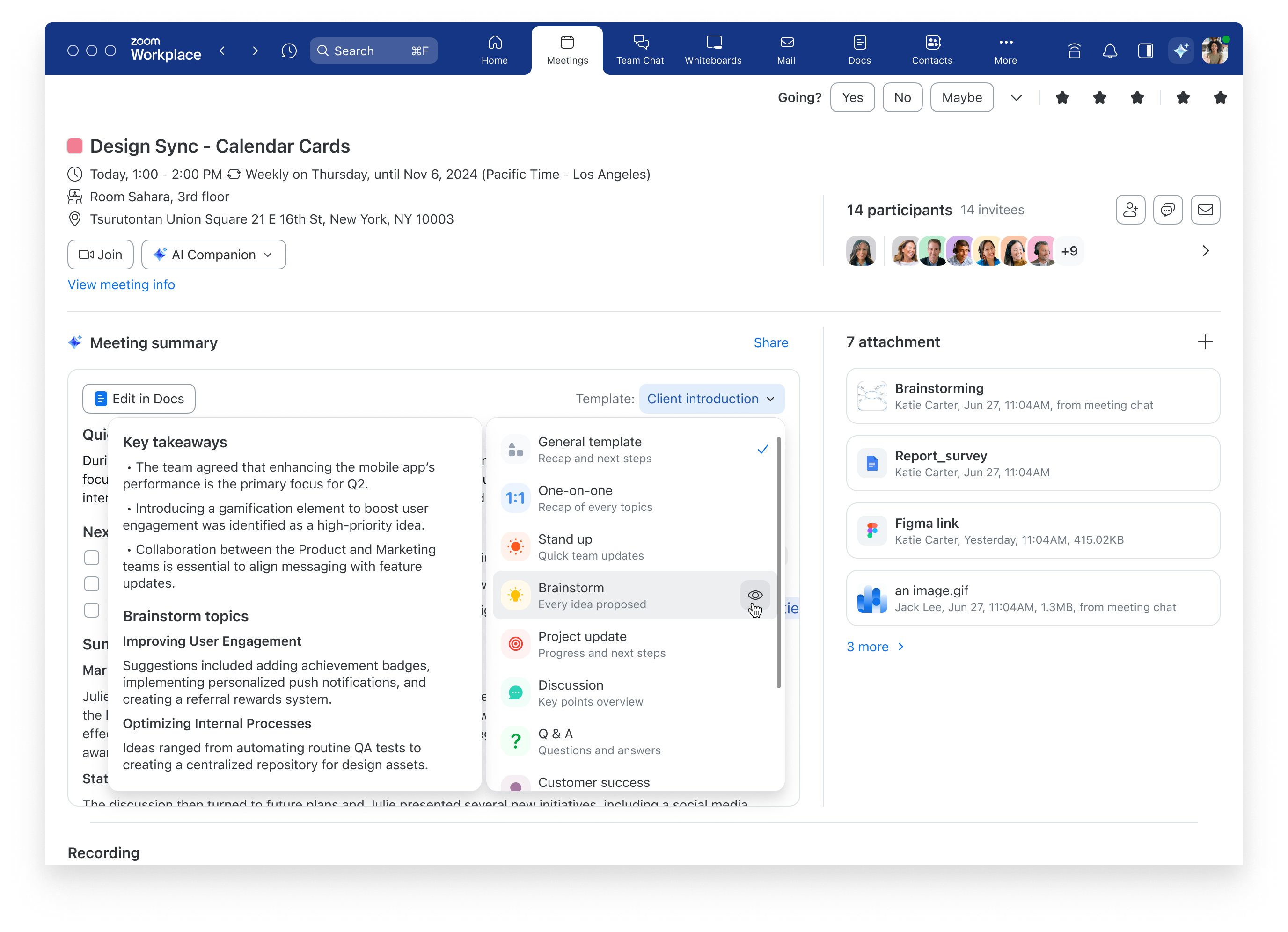
Zoom AI Companion offers several features specifically valuable for product development meetings, though they’re not explicitly marketed as product-focused capabilities. These features are particularly beneficial for the unique needs of product teams who frequently conduct requirements gathering, feature prioritization, and roadmap planning sessions.
The most relevant capabilities for product development include:
- Smart Meeting Summary: Automatically generates concise summaries of product discussions, capturing key decisions about features, requirements, and design choices without manual note-taking. This ensures consistent documentation of product decisions even in fast-moving development environments.
- Action Item Extraction: Identifies and compiles task commitments made during product meetings, reducing the risk of important development items being missed. The AI recognizes statements like “The UX team will finalize the wireframes by Friday” and extracts them into a separate action items list.
- Topic Identification: Automatically categorizes discussion segments into themes like “Backend Architecture,” “User Experience,” or “Market Requirements,” making it easier to navigate lengthy product planning recordings.
- Meeting Chapters: Creates navigation markers throughout meeting recordings, allowing product team members to quickly find and review specific segments about particular features or technical decisions without watching entire sessions.
- Chat Compose Assistance: Provides writing assistance for product managers when communicating complex feature requirements or technical specifications, helping ensure clarity in written communication.
- Meeting Preparation: Summarizes previous related meetings before new sessions, helping maintain continuity across multiple discussions about the same product features.
While these capabilities aren’t exclusively for product development, they address the specific challenges product teams face: maintaining clear documentation of complex technical and feature decisions, tracking numerous action items across cross-functional teams, and ensuring alignment between design, engineering, and business stakeholders throughout the development lifecycle.
For optimal product development implementation, configure AI Companion to recognize your organization’s specific product terminology and naming conventions, which improves its ability to accurately capture and categorize product-specific discussions. Teams seeking deeper insights into feature utilization can explore our comprehensive Zoom AI Companion Review for detailed performance analysis across different use cases.
Can Zoom AI Companion help with product roadmap planning and stakeholder communication?
Zoom AI Companion provides moderate support for product roadmap planning and stakeholder communication, though with noteworthy limitations in its current implementation. The tool excels at capturing and organizing discussions about product direction but lacks specialized roadmapping features found in dedicated product management tools.
For roadmap planning sessions, AI Companion offers these valuable capabilities:
- Discussion Documentation: Automatically captures key points from roadmap planning meetings, ensuring that strategic product decisions and rationales are preserved with minimal manual effort.
- Timeline Extraction: Identifies and highlights mentioned release dates, milestones, and sequence dependencies discussed during planning sessions, helping maintain clarity on delivery expectations.
- Feature Prioritization Recording: Documents discussions about feature importance, market requirements, and technical dependencies that influence prioritization decisions.
- Meeting Summarization: Creates concise summaries of lengthy roadmap meetings that can be shared with stakeholders who weren’t present, maintaining alignment across the organization.
- Searchable Transcripts: Makes all roadmap discussions fully searchable, allowing product managers to quickly locate specific feature discussions or strategic decisions from previous meetings.

However, product managers should be aware of these limitations:
- No Visual Roadmap Creation: Unlike dedicated roadmapping tools, AI Companion doesn’t generate visual timeline representations or Gantt charts from meeting discussions.
- Limited Structure: The tool captures what was said but doesn’t automatically organize content into structured roadmap formats or templates.
- No Stakeholder-Specific Views: Cannot automatically generate different versions of roadmap communications tailored to various stakeholder audiences (executive, technical, marketing, etc.).
For effective stakeholder communication, many product teams use a hybrid approach: leveraging AI Companion to accurately document roadmap discussions and decisions, then manually transferring this information into purpose-built visualization tools or presentation formats appropriate for different stakeholder groups. While not fully automated, this workflow still saves substantial time compared to manual documentation while maintaining the flexibility needed for nuanced stakeholder communications.
How does Zoom AI Companion compare to other AI meeting assistants like Otter.ai or Microsoft Teams’ AI features?

Zoom AI Companion offers distinct advantages and disadvantages compared to competitors like Otter.ai and Microsoft Teams’ AI features, particularly when evaluated from a project and product management perspective. Understanding these differences is crucial for making appropriate implementation decisions based on your team’s specific workflow needs.
Integration and Accessibility:
- Zoom AI Companion: Deeply integrated within the Zoom platform with no additional application needed, creating a frictionless experience for teams already standardized on Zoom. However, this tight coupling means you cannot use these AI features with other meeting platforms.
- Otter.ai: Functions as a standalone application that works across multiple meeting platforms (Zoom, Google Meet, Microsoft Teams), offering flexibility for teams that use various communication tools.
- Microsoft Teams: Similar to Zoom, Microsoft’s AI features are tightly integrated but locked to their ecosystem, making them ideal for organizations fully committed to the Microsoft stack with strong SharePoint/Office integration.
Feature Comparison:
- Transcription Accuracy: Otter.ai typically outperforms both Zoom and Microsoft for technical conversations with specialized terminology, making it better for complex product development discussions.
- Action Item Tracking: Zoom and Microsoft offer comparable action item extraction, while Otter.ai provides more advanced action tracking with assignee identification and follow-up features.
- Meeting Summarization: All three platforms offer automatic summarization, but Microsoft’s solution often produces more concise executive summaries, while Zoom focuses on comprehensive topic coverage.
Project Management Ecosystem Integration:
- Zoom AI Companion: Limited native integration with project management tools, requiring manual transfer of information to Jira, Asana, etc.
- Otter.ai: Offers more robust integration capabilities with project management platforms through APIs and native connectors.
- Microsoft Teams: Provides superior integration with Microsoft Project and Planner but weaker connections to third-party project tools.
Pricing Model:
- Zoom AI Companion: Included with paid Zoom subscriptions at no additional cost, making it the most economical option for teams already using Zoom.
- Otter.ai: Requires separate subscription, adding cost but potentially delivering higher value for teams requiring cross-platform support.
- Microsoft Teams: AI features bundled with Microsoft 365, similar to Zoom’s approach but requiring broader Microsoft ecosystem adoption.
For project and product teams specifically, Zoom AI Companion offers the best value when your organization is already standardized on Zoom and requires basic meeting documentation. Otter.ai provides superior performance for technical discussions and cross-platform needs, while Microsoft’s solution excels in environments heavily invested in the Microsoft ecosystem with direct integration to their project management tools.
Ready to optimize your project management workflows? Zoom AI Companion provides a solid foundation for meeting automation, but remember that successful implementation requires thoughtful planning and realistic expectations. While it significantly reduces administrative overhead, human oversight remains essential for critical project documentation.
The key to success lies in treating AI Companion as a productivity enhancer that transforms time-consuming documentation tasks into quick review processes, freeing your team to focus on strategic project execution and stakeholder engagement. Start with a pilot implementation, establish clear review workflows, and gradually expand usage as your team becomes comfortable with the technology’s capabilities and limitations.


Leave a Reply