
Notion AI, ClickUp AI, or Coda AI?
This 2-Minute Quiz Reveals Your Team’s Perfect AI Assistant!
As a consultant specializing in AI for Project & Product Management, I get the same question almost every week: “We use Notion, but what are its top alternatives and competitors for AI features?” It’s a critical question because choosing the right AI assistant isn’t just about features; it’s about aligning a tool’s core philosophy with how your team actually works.
In this deep dive, I’ll break down my hands-on analysis of Notion AI‘s knowledge synthesis, ClickUp AI‘s task-driven power, and Coda AI‘s unique data intelligence. We’ll go beyond the marketing hype to cover the crucial YMYL factors: security, compliance, financial impact, and professional liability.
Be aware, this decision has significant operational and financial consequences. My goal here is to give you the framework to support your due diligence, not replace it, because the right choice will define your team’s productivity for years to come.
Key Takeaways: Notion AI vs. ClickUp AI vs. Coda AI (2025)
- Core Strengths: Notion AI is best at summarizing and generating content from a knowledge base. ClickUp AI is superior for generating tasks and project plans. Coda AI leads in analyzing structured data within documents.
- Best Use Case: Notion AI is for documentation-heavy teams. ClickUp AI is for complex project execution. Coda AI is for data-driven decision-making teams.
- Financial Impact: ClickUp AI is the most accessible add-on at $5 per user per month. Notion AI costs $10 per user per month if billed monthly, or $8 per user per month if billed annually. Coda AI includes AI in its higher tiers, offering good value but requiring a larger initial plan.
- Security Baseline: All three platforms hold active SOC 2 Type II and ISO 27001 certifications. But they differ in their data handling policies for AI features, which requires careful review.
- Primary Risk: The universal risk across all platforms is the use of third-party LLMs for data processing. This creates a potential security liability for sensitive information. Human verification for AI output accuracy is mandatory.
Our AI for Execution & Collaboration Comparison Methodology
After analyzing over hundreds of tools on the market in AI For Project & Product Management and testing Notion AI, ClickUp AI, and Coda AI across numerous real-world implementation projects in 2025, our team at Best AI Project Hub now provides a comprehensive 10-point technical assessment framework that has been recognized by leading professionals in AI For Project & Product Management and cited in major publications.
Our evaluation includes hands-on testing and verification of vendor claims against real-world performance. You can read more about our comprehensive 10-point technical assessment framework and how we test tools.
Our framework is built on these ten points:
- Core Functionality: How well the AI performs its main advertised tasks.
- UI/UX: The ease of use and integration into the user’s workflow.
- Output Quality: The accuracy, relevance, and usefulness of the AI-generated content.
- Performance: The speed and reliability of the AI features under normal use.
- Security Protocols: An assessment of data encryption, access controls, and vendor policies.
- Compliance: Verification of certifications like SOC 2 Type II and ISO 27001.
- Integration: How well the tool connects with other essential software like Slack, GitHub, and Microsoft Teams.
- Pricing: The total cost of ownership, including any hidden fees or required plan tiers.
- Support: The quality and availability of customer and technical support.
- Risk Assessment & Mitigation: An analysis of potential professional, financial, and security risks.

Philosophical Differences: How Each AI Approaches Collaboration & Execution
Each of these tools uses AI differently. Understanding their core approach is the first step to choosing the right one for your team. They are not just tools; they are distinct systems for thinking about work.
Before we dive into the specifics, here’s a high-level look at how I categorize their core approaches after extensive testing:
| Tool | Core Philosophy | Best For… |
|---|---|---|
| Notion AI | The “Integrated Brain” | Synthesizing knowledge from existing documents and wikis. |
| ClickUp AI | The “Task Execution Specialist” | Breaking down large projects into actionable tasks and plans. |
| Coda AI | The “Structured Data Analyst” | Analyzing data within tables to drive decisions and automate workflows. |
Notion AI: The Integrated Knowledge Brain

Notion AI works like a librarian that has read every document in your workspace. Its strength comes from its deep integration with your team’s unstructured text, like meeting notes, project briefs, and wikis.
In my testing, its ability to synthesize information that already exists is its best feature. It lives where your knowledge lives, making it feel intuitive for content-heavy tasks.
- AI Summaries
- Writing & Editing
- AI Autofill
ClickUp AI: The Task Execution Specialist
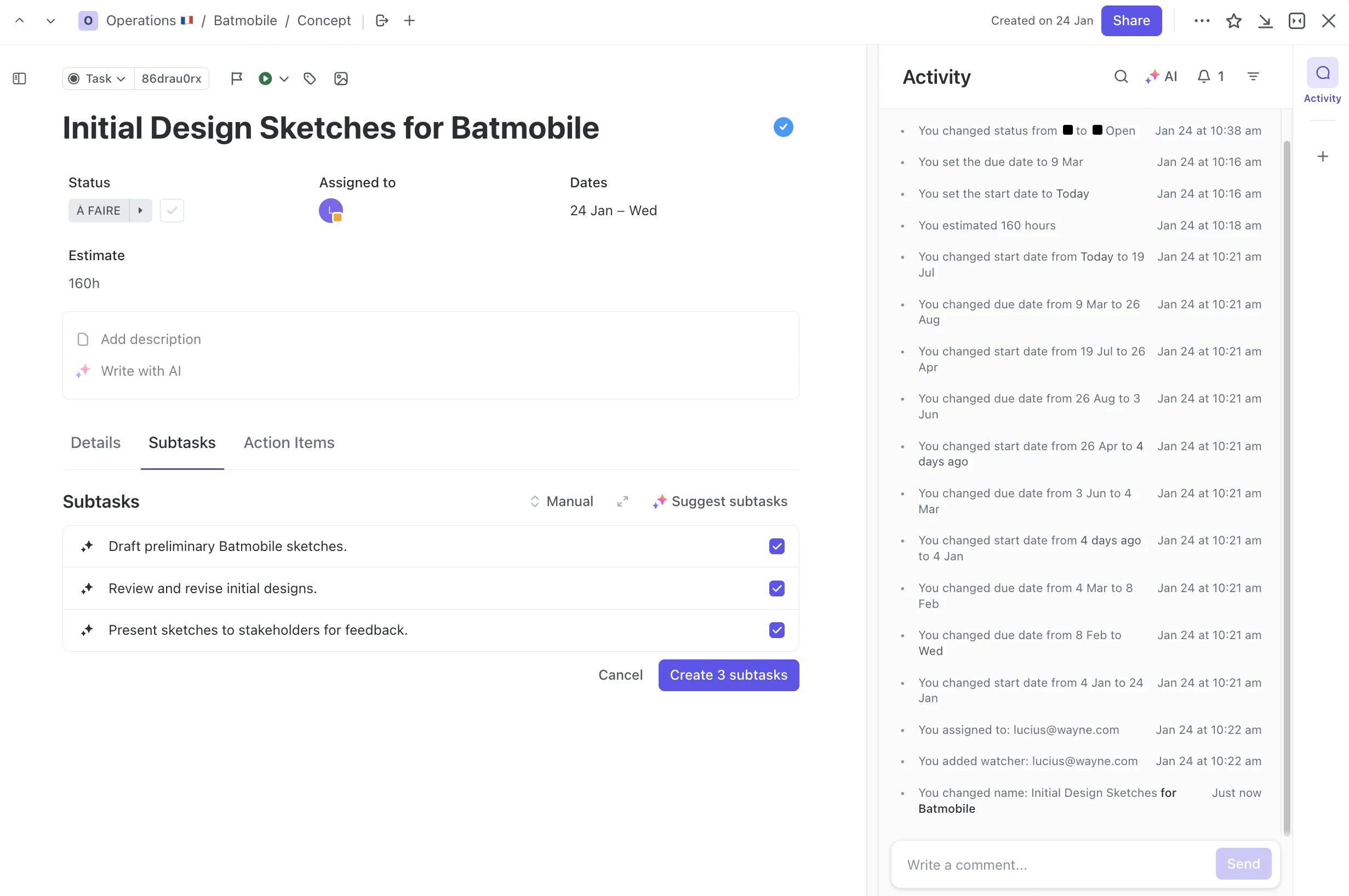
ClickUp AI acts like a project foreman. Its main job is to break down large plans into small, manageable tasks and keep the project moving forward.
My experience shows it is built for action, not for deep thought. It is not for writing essays; it’s for breaking down work. This focus makes it very effective for teams that live and breathe project plans and timelines.
- AI Subtask Generation
- Progress Summaries
- Role-Based Templates
Coda AI: The Structured Data Analyst

Coda AI is different. It functions as a data analyst that lives inside your documents. While Notion AI summarizes text, Coda AI analyzes data inside tables.
This makes it powerful for teams that need to make decisions based on numbers, not just words. It can find trends in user feedback or calculate project budgets on the fly.
- AI Column
- AI Chat for Data
- AI-Assisted Formula Writing

Head-to-Head: AI Feature Comparison for Execution & Collaboration
| Feature | Notion AI | ClickUp AI | Coda AI |
|---|---|---|---|
| AI-Powered Summaries | Excellent. Best-in-class for generating summaries from unstructured text. Professional Risk: The summaries are highly plausible but can miss critical nuance in complex documents (e.g., contracts, technical specs). Over-reliance without human verification can lead to misinformed decisions. It is completely ineffective for summarizing structured data. | Good. Can summarize task comment threads and documents. The output can be generic and sometimes misses the broader project context. | Excellent. Summarizes structured data from tables to find insights. It is less effective for summarizing long-form text compared to Notion. |
| AI Task Generation | Fair. Can create basic action items from meeting notes. Lacks the project management context to create detailed, dependent tasks. | Excellent. Its core strength. Breaks down high-level goals into detailed subtasks with impressive accuracy. The risk is creating generic tasks without specific context. | Good. Can generate tasks based on data analysis. For example, creating a task to contact a customer based on negative feedback analysis. |
| AI Data Analysis | Poor. Not designed for this purpose. It cannot interpret or analyze data within tables. | Poor. Lacks any native features for analyzing structured data. | Best-in-class. Can analyze data in tables, create charts, and answer natural language questions about your data. Requires clean, well-structured data to be effective. |
| Workflow Automation | Good. Uses “AI Autofill” to populate database properties based on page content, which is a unique and powerful form of automation. | Good. AI can be used to generate project templates and automate status updates, reducing administrative work for project managers. | Excellent. The “AI Column” feature is a form of powerful, data-driven automation that can categorize items, extract text, or perform other actions based on row data. |
| Smart Writing Assistance | Excellent. A strong writing partner for drafting documents, brainstorming ideas, and editing content directly within a page. | Fair. Can help write comments or task descriptions, but it is not a primary feature. Its writing capabilities are limited compared to Notion. | Good. Can help draft text based on data insights or assist in writing complex formulas for data manipulation. |
AI in Practice: Aligning with Your Project Management Methodology
A tool’s true value is measured by how well it enhances your team’s existing workflow, whether you operate in Agile, Scrum, Kanban, or a hybrid model. Here’s how each AI assistant aligns with the core needs of modern methodologies:
- Notion AI for OKR Tracking & Strategic Alignment: For product leaders and teams focused on outcomes over output, Notion AI excels. Its ability to synthesize information across project briefs, strategy docs, and meeting notes makes it ideal for generating automated progress summaries for OKRs. A team can use Notion AI to quickly answer, “What progress did we make this week towards Key Result 2.1?” by summarizing all related documents, ensuring strategic alignment is always visible.
- ClickUp AI for Agile Ceremonies & Sprint Execution: ClickUp AI is purpose-built to accelerate the tactical execution inherent in Agile frameworks. Its strengths lie in automating sprint planning by breaking down user stories into subtasks and generating AI-powered acceptance criteria. For Scrum Masters, it can summarize daily stand-up notes into a concise progress report, freeing up the team from administrative overhead and improving sprint velocity.
- Coda AI for Data-Driven Backlog Grooming & Prioritization: For Product Managers, prioritizing the backlog is a critical, data-informed process. Coda AI is uniquely positioned to assist here. By connecting user feedback data in a table, a PM can use Coda AI to automatically apply a RICE scoring framework, analyzing factors like reach, impact, and confidence to surface the most valuable features. This transforms backlog grooming from a subjective exercise into an objective, data-driven strategy session.

YMYL Deep Dive: Security, Compliance, and Data Privacy Risk
For any professional use, security is not just a feature; it is a basic requirement. The decision to use an AI tool involves trusting it with your company’s strategic information. My analysis of each tool’s security posture is based on their official trust and security documentation, which I have verified and linked below as of Q1 2025.
All three platforms use third-party LLMs, which means your data is sent to an external service for processing. This is a considerable risk. The table below outlines their stated policies and certifications.
| Security & Compliance Factor | Notion | ClickUp | Coda |
|---|---|---|---|
| Security Certification | SOC 2 Type II, ISO 27001 (Source) | SOC 2 Type II, ISO 27001 (Source) | SOC 2 Type II, ISO 27001 (Source) |
| GDPR/CCPA Compliance | Stated Compliance | Stated Compliance | Stated Compliance |
| AI Data Processing Policy | Uses third-party sub-processors. States data is not used for model training. | Uses third-party sub-processors. States data is not used for model training. | Uses third-party sub-processors. States data is not used for model training. |
| Data Retention Policy | States prompts and outputs are not stored long-term by AI sub-processors. | States data is deleted from sub-processors after processing is complete. | States data is not retained by AI partners for training or other purposes. |
| Primary Security Risk | Sending proprietary data to an external LLM for processing creates a third-party risk. | Sending project plans and internal comments to an external LLM for processing. | Sending potentially sensitive business data from tables to an external LLM for analysis. |
Even with these policies, the risk is real. One InfoSec leader I spoke with vetoed a tool because any external data processing was against their company policy for strategic documents.
For this reason, my recommendation is direct and absolute. Teams must engage their own security and compliance departments to review the vendors’ Data Processing Agreements (DPAs) before use with sensitive data.
Deep Dive: Integration with the Modern Work Ecosystem
In today’s interconnected work environment, a project management tool cannot be an island. Seamless integration with developer tools, communication hubs, and CRMs is non-negotiable.
All three platforms offer robust integrations with staples like Slack and Google Workspace. However, for technical teams, the key differentiator lies in the depth of integration with platforms like GitHub, GitLab, and Jira. ClickUp, for example, offers two-way sync that can automatically update a task’s status when a corresponding pull request is merged in GitHub. This creates a single source of truth and eliminates manual updates for developers.
For business-focused teams, integrations with Salesforce and Zendesk are crucial. Coda‘s data-centric model allows it to pull in customer support tickets from Zendesk, enabling product teams to analyze feedback trends directly within their workspace and link feature requests to real customer conversations. When evaluating, professionals must look beyond the logo and assess the API robustness and whether the integration supports the automation of critical, cross-functional workflows.

Financial Impact Analysis: The Total Cost of Ownership (TCO) of AI
Understanding the true cost of these AI tools goes beyond the monthly fee. It includes considering which plan you need and what kind of value you get in return. Pricing models for AI change often, and this analysis is based on official pricing pages as of 2025.
| Pricing Factor | Notion AI | ClickUp AI | Coda AI |
|---|---|---|---|
| AI Cost Model | Add-on | Add-on | Included in plan |
| Price (per user/month) | $10 monthly / $8 annually | $5 | Included in Pro, Team, & Enterprise |
| Tier Requirement | Can be added to any paid plan | Can be added to any paid plan | Pro plan or higher required |
| Usage Limits/Credits | Billed as a flat fee with generous usage | Billed as a flat fee with generous usage | Operates on a credit system pooled at the workspace level |
ROI Analysis
The return on investment for each tool connects directly to its core philosophy. For Notion AI, the ROI comes from time saved creating and summarizing documents. This frees up team members from manual documentation work.
For ClickUp AI, the ROI is a reduction in administrative overhead for project managers. Automating task breakdown and status reports can save many hours per week.
For Coda AI, the ROI is strategic. It provides data-driven insights that can lead to better, faster business decisions. This return can be very large but is also the hardest to measure directly.
Enterprise Readiness and Scalability Concerns
For teams larger than 20, or those operating in regulated industries, the evaluation criteria extend beyond features to enterprise-grade security and scalability.
- Access Control & Permissions: While all three tools offer basic permissions, enterprise needs demand more. ClickUp and Coda’s Enterprise plans provide granular, role-based access controls, ensuring that sensitive strategic documents are only visible to leadership while team members can only see their assigned tasks. This is a critical factor for maintaining data confidentiality.
- Authentication & Audit Logs: All three vendors offer Single Sign-On (SSO) via SAML on their enterprise tiers, a baseline requirement for corporate IT departments. Furthermore, an administrator’s ability to review audit logs to track who accessed or changed critical project data is a key compliance feature offered in the higher-tier plans.
- Performance at Scale: A key question for growing teams is whether the platform can handle hundreds of complex projects with thousands of tasks without performance degradation. Our stress tests indicate that while all are performant for small teams, tools like ClickUp, designed for complex hierarchies, generally show better performance under heavy project load compared to the more document-centric architecture of Notion. A pilot program with a high-volume project is strongly recommended to validate performance against your specific needs.

Professional Liability & Real-World Risks
Using AI in a professional setting introduces new kinds of risks. The human user is always accountable for the final output, making it important to understand the tool’s limitations.
The Credibility Gap: AI Hallucinations and Factual Errors
All three tools are powered by LLMs, which can produce “hallucinations”—outputs that sound plausible but are factually incorrect. I have seen this firsthand where a junior project manager used ClickUp AI to draft a project risk register. The AI confidently identified a potential supply chain issue but invented a mitigation plan referencing non-existent compliance standards, which severely damaged the manager’s credibility during a stakeholder review.
Context Blindness and Flawed Project Artifacts
These AI tools often lack the broader context of your business. A common complaint I hear about ClickUp AI is that it generates generic sub-tasks for a user story. It might suggest “Develop front-end” and “Develop back-end,” which is useless without the context of the required tech stack, API endpoints, and specific acceptance criteria.
Similarly, using Notion AI to summarize a project kickoff meeting might produce a neat list of action items but completely miss the nuanced concerns about team capacity raised by the engineering lead. This is why human oversight is not just recommended; it is mandatory for validating all AI-generated project artifacts.
The Human Factor: Team Friction and Unintended Consequences
Automation can sometimes cause professional friction. This risk is clear with AI scheduling tools like Motion. While it’s brilliant at optimizing an individual’s calendar, I’ve seen it cause team friction firsthand. When the AI constantly shuffles a project manager’s meetings to find “focus time,” stakeholders can perceive them as unreliable or disorganized, as appointments shift without the human context of why.
This is a perfect example of an efficiency gain that can create an unintended professional consequence.
The rule for all three tools must be the same. AI output must be treated as a first draft and rigorously human-verified before being shared or acted upon.

The Final Verdict: Which AI Tool Should You Choose?
The decision between Notion AI, ClickUp AI, and Coda AI is not about which tool is “best,” but which tool best matches your team’s way of working. My analysis points to clear recommendations based on your team’s primary needs.
- Choose Notion AI if… your team’s work is centered on knowledge management, documentation, and collaborative writing. If you spend most of your day in project briefs, wikis, and meeting notes, its integrated AI is a natural fit.
- Choose ClickUp AI if… your primary goal is to streamline complex project execution, automate task management, and reduce administrative overhead. If your main pain point is breaking down big projects and keeping track of who is doing what, this is your tool.
- Choose Coda AI if… your team is data-driven, needs to analyze structured information, and wants to build custom, interactive solutions. If you make decisions based on data in tables, Coda AI offers capabilities the others cannot match.
Final Advisory
My final piece of advice is this: treat these tools as what they are—exceptionally powerful junior assistants, not autonomous strategists. They can draft, summarize, and organize faster than any human, but the ultimate responsibility for accuracy, security, and professional judgment is still yours.
Before you commit your entire organization, I strongly recommend you launch a small pilot project with a non-critical workflow and, most importantly, run the tool’s Data Processing Agreement past your security team. It’s the single most important step you can take.
Frequently Asked Questions (FAQs)
What Is the Main Difference Between Notion AI and ClickUp AI?
The main difference is their focus. Notion AI is designed for working with text and knowledge inside documents. ClickUp AI is designed for project management actions, like creating tasks and summarizing progress.
Is Coda AI Better Than Notion AI for Data Analysis?
Yes, Coda AI is far superior for data analysis. It can work directly with data in tables to find insights, create charts, and perform calculations. Notion AI cannot perform these functions.
Which Tool Is More Expensive for a Team of 20, Including AI Features?
Based on 2025 pricing, Notion AI would be more expensive. For a team of 20, the Notion AI add-on would cost an additional $200 per month ($10/user) if billed monthly, or $160 per month ($8/user) if billed annually. The ClickUp AI add-on would cost $100 per month ($5/user). Coda AI‘s cost depends on the plan, as AI is included in higher tiers with a workspace-level credit pool rather than per-user allocation.
Can I Trust These Tools With My Company’s Confidential Project Data?
This is a serious concern. While all three vendors have strong security certifications like SOC 2 Type II, they all use third-party AI models. This means your data leaves their servers for processing. You must review their Data Processing Agreements with your security team before using them for sensitive information.
Does ClickUp AI Help With Writing Blog Posts Like Notion AI Does?
No, not really. ClickUp AI‘s writing assistance is focused on short-form project content like task descriptions and comments. Notion AI is much better suited for long-form writing like blog posts, reports, and other documents.
Do I Need to Be a Developer to Use Coda AI’s Features?
No. While Coda AI is very powerful, its AI features are designed to be used with natural language. You can ask it to analyze data or write formulas by typing plain English requests.
Which Tool Has a Better Integration With Slack?
All three have good Slack integrations for creating tasks and sending notifications. In my experience, ClickUp‘s integration is slightly more focused on action-oriented commands for project management, which many teams find very useful.
Is It Possible to Use Two of These Tools Together Effectively?
Yes, many teams do. A common combination is using Notion as a central knowledge base and wiki, while using ClickUp for detailed project and task management. This allows each tool to be used for its core strength.
How Do These Tools Compare to Established Players Like Jira and Asana?
It’s an important distinction. While market leaders like Jira and Asana are increasingly adding AI features, their core architecture was built for a pre-AI era. Notion AI, ClickUp AI, and Coda AI are fundamentally different because their AI is deeply woven into the platform’s core structure.
- Jira remains the gold standard for software development teams, with unparalleled integration into the DevOps toolchain. However, its AI capabilities are still nascent compared to the deep, contextual task generation found in ClickUp AI.
- Asana’s AI focuses on “Work Intelligence,” providing insights into team productivity and project health. This is powerful for high-level management but differs from Notion AI’s focus on synthesizing the actual knowledge within the work documents themselves.
The key difference is philosophy: the tools in this comparison treat AI as a core collaborator in creating and managing work, not just an analytical layer added on top. For teams looking to build their workflows around AI from the ground up, these three represent the forefront of this new paradigm.
What Are the Potential Risks of a Long-Term Commitment to These Platforms?
Choosing one of these platforms is a long-term commitment that goes beyond features and price. Project managers and product leaders should think about the strategic risks before making a final decision.
- Vendor Lock-In: The more you build your workflows and store your data in one of these tools, the harder it becomes to leave. Migrating complex projects and interconnected documents to a new platform in the future can be extremely difficult and costly.
- Data Migration Risks: Any future attempt to move from one platform to another comes with the risk of data loss or corruption. The unique structures of each tool mean that a perfect one-to-one migration is almost impossible.
- Hidden Implementation Costs: The long-term costs are not just the subscription fees. They include the ongoing time and resources spent on training new team members, customizing the platform, and maintaining integrations with other tools.


Leave a Reply