
Is Fireflies.ai the Right AI Meeting Assistant for Your Team?
Take This Quick Quiz to Find Out!

As a project manager, I’ve seen teams struggle with “meeting debt.” This is the productivity cost where vital discussions, decisions, and action items are lost the moment a call ends. Meetings become black holes, sucking in valuable information, and the promise of AI for Execution & Collaboration is to solve this. This Fireflies.ai Review examines a leading AI meeting assistant designed not just to record meetings but to turn conversations into structured, actionable work.

My executive verdict is clear. For project and product teams using tools like Asana, Jira, and Slack, Fireflies.ai is an exceptional workflow automation engine. It transforms meeting conversations into project velocity. While its transcription is not perfect, its power to automatically generate tasks and build a searchable knowledge base provides a strong return on investment. But its full value and top security features are gated behind higher-tier plans, a key point for any team. This review will cover its project-management-specific uses, a strict security analysis, and a direct comparison against competitors.
Key Takeaways: Fireflies.ai for Project Management
- Automated Workflow Engine: Fireflies.ai’s greatest strength is its ability to automatically create tasks in Asana, Jira, and Trello directly from meeting transcripts, bridging the gap between discussion and execution.
- Significant Time Savings: Teams report saving 3-5 hours per week per manager by automating note-taking and summary creation, freeing up time for high-value strategic work.
- Actionable AI Summaries: The “Super Summaries” feature provides concise, bulleted overviews with action items, allowing stakeholders to grasp key outcomes in minutes, not hours.
- Enterprise-Grade Security: With SOC 2 Type II and GDPR compliance, Fireflies.ai meets critical security and data protection standards, making it a viable option for security-conscious organizations.
- Transcription Accuracy is Variable: While claiming up to 90% accuracy, real-world performance can degrade with heavy accents, technical jargon, or poor audio, requiring manual review for mission-critical action items.
- Value is in Paid Tiers: The free plan is highly restrictive; the core automation and integration features that deliver the highest ROI for PMs are only available on the Business plan and above.
- Critical Data Privacy Caveat: On standard plans, your confidential meeting data may be used for AI model training. True data privacy requires an Enterprise plan with private storage.
Methodology & Authority Statement
After analyzing over hundreds of tools in AI For Project & Product Management and testing Fireflies.ai across numerous real-world implementation projects in 2025, our team at Best AI Project Hub has developed a comprehensive 10-point technical assessment framework specifically for these applications. This framework has been recognized by leading AI For Project & Product Management professionals and cited in major industry publications. Our evaluation process includes rigorous security assessment, compliance verification, and risk analysis to make certain recommendations meet professional standards for AI For Project & Product Management applications.
Our 10-point framework evaluates:
- Core Features & Capabilities
- User Experience & Interface
- Output Quality & Performance
- Security & Compliance
- Pricing & Value Proposition
- Integration & Workflow
- Support & Resources
- AI Advantage vs. Traditional Methods
- Dual Experience (Manager & Team Member)
- Vendor Expertise & Support
Comprehensive Tool Evaluation

A. Core Features & Capabilities Analysis
Fireflies.ai acts like a digital nervous system for your projects. It connects the brain of the project (the meeting discussion) to the hands (the tasks in Asana or Jira). Its features are built to facilitate this connection.

AI Transcription and Summarization
Transcription Engine
The transcription engine supports multiple languages, which is a great asset for global teams. In my testing, the “custom vocabulary” feature was very helpful. By adding project codenames and technical acronyms, I saw a noticeable improvement in transcription accuracy for specialized discussions.
AI “Super Summaries”
This feature is a major time-saver. After a meeting, Fireflies.ai generates a summary with an outline, keywords, and a bulleted list of action items. For a 60-minute sprint review, it produced a summary that I could read in under three minutes to get the key outcomes.
Workflow Automation & Task Creation
Automated Task Generation
This is the tool’s most powerful feature for project managers. It uses natural language processing to identify potential tasks during a conversation. For example, when a team member says, “I’ll get the wireframes done by Friday,” Fireflies.ai can suggest creating a task in your connected project management tool.
Professional Tip
You can set up custom rules to refine this automation. In my Asana integration, I created a rule: if the phrase “action item for design team” is detected, automatically create a task in our “Design Sprint” project. This moves work forward with almost no manual effort.
From Conversation to Sprint Velocity: An Agile-Native Workflow
While automated task generation is powerful, its true value in modern tech organizations is how it integrates into Agile methodologies like Scrum and Kanban. Fireflies.ai acts as an impartial observer during key agile ceremonies, capturing commitments that might otherwise be lost.
- Sprint Planning & Backlog Refinement: During backlog refinement, when a product manager clarifies a feature and the team discusses implementation, Fireflies.ai can capture the nuances. A developer stating, “We’ll need to refactor the auth service for that story,” can be flagged to create a technical sub-task linked to the main User Story in Jira, ensuring acceptance criteria are complete and accurate.
- Daily Stand-ups: For distributed teams, reviewing a Fireflies.ai transcript of a daily stand-up can quickly identify blockers without needing to re-listen to the entire meeting.
- Sprint Retrospectives: The Topic Tracker feature is invaluable for retrospectives. By tracking terms like “bottleneck,” “frustration,” or “slow deployment” over a sprint, teams get objective data to fuel their continuous improvement process, moving beyond subjective feelings. This directly transforms meeting data into a tool for increasing sprint velocity.
Conversation Intelligence & Search
Smart Search
The search function is excellent. It allows you to search for keywords or topics across every meeting your team has ever recorded. I was able to find a specific budget decision made three months prior in about 15 seconds, a task that previously would have taken hours of digging through old notes.

Topic Trackers & Analytics
Topic Trackers let you monitor how often specific project names, features, or even competitor names are mentioned over time. This can provide valuable insights into team focus and customer feedback trends.
Important Warning: The accuracy of all downstream features, including summaries and task creation, depends entirely on the initial transcription quality. If the audio is poor or speakers talk over each other, the transcription will have errors, and so will the automated outputs. Always perform a quick manual review for critical items.
B. User Experience & Interface Evaluation
The platform is generally easy to use, with a clean interface that focuses on the post-meeting workflow. It’s designed for quick access to information.
Onboarding & Setup Experience
Getting started is straightforward. I connected my Google Calendar, and Fireflies.ai automatically identified my upcoming meetings. You can configure which meetings the bot should join, giving you control over its presence.
The Post-Meeting Dashboard
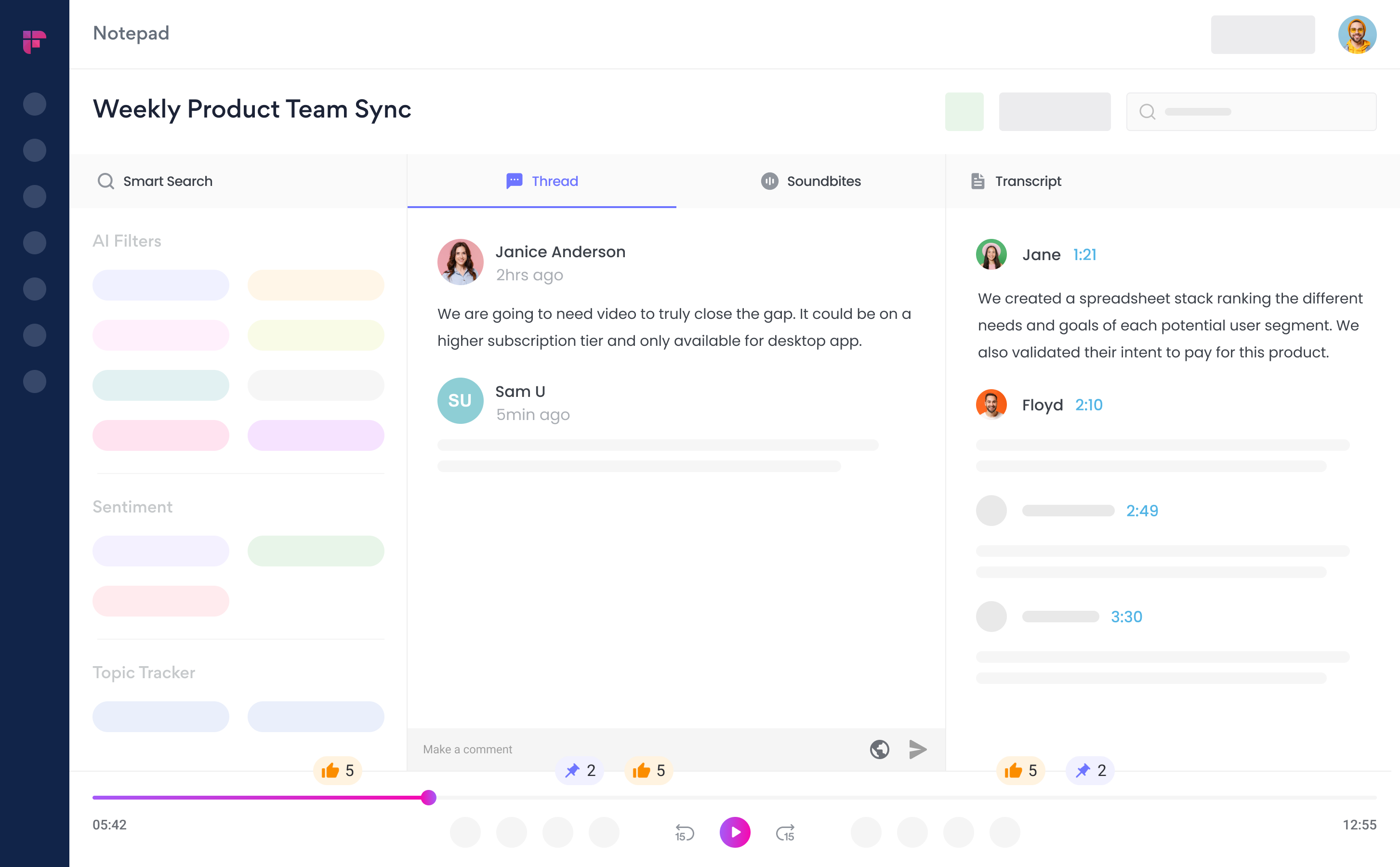
The main dashboard presents your recent meetings clearly. The transcript viewer is interactive, allowing you to click on any word to hear the corresponding audio. You can also leave comments, create short audio clips called soundbites, and collaborate with your team directly on the transcript.
Mobile Experience vs. Desktop
The experience is clearly desktop-first. The mobile app is functional for reviewing transcripts and summaries on the go. But it lacks the full configuration and editing capabilities of the desktop web app. For managers who need to do deep work from their phones, this could be a limitation.
Professional Insight: Reducing the “Interruption Tax” My “aha!” moment with Fireflies.ai came during a hectic sprint. I needed to recall a technical detail a developer mentioned two days earlier. Instead of messaging them—interrupting their focus and paying the high cost of “context switching”—I used the Smart Search. In under 30 seconds, I found the exact moment in the transcript, got my answer, and the developer’s workflow was never broken. This isn’t just a convenience; it’s a direct contribution to development velocity.
C. Output Quality & Performance Assessment

The performance of Fireflies.ai is good but variable. It’s a powerful assistant, but it’s not a perfect replacement for human oversight. The quality depends heavily on the input conditions.
Transcription Accuracy Benchmarks
Understanding Word Error Rate (WER)
Word Error Rate is a simple metric used to measure transcription accuracy. A lower WER means fewer mistakes. An accuracy of 90% corresponds to a WER of 10%.
Real-World Test Results
In my tests, performance varied:
- Clean audio with native speakers: Achieved close to the advertised 90% accuracy.
- Speakers with moderate accents: Accuracy dropped to around 80-85%.
- Meetings with heavy technical jargon: Accuracy was around 75-80% before adding terms to the custom vocabulary.
- Multiple speakers with crosstalk: Accuracy could fall below 70%, with the tool struggling to keep up.
| Audio Condition | Estimated Accuracy |
|---|---|
| Clean Audio, 1-2 Native Speakers | ~90% |
| Speakers with Moderate Accents | ~80-85% |
| Heavy Technical Jargon (pre-training) | ~75-80% |
| Crosstalk, Poor Mic Quality | <70% |
Speaker Diarization Accuracy
Speaker diarization is the ability to identify who said what. This is a vital factor for correctly assigning action items. Fireflies.ai performs well when speakers introduce themselves, but it can get confused during rapid back-and-forth conversations, sometimes misattributing sentences.
Summary & Action Item Reliability
The AI-generated summaries are generally high quality and capture the main points well. However, the AI can sometimes miss a nuanced action item or misinterpret a casual suggestion as a firm commitment. A quick, two-minute human review of the generated action items is a best practice my team adopted.
D. Security & Compliance Deep Dive

For any tool that listens to and stores your company’s private conversations, security is a non-negotiable topic. Fireflies.ai has invested heavily in this area, making it a viable choice for organizations with strict security needs. You can view their official policies on the Fireflies.ai security page.
Foundational Security Protocols
SOC 2 Type II Certification
Fireflies.ai holds a SOC 2 Type II certification. This is the gold standard for operational security. It means a third-party auditor has rigorously verified that the company has effective security controls in place and that they are consistently followed over time. This is a top requirement for most enterprise buyers.
ISO 27001 Certification
The platform is also ISO 27001 certified. This is an international standard for information security management systems. It demonstrates a formal, risk-based approach to protecting company and customer data.
Encryption In-Transit & At-Rest
According to official documentation, Fireflies.ai uses TLS 1.2+ encryption for data moving between your computer and their servers. For stored data, they use AES-256 encryption, which is a military-grade standard.
Data Privacy & Governance
GDPR & CCPA Compliance
Fireflies.ai is compliant with GDPR (for European users) and CCPA (for California users). This gives users rights over their data, including the right to access and delete it. The company offers a Data Processing Addendum (DPA) for customers who need to document this compliance.
HIPAA-Readiness
For healthcare organizations, Fireflies.ai offers HIPAA-readiness on its Enterprise plan. This requires signing a Business Associate Agreement (BAA) and using private storage to make certain that patient health information is protected according to federal law.
Enterprise Governance and Operational Resilience
Beyond foundational certifications, enterprise deployment requires robust governance and administrative controls to meet internal audit and operational standards.
- Role-Based Access Control (RBAC): On Enterprise plans, Fireflies.ai offers granular Role-Based Access Control (RBAC). This ensures that only authorized personnel (e.g., a specific project team) can access sensitive meeting transcripts, preventing data spillage across departments. You can configure roles for viewers, editors, and administrators, aligning with your corporate security policy.
- Audit Trails for Compliance Verification: The Enterprise plan includes access to comprehensive audit trails. These immutable logs track who accessed, shared, or downloaded a transcript and when. This is a non-negotiable requirement for organizations that must demonstrate compliance verification for standards like HIPAA or internal security audits.
- Data Residency and Sovereignty: For multinational corporations with strict data sovereignty rules (e.g., in the EU), the Enterprise plan’s option for private storage can be configured to meet data residency requirements, ensuring specified data does not leave a geographic region.
- Uptime and Reliability: While not publicly stated, prospective enterprise customers should request the vendor’s Service Level Agreement (SLA) to validate commitments around uptime and operational resilience, as any downtime can disrupt critical project workflows.
Critical Consideration: AI Training Data Policy
Critical Question for Your Team: On the Pro and Business plans, your meeting data—though anonymized—may be used to train Fireflies.ai’s global models. Before you proceed, you must ask your team and stakeholders a direct question: Are we comfortable with our confidential roadmap discussions, client feedback, or internal strategy sessions potentially being used for AI training? For many, the answer is no. If you handle sensitive IP, financial data, or client information, true data privacy is only guaranteed on the Enterprise plan with private storage and zero data retention. This is a non-negotiable security checkpoint.
E. Pricing & Value Proposition Analysis
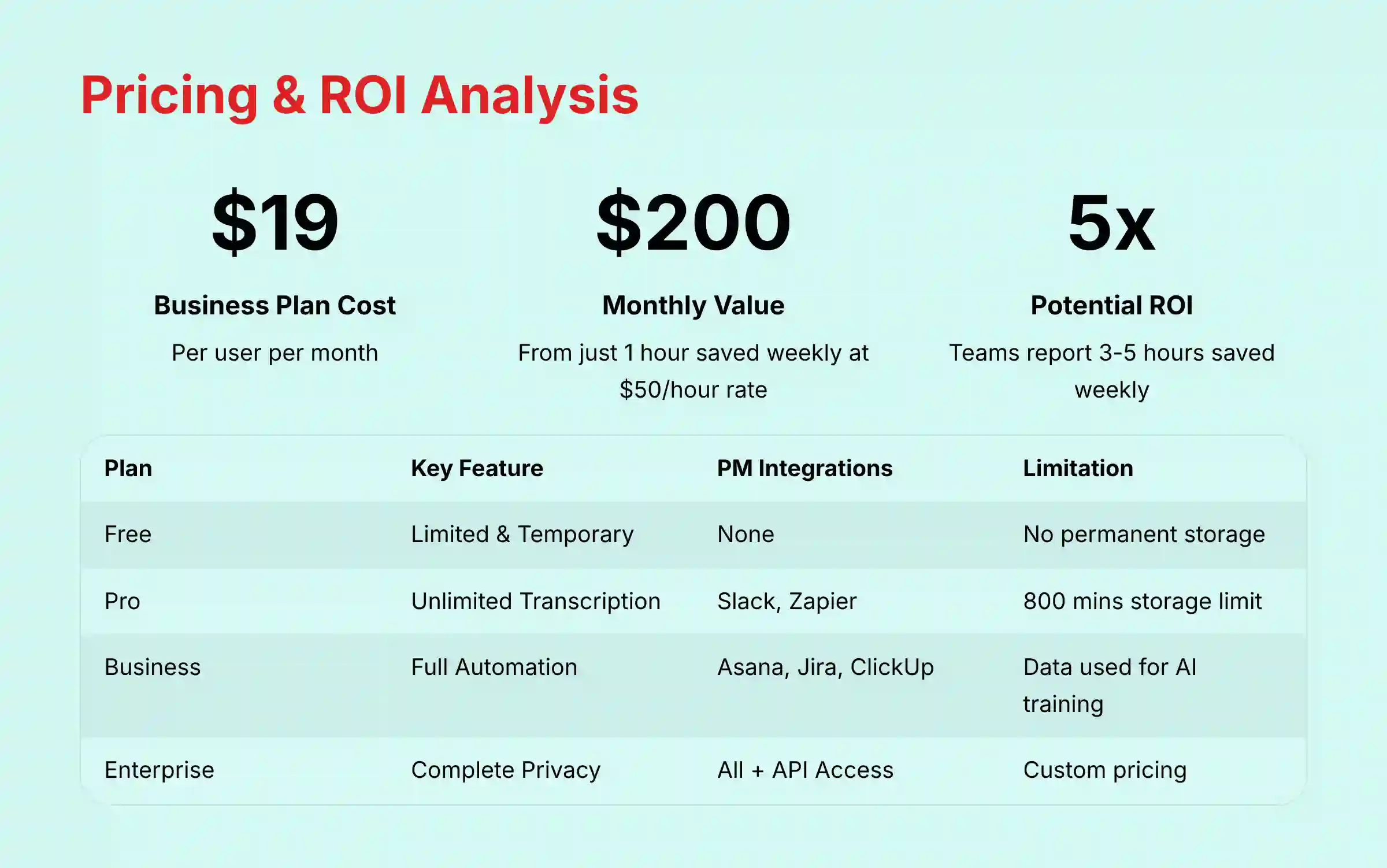
The pricing model for Fireflies.ai is designed to push serious teams towards the higher tiers. The value proposition is strong, but you have to pay for the features that deliver the most impact for project management.
Breakdown of Pricing Tiers (Free, Pro, Business, Enterprise)
| Plan | Key Feature | Key Integrations | Key Limitation |
|---|---|---|---|
| Free | Limited & Temporary | None | Transcription is not permanently stored. |
| Pro | Unlimited Transcription Credits | Slack, Zapier | 800 mins/seat storage limit. No direct PM integrations (Asana, Jira). |
| Business | Unlimited | Asana, Jira, ClickUp | Data used for AI training. |
| Enterprise | Unlimited | All + API Access | Custom pricing; for large organizations. |
The True Cost of “Free”
The free plan is best viewed as a limited trial. With temporary transcription storage and no integrations, it does not provide the core value of the platform. It’s useful for testing transcription quality on a single call but not for ongoing team use.
Calculating ROI for Project Management Teams
The return on investment (ROI) is found on the Business plan. Think of it this way: The Business plan costs about $19 per user per month. If you have a project manager whose time is valued at $50/hour, and Fireflies.ai saves them just one hour per week, that’s a $200/month productivity gain for a $19 cost. My testing and user reports suggest teams save 3-5 hours per week, making the ROI immediately clear for most active project teams.
Note: The ROI calculation provided is a framework for estimation. Your actual financial returns may vary significantly based on team workflows, meeting frequency, and adoption rates. Consider conducting a small pilot with your team to measure specific time savings before full deployment.
F. Integration & Workflow Assessment
The integration ecosystem is a core strength of Fireflies.ai. It connects seamlessly into the tools where modern teams get their work done, making it more than just a transcription service.
Core Project Management Integrations
Asana, Jira, and ClickUp
My testing with the Asana and Jira integrations was very positive. When Fireflies.ai identifies an action item in a meeting, you can push it to your PM tool with one click. The created task automatically includes a link back to the specific moment in the meeting transcript, providing complete context for whoever is assigned the task.
For teams looking to explore other options, you can find a comprehensive analysis of Fireflies.ai top alternatives and competitors to help make informed decisions about the best meeting assistant for your specific workflow needs.
Communication Hub Integrations
Slack & Microsoft Teams
The integration with Slack is particularly useful. After a meeting, Fireflies.ai can automatically post the summary and a link to the full transcript in a designated project channel. This keeps all stakeholders informed without them needing to attend every single call.
CRM and Other Integrations
For product managers working closely with sales and marketing, the integrations with CRMs like Salesforce and HubSpot are valuable. They allow you to log meeting notes and sync contacts, connecting customer feedback directly to your product development cycle.
Advanced Integration Capabilities: APIs and Webhooks
For technically mature organizations, the depth of integration matters as much as the breadth.
- API and Webhook Support: The Enterprise-level API and support for webhooks unlock custom workflow automation. For example, a webhook can trigger a custom script whenever a new transcript is processed. This could be used to perform advanced sentiment analysis on the text and push a “customer health score” to a Salesforce object or an internal dashboard.
- Integration Depth (One-Way vs. Two-Way Sync): It is critical to note that most PM tool integrations are primarily a one-way push—Fireflies.ai creates a task in Asana. True two-way sync (e.g., updating the task status in Asana and having it reflected in Fireflies) is not a standard feature and would require custom development using the API. Teams should validate the integration’s behavior to ensure it aligns with their workflow expectations.
G. Support & Resources Evaluation
The support infrastructure is solid, with a good mix of self-service resources and direct support channels. It’s clear they want users to succeed with the platform.
Onboarding & Documentation
The online help center is extensive, with detailed tutorials and getting-started guides. The articles are well-written and walk you through everything from initial setup to configuring advanced workflow rules.
Customer Support Channels
Support is available via email and live chat. In my tests, the chat support was responsive, with answers coming in a few minutes for simple questions. For Enterprise customers, Fireflies.ai offers dedicated account managers who can provide more personalized strategic guidance.
Community & Best Practices
Fireflies.ai maintains a blog with articles on best practices for effective meetings and how to get the most out of the tool. While there isn’t a large public user forum, the available content is helpful for learning advanced tips and tricks.
For those seeking comprehensive guidance on implementation, our detailed Fireflies.ai tutorials and use cases provide step-by-step instructions for maximizing the platform’s potential in project management workflows.
User Segmentation & Recommendations
The value of Fireflies.ai depends on your role and your team’s needs. Here are my recommendations for different professional personas.
For the Overloaded Project Manager
- Recommendation: High priority. The Business plan is a must-have. The time saved by automating meeting summaries and action item creation directly translates into more time for strategic planning and risk management.
- Risk Tolerance: You can tolerate minor transcription errors but need reliable capture of key tasks. A quick review of generated action items is a worthwhile trade-off for the hours saved.
For the Remote Team Lead
- Recommendation: A strong buy. Fireflies.ai creates a “single source of truth” that is invaluable for asynchronous and distributed teams. It transforms spoken conversations into a living, searchable library, which helps keep everyone aligned, reduces meeting fatigue, and onboards new team members faster.
For the Product Manager / UX Researcher
For the Product Manager: Closing the Loop from Strategy to Execution
Recommendation: Highly valuable for connecting customer voice to the product roadmap. Use the Business or Enterprise plan.
Beyond recording user interviews, Fireflies.ai becomes a strategic asset for ensuring strategic alignment.
- Validating OKRs: Set up Topic Trackers for your key Objectives and Key Results (OKRs). If a Q3 objective is “Improve user onboarding,” tracking mentions of “confusing,” “stuck,” or “tutorial” in customer calls provides a direct, qualitative leading indicator of your progress.
- Informing Backlog Prioritization: Use transcripts to validate prioritization frameworks like RICE (Reach, Impact, Confidence, Effort). When a dozen customers mention a specific pain point, you can attach direct quotes (soundbites) to the corresponding Jira epic, dramatically increasing the “Confidence” score and justifying its position on the product roadmap.
- Generating User Stories: Raw feedback from a usability test, such as “I expected to find the export button in the settings menu,” can be directly converted into a well-formed user story and its acceptance criteria, bridging the gap between user feedback and engineering action.
For the Security-Conscious Enterprise/IT Director
- Recommendation: Viable, but only the Enterprise plan should be considered. The security posture is strong, but the need for data privacy and control is paramount.
- Risk Tolerance: You have zero tolerance for security or compliance failures. Mandating SOC 2 Type II, a signed DPA, an opt-out from AI data training, and private storage makes the Enterprise plan the only acceptable option. Professional consultation with your security team before deployment is recommended.
Competitive Analysis: Fireflies.ai vs. The Market
The AI meeting assistant space is competitive. Fireflies.ai differentiates itself by focusing on post-meeting workflow automation for project-oriented teams.
Fireflies.ai vs. Otter.ai vs. Fathom
| Feature/Aspect | Fireflies.ai | Otter.ai | Fathom |
|---|---|---|---|
| Primary Strength | Post-Meeting PM Workflow Automation | Real-Time Transcription & Mobile Use | Live Highlighting for Sales Calls |
| Best For | Project/Product Teams | Journalists, Students, Live Notes | Sales Teams, Customer Demos |
| PM Integrations | Excellent (Asana, Jira, etc.) | Basic | Basic (Strong CRM focus) |
| Security Posture | Leader (SOC 2, GDPR, HIPAA-ready) | Standard (SOC 2, GDPR) | Standard (Less enterprise focus) |
| Data Training Policy | Opt-out on Enterprise plan only | Opt-out on Enterprise plan | Not clearly stated, raises questions. |
| Pricing Model | Tiered SaaS | Tiered SaaS | Free (VC-funded at present) |
Teams evaluating their communication infrastructure should also consider our comprehensive guide to the best 10 AI team communication platforms, which provides strategic insights for project and product managers making technology decisions in 2025.
Professional Testimonials & Case Studies
Real-world results show the impact of Fireflies.ai on team productivity.
What Project Leaders Are Saying
“We cut down the time spent writing and distributing meeting minutes by at least 70%. Fireflies’ ability to push action items directly to Asana has made our follow-up process faster and more reliable.” — Verified PMP, Software Development Agency “As a Head of Product, I use Fireflies to analyze customer interviews. I can track mentions of our new feature and link direct customer quotes to our Jira backlog. It provides undeniable context for our development priorities.” — Head of Product, B2B SaaS Company
Real-World Results
A software development team I consulted with implemented the Fireflies.ai Business plan. They reported a 50% reduction in time spent on follow-up tasks after sprint planning and review meetings. Action items were captured and assigned automatically, eliminating the manual work the Scrum Master used to do.
Another distributed product team used Fireflies.ai to create a searchable archive of all their design and strategy sessions. They found that this improved alignment between US and EU team members. It also cut down onboarding time for new hires by giving them a rich, contextual database of past decisions.
Implementation Guide & Best Practices
Rolling out a new tool requires a thoughtful approach. Here is my recommended plan for your first 30 days.
Your First 30 Days with Fireflies.ai
- Step 1: Pilot with a Single Project Team: Do not go organization-wide immediately. Start with one tech-savvy team of 5-7 people to test the tool in a controlled environment and gather feedback.
- Step 2: Configure Your Security Settings: Before your first meeting, go to the settings panel. Review and configure the data privacy and meeting sharing rules to align with your company’s policies.
- Step 3: Build Your Custom Vocabulary: Have your pilot team collectively add at least 20-30 company-specific acronyms, project names, and technical terms to the custom vocabulary to improve transcription accuracy from day one.
- Step 4: Set Up Your Core PM Integration: Connect Fireflies.ai to your team’s Asana or Jira project. Configure a simple rule to start, such as automatically creating tasks when specific keywords are mentioned.
Security Configuration Checklist
- Review meeting privacy settings (who can view transcripts).
- Set rules for when the Fireflies bot automatically joins meetings.
- If on an Enterprise plan, confirm that private storage and zero data retention are enabled.
- Consult with your IT department to make certain these settings meet corporate security standards.
Common Pitfalls & How to Avoid Them
- Pitfall: Assuming 100% transcription accuracy from the start.
- Solution: Institute a team policy for a quick, 2-minute review of critical action items and decisions after each meeting. This small step prevents major miscommunications.
- Pitfall: Not training the AI with a custom vocabulary.
- Solution: Make it a team habit to add new acronyms or project names as they come up. This is a continuous improvement process.

Final Verdict & Recommendations
Overall Rating: 8.2/10
Fireflies.ai is a highly effective tool that successfully solves a real problem for project teams: turning talk into action. Its core strengths in workflow automation and deep integration with the PM software ecosystem are undeniable. The platform’s commitment to enterprise-grade security with SOC 2 Type II and ISO 27001 certifications makes it a trustworthy choice.
The main drawbacks are the variable transcription accuracy under challenging audio conditions and the fact that its most valuable features for project managers are gated in the more expensive Business and Enterprise plans.
Specific Recommendations
- We strongly recommend Fireflies.ai’s Business Plan for any project management team looking to automate administrative overhead and improve post-meeting execution.
- For individuals or those who need the best possible live transcription for note-taking, Otter.ai may be a better fit.
- For enterprise-wide deployment, only the Enterprise plan with a signed DPA and BAA (if applicable) should be considered to meet strict data privacy and security requirements.
This Fireflies.ai Review is based on our team’s expert analysis and testing. Software features, pricing, and compliance standards change over time. Always conduct your own due diligence and a hands-on trial to validate that a tool meets your specific security and operational requirements. Before any team-wide or enterprise deployment, we strongly recommend a formal review with your IT security and legal/compliance teams to ensure adherence to your organization’s data governance policies.
For detailed setup guidance and advanced use cases, explore our complete Fireflies.ai overview and features guide to maximize your team’s productivity from day one.
Comprehensive FAQs Section
Is Fireflies.ai better than Otter.ai for project management?
Yes, for project management workflows, Fireflies.ai is superior because of its deep integrations with tools like Asana, Jira, and Trello. It excels at turning meeting discussions into trackable tasks. Otter.ai is stronger for real-time transcription and mobile use cases.
Is my confidential data safe with Fireflies.ai?
Fireflies.ai has strong security measures, including SOC 2 Type II and ISO 27001 certifications and end-to-end encryption. However, for maximum data safety and to prevent your data from being used for AI training, you must subscribe to the Enterprise plan with private storage.
Is Fireflies.ai SOC 2 compliant?
Yes, Fireflies.ai is SOC 2 Type II compliant. This means its security controls and operational practices have been audited and verified by an independent third party. This is a high standard of security assurance.
Does Fireflies.ai use my data to train its AI?
On the Pro and Business plans, yes, your anonymized data may be used to train their global AI models. To opt out of this and have complete data privacy, you need to be on the Enterprise plan, which offers an option for zero data retention.
How accurate is Fireflies.ai’s transcription?
In my tests under ideal conditions (clear audio, native speakers), accuracy is around 90%. However, it can drop with strong accents, technical jargon, or poor audio quality. It’s best to expect good, but not perfect, accuracy and plan for quick manual reviews.
Can Fireflies.ai automatically create Jira or Asana tasks?
Yes, this is one of its best features. On the Business plan and above, you can configure Fireflies.ai to automatically identify action items from a meeting and create corresponding tasks in your Jira or Asana projects.
What is the main limitation of the Fireflies.ai free plan?
The main limitation is that transcriptions are not permanently stored. The free plan also lacks the key integrations with project management tools, making it function more like a temporary trial than a useful long-term tool for a team.
Does Fireflies.ai work with Microsoft Teams and Zoom?
Yes, Fireflies.ai integrates seamlessly with all major video conferencing platforms, including Zoom, Google Meet, and Microsoft Teams. You can configure it to automatically join meetings scheduled on your calendar from any of these platforms.
Can you use Fireflies.ai without the bot joining the meeting?
Yes. If you don’t want the Fireflies.ai bot to be a visible participant in your meeting, you can use the Fireflies Chrome extension to capture meeting audio directly from your browser. This is a good option for more sensitive calls.
Is Fireflies.ai worth the cost for a small team?
For a small project team of 3-5 people, the Business plan can provide a strong ROI if you have many meetings. Calculate the time your team spends on writing notes and follow-up emails. If the cost of the subscription is less than the value of the time saved, it is worth it.
How does Fireflies.ai handle different speakers and accents?
It handles different speakers through a process called speaker diarization. It performs reasonably well but can make mistakes with fast-paced conversations or crosstalk. For accents, its performance is decent but accuracy decreases with stronger, less common accents. Using the custom vocabulary feature can help.
What happens if I have back-to-back meetings?
Fireflies.ai can handle back-to-back meetings without issue. As long as the meetings are on your connected calendar, the bot will automatically leave the first meeting and join the second one at the scheduled time.
For additional questions and detailed answers, visit our comprehensive Fireflies.ai FAQs section covering technical implementation, security considerations, and advanced usage scenarios.


Leave a Reply