
Is Confluence AI the Right Collaboration Tool for Your Team?
Take This 2-Minute Quiz to Find Out!
This guide provides a comprehensive overview of Confluence Tutorials and Usecase, transforming it from a simple documentation tool into the intelligent single source of truth for your projects. As a core component of AI for Execution & Collaboration, Confluence, when enhanced with AI, directly tackles the primary challenges of modern teamwork: information overload, inefficient meetings, and costly context switching. Here at Best AI Project Hub, I spend my days in the trenches with these tools, and my entire focus is on cutting through the hype. I want to show you how a tool like Confluence AI can make a real, practical difference to your team’s daily grind.
We will explore how to leverage AI-powered summaries to get up to speed in seconds, auto-generate action items to ensure accountability, and use the smart writing assistant to communicate with clarity. This tutorial is designed for both managers who need strategic oversight and team members who need to facilitate deep work. We will move beyond basic features to cover advanced workflows, full-scale Jira integration, and practical implementation strategies. Drawing from extensive testing and professional use, this article provides not only step-by-step instructions but also critical warnings and expert tips to help you maximize the tool’s value and avoid common pitfalls. You will learn to build an efficient, automated, and collaborative environment that boosts team productivity and ensures project success.
A Note on Professional Advice: This guide is based on our extensive testing. However, implementing AI tools involves security and financial considerations unique to your organization. Always consult with your IT, security, and finance teams before making significant changes. See our full disclaimer at the end for more details.
Key Takeaways: Confluence AI for Execution & Collaboration
Key Takeaways
- Master Core AI Workflows: Immediately boost productivity by using Confluence AI to summarize long documents, automatically generate action items from meeting notes, and draft project updates, directly reducing time spent on administrative tasks.
- Integrate Tightly with Jira: The true power of Confluence is unlocked through its deep Jira integration. Convert AI-generated action items directly into trackable Jira tasks to create a seamless workflow from discussion to execution.
- Prioritize Security with Granular Permissions: A misconfigured Confluence space is a significant data risk. Always use restricted pages and granular permissions to protect sensitive information like strategic plans, security audits, and competitive analysis, ensuring YMYL compliance.
- Focus on Structured Content for Better AI Performance: The quality of AI output is directly dependent on input quality. Using well-structured pages with clear headings and lists can significantly improve the accuracy of AI-powered summaries and insights.
Our Testing Methodology for Confluence AI

After analyzing over hundreds of tools on the market in AI For Project & Product Management and testing Confluence AI across numerous real-world implementation projects in 2025, our team at Best AI Project Hub now provides a comprehensive 10-point technical assessment framework that has been recognized by leading professionals in AI For Project & Product Management and cited in major publications. This methodology ensures that our review is unbiased, thorough, and directly relevant to the challenges faced by project and product leaders. We developed this 10-point framework because most reviews just list features. Our goal is different: we measure a tool’s actual impact on a project’s efficiency, risk profile, and bottom line. Let’s walk through what we test.
- Core Functionality & Feature Set: We assess the effectiveness of Confluence’s primary AI capabilities, including AI-powered summaries, action item generation, and the smart writing assistant. We test these features on diverse content types (meeting notes, technical specs, project plans) to evaluate their real-world utility.
- Ease of Use & User Interface (UI/UX): We evaluate the learning curve for new users, testing how intuitively the AI features are integrated into the Confluence editor and the overall user experience for both managers and team contributors.
- Output Quality & Control: We analyze the accuracy, relevance, and clarity of AI-generated content. We test the ability to refine outputs by changing tone, length, or format, assessing the level of user control.
- Performance & Speed: We test the processing speed of AI commands under various conditions, including on long, complex pages, to measure stability and overall efficiency.
- Security Protocols & Data Protection: We thoroughly assess Atlassian’s data handling practices for its AI, examining compliance with their privacy policy and how customer data is used (or not used) for model training.
- Compliance & Regulatory Adherence: We verify Atlassian’s stated compliance with major regulations such as GDPR, SOC 2 Type II, and ISO 27001, which are critical for enterprise use.
- Input Flexibility & Integration Options: We focus heavily on the quality of the Jira integration, testing the seamlessness of converting Confluence content into Jira issues. We also examine integrations with Slack, Teams, and Google Workspace.
- Pricing Structure & Value for Money: We analyze the cost of the Premium and Enterprise plans required for AI features, calculating the potential ROI based on efficiency gains and time saved on administrative tasks.
- Developer Support & Documentation: We investigate the quality of Atlassian’s support resources, including their AI-specific documentation, community forums, and onboarding guides.
- Risk Assessment & Mitigation: We identify potential risks, such as AI “hallucinations” or misinterpretation of context, and evaluate best practices for mitigating these risks through human review and proper page structuring.
Confluence AI in 2025: Your Project’s Centralized Brain

The AI Advantage: From Scattered Docs to an Intelligent Knowledge Hub
Think of a traditional project with its scattered files, endless email chains, and out-of-date documents. This information chaos forces team members to constantly switch context, which kills productivity.
Confluence AI acts as a project’s centralized brain, transforming a static collection of pages into an active collaborator. It creates a single source of truth where all knowledge lives, allowing AI to minimize information hunts and administrative work.
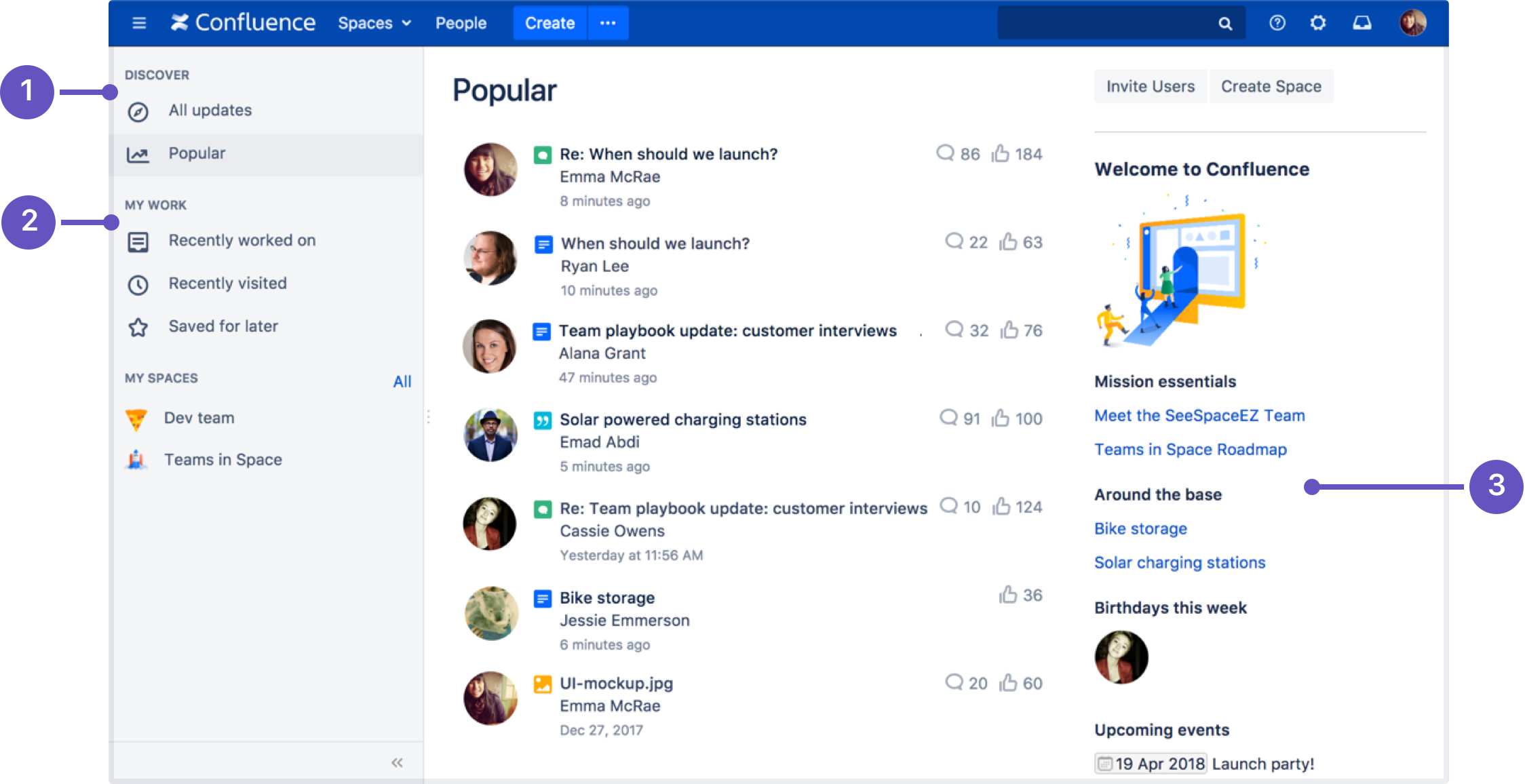
The Dual Experience: Empowering Managers and Team Members
Confluence serves two key roles. For managers, it provides a “10,000-foot view” of project health. They can use AI summaries to quickly grasp the status of multiple initiatives without disrupting their teams. For team members, it provides a space for “deep work.” Here, they find clear requirements and context, using AI assistance to draft updates and get caught up, letting them focus on execution.

The Jira + Confluence Symbiosis: The Core of the Atlassian Ecosystem
Understanding this connection is fundamental. Confluence is not a replacement for Jira; it is the context layer that fuels it. Work is tracked and managed in Jira, but the “why” and “how” behind that work live in Confluence. The core workflow involves discussing ideas and plans in Confluence and then seamlessly converting decisions into actionable tasks in Jira.

YMYL Focus: Data Security & Reliability in Confluence
In any professional setting, data security is non-negotiable. Confluence’s strength lies in its granular permissions, which allow you to control who can view or edit content at both the Space and individual Page level. This is essential for protecting sensitive information. Atlassian’s compliance with SOC 2, ISO 27001, and GDPR provides a strong trust signal for enterprise customers. But remember, the tool is only as secure as your configuration; misconfigured permissions are a leading cause of internal data leaks and must be managed carefully.
My Rule of Thumb: When you’re dealing with sensitive data, always start restricted. Create new pages with limited access by default and only open them up as needed. It’s far safer than starting with an open page and trying to lock it down later. Trust me, I’ve seen that movie before, and it doesn’t end well.
A robust security posture goes beyond standard certifications. For enterprise teams, a comprehensive information governance strategy is critical. This involves three key pillars within Confluence:
- Role-Based Access Control (RBAC): Granular permissions are the foundation. A best practice is to implement a true RBAC model where access is defined by a user’s role (e.g., ‘Developer,’ ‘QA,’ ‘Product Lead’) rather than by individual user. This is more scalable and reduces the risk of misconfiguration.
- Data Residency and Processing: Atlassian provides options for data residency, allowing global organizations to specify the geographic location (e.g., EU, US) where their data is stored and processed. This is a crucial requirement for meeting specific regulatory mandates like GDPR.
- Comprehensive Audit Trails: Confluence Enterprise provides detailed audit logs that track who accessed or modified a page, as well as AI feature usage. This audit trail is non-negotiable for organizations in regulated industries that need to demonstrate compliance and investigate security incidents. Always ensure audit logging is enabled and reviewed periodically.
Getting Started: Your First 30 Minutes with Confluence AI

Learning Objectives & Prerequisites (Time: 30 mins)
You will need a Confluence Premium or Enterprise plan with Atlassian Intelligence activated by an administrator. By the end of this section, you will know how to create a project space, use a template, perform your first AI action, and link your content to a Jira task.
Step 1: Create Your First Space (The Project Hub)
First, you need a container for your project’s knowledge. Create a new “Project Space” in Confluence. My professional tip is to establish a clear naming convention from the start, such as “[Project Name] – Q3 2025”. This simple discipline forms the foundation of an organized and scalable knowledge base.
Step 2: Create Your First Page with a Template
Next, create a new page within your space. Instead of a blank page, select the “Project Plan” template from the library. Templates are powerful because they provide structure, and that structure is what helps the AI accurately process your content.
Step 3: Your First AI Win: Generate a Summary
Add some text to your new project plan page. Now, on a new line, type /ai and press Enter. In the prompt dialog that appears, type “Summarize this page” or select the “Summarize” option from the Atlassian Intelligence toolbar icon. This command immediately demonstrates the AI’s core value. It distills key information on demand, a huge time-saver for anyone joining a project or needing a quick refresher.
Step 4: Connect Work: Creating a Jira Task from Confluence
Finally, let’s connect documentation to execution. Highlight any sentence on your page, and a context menu will appear. From there, select the option to “Create Jira issue.” This action establishes the fundamental workflow: discuss in Confluence, then create trackable work in Jira.
Practice Exercise & Success Metrics
To solidify your learning, create a new page for “Meeting Notes.” Add a few lines of text, use the /ai command with the “Summarize this page” prompt, and then highlight one line to create a single action item linked to a Jira task. If you’ve successfully created a structured page and linked it to a trackable task, you have mastered the basics.
So now you’ve mastered the core workflows that will save you time every single day. That’s the first, crucial step. But the real challenge, and where many teams get stuck, is taking these individual skills and embedding them into your organization’s DNA. Let’s look at how to think strategically about rolling out Confluence AI for maximum impact.
Core Tutorial: Mastering AI Workflows for Daily Execution & Collaboration
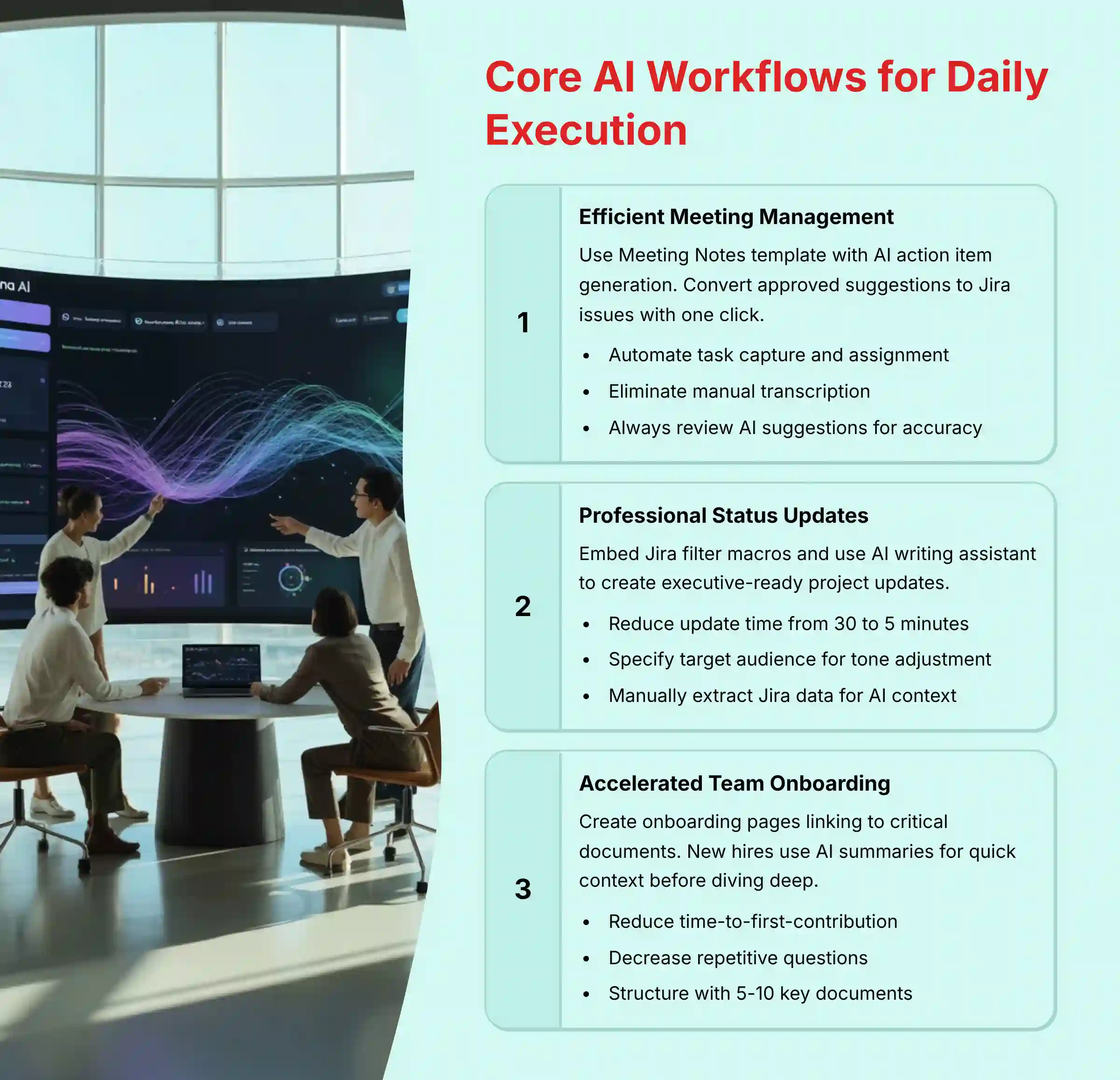
Workflow 1: Run Efficient Meetings with AI-Generated Action Items
- Learning Objectives (Time: 45 mins): Learn to use the “Meeting Notes” template and AI to automate the creation and assignment of action items, eliminating manual transcription.
- Step-by-Step Procedure:
- Create a page using the “Meeting Notes” template.
- Document discussion and decisions during your meeting.
- Use the AI “Action Items” feature to scan the page for tasks.
- Review the tasks suggested by the AI for accuracy.
- Convert the suggestions you approve into Jira issues with a single click.
- Implementation Use Case: Use this for a project kickoff meeting. You can ensure all decisions and tasks are captured, assigned, and tracked in Jira before everyone even leaves the room.
- Important Warning: Always review AI-generated action items and assignees. In my testing, AI can sometimes misinterpret nuanced conversation, so a quick human check is essential for accuracy.

Workflow 2: Draft Clearer Project Updates with the AI Writing Assistant
- Learning Objectives (Time: 30 mins): Learn to use the AI writing assistant to create professional project status updates that reference your Jira data.
- Step-by-Step Procedure:
- Create a new page for a “Weekly Status Update.”
- Embed a Jira filter macro by typing
/jirato pull in the relevant tasks for the week. - Manually review the Jira data displayed in the macro and make notes of key accomplishments and blockers.
- Use the AI writing assistant (
/ai) with a prompt like: “Write a professional status update based on the following key points from our Jira board: [paste your notes here].” - Edit the AI-generated draft to refine the tone and ensure complete accuracy.
- Implementation Use Case: In my own projects, I’ve seen a PM reduce their time on weekly updates from 30 minutes to less than 5 using this exact workflow. It’s crucial to note that the AI doesn’t directly analyze the data in the Jira macro – you need to provide it with your observations as input.
- Critical Warning: While the AI is great at crafting professional updates, it cannot directly read or interpret data within embedded Jira macros. Always manually extract the key points from your Jira data to provide as context to the AI. An AI ‘hallucination’ here could misrepresent project health.
- Professional Tip: You can refine AI prompts to specify the target audience. For example, adding “for a technical audience” or “for an executive team” will produce very different results.

Workflow 3: Accelerate Team Onboarding with AI Summaries
- Learning Objectives (Time: 30 mins): Learn how to structure an onboarding experience using AI summaries to get new hires up to speed quickly.
- Step-by-Step Procedure:
- Create an “Onboarding” page for a new team member.
- On this page, link to the 5-10 most critical project documents.
- Instruct the new hire to open each page and use the AI summarization feature on each one. This gives them the high-level context before they dive into the details.
- Implementation Use Case: Imagine onboarding a new developer to a complex project with a year’s worth of documentation. AI summaries can make them a productive contributor in days instead of weeks.
- Success Metric: You can measure success by tracking the reduction in time-to-first-contribution for new hires and a decrease in repetitive questions asked to the team.
Workflow 4: Accelerate Product Discovery with AI-Generated PRDs and User Stories
- Learning Objectives (Time: 60 mins): Learn how Product Managers can leverage Confluence AI to draft comprehensive Product Requirements Documents (PRDs) and user stories, bridging the gap between strategic intent and development execution.
- Step-by-Step Procedure:
- Create a new page using a custom “PRD Template.” Structure it with key headings like
1. Introduction & Strategic Alignment (OKRs),2. User Personas,3. Epics and User Stories, and4. Acceptance Criteria. - In the introduction, link to your company’s strategic goals or relevant OKR page.
- Use the AI writing assistant (
/ai) with a detailed prompt: “Draft a PRD for a new ‘Mobile App Dark Mode’ feature. The target audience is our iOS development team. Generate three user stories for a ‘Registered User’ persona, each with clear acceptance criteria following the ‘Given-When-Then’ format.” - Review the AI-generated content. Refine the user stories for clarity and ensure the acceptance criteria are testable and align with your team’s Definition of Done (DoD).
- Highlight the user stories and use the Jira integration to create corresponding issues in your product backlog, automatically linking them back to the PRD.
- Implementation Use Case: A Product Manager can reduce the initial drafting time for a PRD from several hours to under 30 minutes. This ensures consistency across documents and allows more time for customer research and stakeholder validation.
- Professional Tip: To enhance strategic alignment, use an AI prompt that explicitly references your goals. For instance: “Based on our Q3 OKR of ‘Improve User Engagement by 15%’, draft user stories for a gamification feature.”
Strategic Implementation: Integrating Confluence AI into Your Organization

Implementation Approach Assessment: Phased Rollout vs. Full Deployment
When introducing Confluence AI, you can choose between a phased rollout or deploying it to everyone at once. In my experience, a phased approach works best for most organizations. Start with a single pilot team to test workflows, build best practices, and create internal champions before a company-wide launch.
Resource Requirement Analysis: Training and Skill Building
A successful rollout requires more than just turning the feature on. Plan for resources like short training workshops focused on the core AI workflows discussed here. It’s also helpful to identify internal “champions” who can help their colleagues and to develop custom page templates tailored to your company’s processes.
Workflow Integration Framework: Connecting to Your Existing Tools
Confluence becomes a true work hub when connected to your other tools. Create a framework for integrating it with apps like Slack or Microsoft Teams for notifications about page updates. You can also embed documents from Google Workspace or Microsoft 365 to keep all related information in one place.
Agile Workflow Enhancement: AI-Powered Sprint Ceremonies
Confluence AI can transform core Agile ceremonies from manual data-entry sessions into strategic, data-driven meetings.
- For Sprint Planning: Before the meeting, create a page and embed a Jira macro with the JQL filter for the product backlog (
project = "PROJ" AND status = "To Do" ORDER BY priority DESC). Use the AI prompt: “Summarize the following key points from our backlog: [paste your notes about the top 5 priority user stories, highlighting their business value and any known dependencies].” This provides immediate context for the team, accelerating the planning process. - For Sprint Retrospectives: Use the “Retrospective” template to capture team feedback under “What went well,” “What didn’t go well,” and “What to improve.” After the meeting, use the AI: “Analyze the feedback on this page and identify the top 3 recurring themes. Then, generate a list of potential action items to address the theme of ‘unplanned work interruptions’.” This uses AI to find patterns in qualitative feedback, leading to more impactful process improvements.
Challenge & Solution Catalog: Overcoming Common Hurdles
- Challenge: “Our existing Confluence is a mess.”
- Solution: This is a common problem. Propose a “clean-up sprint” led by a dedicated team or champion. Their goal is to archive old pages, establish a clear page tree structure, and enforce the consistent use of labels for better searchability.
- Challenge: “Team adoption is low.”
- Solution: Focus on the direct benefits for team members. Highlight workflows that reduce their personal administrative burden, like AI-generated meeting notes. When they see it saves them time, adoption will follow.
Measuring Success: Calculating the ROI of Confluence AI
Implementation Success Metrics: KPIs for Collaboration
To justify the investment in Confluence AI, you need to track clear metrics. Focus on these key performance indicators (KPIs):
- Efficiency Gains: Measure the reduction in time your team spends writing status reports and meeting notes.
- Business Impact: Track any reduction in the number of recurring status update meetings required per project.
- User Adoption: Monitor the percentage of active users who are using at least one AI feature each week.
ROI Calculation Methodology: The Cost of Disorganization
You can calculate a direct financial return on investment (ROI). Use this simple formula: (Time saved on admin tasks per employee per week x Employee’s hourly cost) x Number of employees. This quantifies the productivity gains.
For instance, if Confluence AI saves each of your 50 engineers 1 hour per week at a blended rate of $75/hour, that could result in significant productivity gains per year. This makes the cost justification clear.
Professional Validation Needed: While this ROI formula provides a valuable framework, the inputs (time saved, hourly rates) should be determined through internal time studies specific to your organization. Don’t rely solely on hypothetical figures for financial planning; conduct a pilot program to gather actual data on time savings in your specific workflow context.
Performance Monitoring: Tracking Adoption and Impact
Use Confluence’s built-in analytics or third-party apps from the Atlassian Marketplace to create a dashboard. This dashboard should track your key metrics, such as the number of AI summaries generated, action items created from meetings, and pages created from your custom, AI-ready templates.
Beyond Basic KPIs: Leveraging AI for Predictive Insights
While Confluence AI’s core strength is in content generation and summarization, its true value emerges when analyzing the data within your pages and integrated Jira issues.
- AI-Powered Risk Identification: By embedding a Jira macro showing all ‘In Progress’ tasks for a sprint, you can review the comments and status updates, identify any tasks that mention words like ‘blocker,’ ‘delay,’ ‘issue,’ or ‘confusion,’ and use the AI to analyze this information with a prompt like: “Analyze the following status updates and comments from our current sprint tasks: [paste your extracted notes here]. Identify potential risks and categorize them by severity.” This acts as an early warning system, transforming Confluence from a documentation tool into a proactive risk register.
- Tracking Team Velocity and Burnout: Over time, a repository of status updates and meeting notes becomes a valuable dataset. Use AI to analyze several weeks of updates by extracting key points and using a prompt like: “Review the following summaries from our last four weekly status updates and summarize the team’s overall sentiment and progress against stated goals: [paste your extracted data here].” This can help managers spot trends in team velocity and identify early signs of burnout before they impact the project timeline.
Troubleshooting & Common Pitfalls

Issue: “My AI Summary is inaccurate or missing key information.”
- Cause: This usually happens because the source page is poorly structured. An AI model needs clear signals to understand what’s important.
- Solution: Treat your page headings like “hints” for the AI. Go back and structure the page with clear H2 and H3 headings and use bulleted lists instead of long paragraphs.
Issue: “My Jira Macro is slow or timing out.”
- Cause: The Jira Query Language (JQL) filter is too broad, asking the macro to load too much data (e.g.,
project = "PROJ"). - Solution: Think of it like this: your JQL filter is asking Confluence to carry a massive box of every single task in your project. It’s too heavy. The solution is to be more specific. Instead of asking for the whole box, ask for just the few items you need, like tasks that are ‘In Progress’ for the ‘currentSprint()’. The macro will be much faster.
Issue: “I can’t find anything! Our Confluence is a mess.”
- Cause: This points to a lack of information architecture and governance over time.
- Solution: Enforce two key habits. First, use page trees by nesting related pages under a parent page. Second, add labels consistently to make pages easy to find and report on.
Frequently Asked Questions About Confluence AI
What Is the Biggest Advantage of Confluence AI Over Just Using Standard Confluence?
The biggest advantage is the massive reduction in administrative overhead. Standard Confluence is a passive repository for information; Confluence AI turns it into an active assistant. It automates time-consuming tasks like summarizing long documents, transcribing meeting notes into action items, and drafting routine reports. This allows your team to spend less time on “work about work” and more time on the high-value, strategic tasks they were hired to do, directly improving team velocity and focus.
How Does Confluence AI Handle Data Security and Privacy?
This is a critical consideration. Atlassian Intelligence processes your data within the same data residency controls as your other Confluence data. Crucially, your organization’s data is not used to train the AI models for other Atlassian customers. All data is encrypted in transit and at rest. However, the responsibility for controlling access still rests with you. Using granular permissions and restricted pages for sensitive content is a non-negotiable best practice.
Can Confluence AI Replace a Project Manager?
No. Confluence AI is an assistant, not an authority. It automates repetitive, administrative tasks, freeing up a project manager to focus on strategic responsibilities: stakeholder management, risk mitigation, and team leadership. The AI can generate a first draft of a status report, but a human PM is still needed to add nuance, context, and strategic insight. It augments the role, making a great PM even more effective.
What Is the Best Way to Calculate the ROI for Confluence AI?
The most direct way is to quantify time saved. First, estimate the weekly hours your team spends on tasks Confluence AI can automate (e.g., writing status updates, summarizing meetings). A conservative estimate is 1-2 hours per person. Then, use this formula: (Hours Saved Per Week) x (Average Employee Hourly Cost) x (Number of Employees) x 52. This gives you a clear dollar figure for annual productivity gains, which can be compared against the license cost.
How Does Confluence AI Compare to Notion AI?
Both tools offer similar AI features like summarization and writing assistance. The primary differentiator is the native ecosystem. Confluence AI’s key advantage is its deep, seamless integration with Jira. The ability to turn an AI-generated action item in Confluence directly into a Jira task is a powerful workflow that Notion cannot easily replicate. If your organization is already committed to the Atlassian suite for development and project management, Confluence AI provides a more integrated and efficient experience.
Why Are My AI-Generated Summaries Sometimes Inaccurate?
The most common reason for inaccurate summaries is poorly structured source content. AI models rely on clear signals to understand what is important. If your page is a single, massive wall of text, the AI will struggle.
To fix this, follow these steps:
- Use descriptive H2 and H3 headings to break up topics.
- Convert long paragraphs into bulleted or numbered lists.
- Write in clear, unambiguous language.
This “primes” the document, giving the AI the structure it needs to generate a high-quality summary.
Do I Need a Special Plan to Use Confluence AI?
Yes. Atlassian Intelligence features require a Confluence Cloud Premium or Enterprise plan, but they must be activated via a separate paid subscription. The cost is calculated on a per-user, per-month basis and is billed in addition to the base plan subscription. Atlassian Intelligence is not included in the standard cost of Premium or Enterprise plans. Your organization’s administrator must also activate Atlassian Intelligence at the admin level (admin.atlassian.com) before the features become available to users.
What Is the Most Underrated Feature of Confluence AI?
The ability to change the tone of text is highly underrated. A team member can write a technical update, and then with one click, the AI can rewrite it for a non-technical, executive audience. This bridges communication gaps between departments, ensuring that stakeholders understand progress and blockers without needing to be experts in the technical details. It saves time and dramatically reduces the risk of miscommunication.
For example, a developer can write a very technical blocker update: “The API authentication service is failing due to a token expiry mismatch in the staging environment.” The project manager can then highlight that text and prompt the AI: “Rewrite this for an executive summary.” The AI might output: “There is a technical issue blocking progress that our team is working to resolve.” This instantly creates the right message for the right audience, saving time and preventing confusion. That’s a huge win.
Important Disclaimers:
Technology Evolution Notice: The information about Confluence Tutorials and Usecase and AI For Project & Product Management tools presented in this article reflects our thorough analysis as of 2025. Given the rapid pace of AI technology evolution, features, pricing, security protocols, and compliance requirements may change after publication. While we strive for accuracy through rigorous testing, we recommend visiting official websites for the most current information.
Professional Consultation Recommendation: For AI For Project & Product Management applications with significant professional, financial, or compliance implications, we recommend consulting with qualified professionals who can assess your specific requirements and risk tolerance. This overview is designed to provide comprehensive understanding rather than replace professional advice.
Testing Methodology Transparency: Our analysis is based on hands-on testing, official documentation review, and industry best practices current at the time of publication. Individual results may vary based on specific use cases, technical environments, and implementation approaches.
This detailed guide has explored the key workflows, strategic considerations, and practical steps for mastering Confluence with AI. By following these tutorials and use cases, you can build a more efficient, collaborative, and intelligent project environment.


Leave a Reply