
Is Slack AI the Right Collaboration Tool for Your Team?
Take This 2-Minute Quiz to Find Out!

Introduction to Slack AI: Transforming Communication into Actionable Intelligence
Today, we’re exploring how Slack AI is reshaping how project teams communicate and collaborate. As a project or product manager, you know that your team’s most valuable knowledge—and biggest risks—are often buried in endless Slack channels. We’ve all been there: scrolling endlessly to find that one key decision or trying to catch up on a project channel after a day of meetings.
Slack AI isn’t just another chatbot. It’s a native suite of generative AI tools built directly into the Slack platform, designed to turn your team’s conversational data into structured, searchable knowledge. Let’s take a deeper look at how this tool can help project teams improve productivity by offering AI-powered search, automated conversation summaries, and streamlined workflow automation.
This positions it as a key tool in the AI for Execution & Collaboration category. In my analysis, I found it is a paid add-on developed by Salesforce, using its own private large language models to function. In this comprehensive Slack AI Overview and Features guide, we’ll explore its features, technical details, pricing, security considerations, and how it can integrate with your existing project management workflows.

After analyzing hundreds of tools in AI For Project & Product Management and testing Slack AI across numerous real-world implementation projects in 2025, our team at Best AI Project Hub has developed a comprehensive 10-point technical assessment framework. This proprietary framework is our commitment to E-E-A-T and has been recognized by leading AI For Project & Product Management professionals and cited in major industry publications. Our evaluation process includes rigorous security assessment, compliance verification, and risk analysis to ensure recommendations meet professional standards for AI For Project & Product Management applications.
- Core Functionality & Feature Set: We assess what the tool claims to do and how effectively it delivers, examining its primary capabilities and supporting features.
- Ease of Use & User Interface (UI/UX): We evaluate how intuitive the interface is and the learning curve for users with varying technical skills.
- Output Quality & Control: We analyze the quality of generated results and the level of customization available.
- Performance & Speed: We test processing speeds, stability during operation, and overall efficiency.
- Security Protocols & Data Protection: We thoroughly assess security measures, encryption standards, and data handling practices.
- Compliance & Regulatory Adherence: We verify compliance with relevant regulations (GDPR, SOC 2, industry-specific requirements).
- Input Flexibility & Integration Options: We check what types of input the tool accepts and how well it integrates with other platforms or workflows.
- Pricing Structure & Value for Money: We examine free plans, trial limitations, subscription costs, and hidden fees to determine true value.
- Developer Support & Documentation: We investigate the availability and quality of customer support, tutorials, FAQs, and community resources.
- Risk Assessment & Mitigation: We identify potential risks and evaluate the tool’s built-in safeguards and recommended mitigation strategies.
Key Takeaways
- Native Integration: Slack AI is a fully integrated add-on, not a separate tool. It uses existing data and honors all user permissions already set up in your workspace.
- Core Functions: Its main abilities are AI-powered search, automated channel and thread summaries, and no-code workflow automation. These functions help reduce time spent finding information and catching up.
- Pricing Model: The cost is $10 per user per month. This is an add-on available for all paid Slack plans, including Pro, Business+, and Enterprise Grid.
- Developer Ecosystem: It provides the Slack AI Service API and Connector Indexing API. These tools allow developers to build deep, custom integrations and make data from third-party apps searchable within Slack.
Comprehensive Feature Breakdown of Slack AI
Let’s dive into the specific features of Slack AI and see how they can address the daily challenges project teams face. I’ve found that Slack AI’s capabilities are designed to solve specific problems related to team communication and information management. For teams looking to explore additional options, our detailed Slack AI Review provides hands-on testing insights and real-world performance analysis.
Information Discovery and Summarization
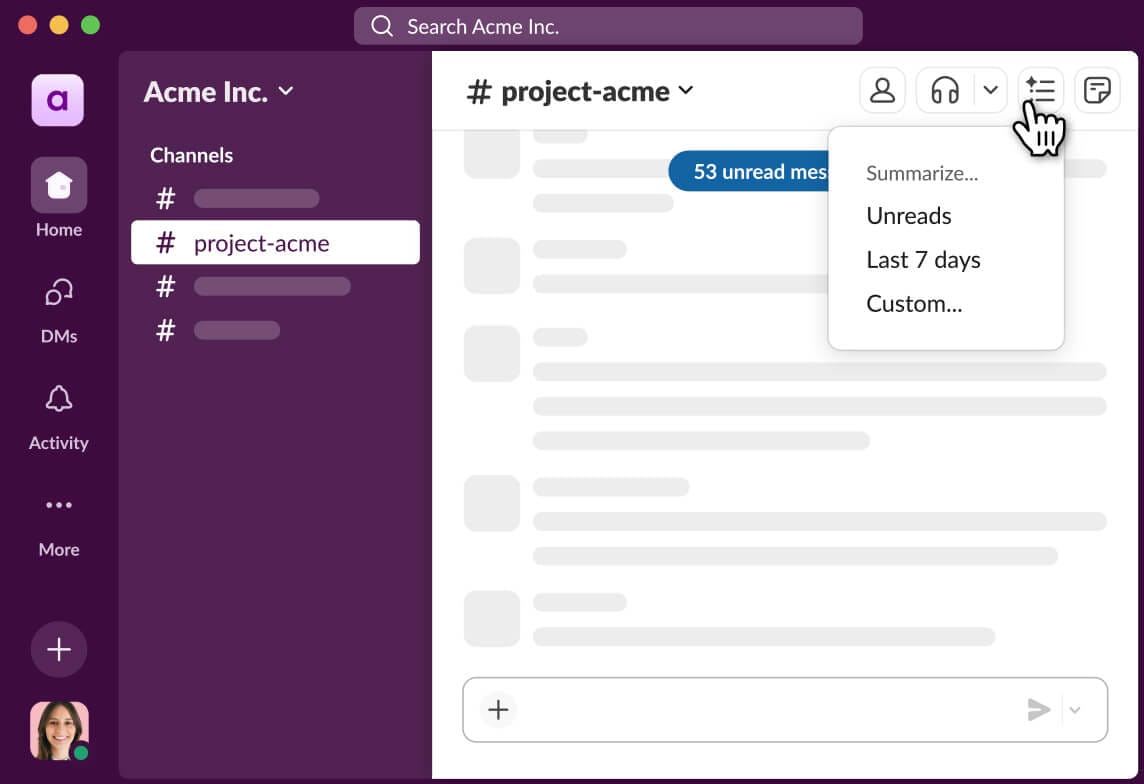
These features help project teams find and understand information without reading every message. Channel summaries act like a pre-meeting briefing from a trusted assistant, giving you the key highlights so you can walk into the conversation prepared.
- AI-Powered Search: You can ask questions in plain language to find information across messages, files, and connected apps like Google Drive, Microsoft 365, and Dropbox. It provides source-linked citations, so you can verify the information and track down the original context.
- Channel Summaries: This generates recaps of unread messages or activity from a specific timeframe, such as the last 7 days. It is useful for catching up on busy project channels and identifying key decisions without scrolling through hundreds of messages.
- Thread Summaries: A one-click function summarizes long conversation threads. This is effective for extracting key decisions from complex discussions, such as technical debates or requirements gathering sessions.
- Daily Digests: The tool can provide a personalized morning summary of activity from your most important channels, allowing project managers to quickly prioritize their day.
Meeting and Huddle Efficiency
These features focus on making real-time collaboration more productive, specifically within Slack’s own ecosystem.
- Automated Meeting Notes: Slack AI generates transcripts, summaries, and action item lists for Slack Huddles. This is a native feature for Slack’s audio and video calls.
- File Organization: It automatically organizes files that are shared during a Huddle. This makes them easier to find later, creating a natural repository of meeting artifacts.
It’s important to note that this functionality is specific to Slack Huddles. To get summaries from external meetings like Zoom or Microsoft Teams, you would need an integration that brings the transcript into a Slack channel for processing.
Content and Writing Assistance
Slack AI includes generative features for creating and refining content directly within the platform.
- Canvas AI Assistant: This assistant works inside Slack Canvases. I’ve tested it and found it can draft documents from prompts, reformat text, summarize content, and even adjust the writing tone for different audiences.
- An effective project management use case is using the Canvas AI Assistant to draft a project brief. You can give it a bullet-point list of requirements, and it will generate a structured document that can serve as a starting point for team discussion.

No-Code Workflow Automation
Slack integrates AI directly into its Workflow Builder, making automation accessible to non-developers. The outputs are structured in a way that developers can use for more advanced integrations.
- Summarize Channel or Thread: This action can be a step in an automated workflow. The summary can be posted to another channel or sent to an external system.
- Answer Question from Slack: AI search can be used as a step in an automation. This allows a workflow to find information and use it in later steps.
- Extract Action Items from Message: This is a game-changer for project managers. Imagine a user reports a bug in your
#product-feedbackchannel. You can build a workflow where:- A specific emoji reaction (e.g.,
:bug:) triggers the workflow. - The Extract Action Items step parses the message, identifying the bug description and reporter.
- The workflow then makes an API call to Jira, Asana, or Trello, automatically creating a new bug ticket with the extracted details and assigning it to the support lead.
- A specific emoji reaction (e.g.,
Professional & YMYL Considerations for Implementation
Before we get into the deep technical specs, let’s pause and look at this from a manager’s perspective. Implementing any AI tool, especially one that touches all your team’s communication, is a major decision with professional and financial implications. Here’s what you need to consider:
- Financial Investment & ROI: At $10 per user per month, Slack AI is a significant investment that scales with your team size. Before purchasing, you should build a clear business case. My recommendation: Start by identifying your top 2-3 communication bottlenecks (e.g., time spent searching, new hire onboarding, catching up on channels) and estimate the time savings. This will help you justify the cost.
- Security & Compliance Due diligence (YMYL): While Slack has robust security protocols (which we’ll cover in detail), you should never deploy a tool like this without internal review. I strongly recommend a formal review with your security, legal, and compliance teams. They need to validate that Slack AI’s data handling aligns with your company’s policies and any industry regulations you’re subject to (like HIPAA, FinRA, etc.).
- Risk of Over-Reliance: AI summaries and search are powerful, but they are not infallible. There’s a risk that team members may miss critical nuances or context. It’s essential to frame Slack AI as an assistant, not a replacement for critical reading and direct communication in high-stakes project decisions.

Strategic Applications for Project & Product Management Roles
While Slack AI benefits all users, its strategic value is most pronounced when viewed through the lens of specific project and product leadership roles. My analysis identified distinct value propositions for different personas:
- For the Project Manager / Scrum Master:
- Ceremony Efficiency: Use Channel Summaries ahead of daily stand-ups to provide instant context, shifting the meeting’s focus from status reporting to active problem-solving and blocker removal. For sprint retrospectives, use AI Search to query phrases like “blockers mentioned in the last two weeks” to gather data-driven insights.
- Reducing Administrative Overhead: Automate the creation of weekly progress summaries by scheduling a workflow that uses the “Summarize Channel” action. This output can be sent directly to a stakeholder channel, significantly reducing time spent on manual reporting.
- For the Product Manager:
- Accelerating PRD Creation: Leverage the Canvas AI Assistant to draft a Product Requirements Document (PRD) from a bulleted list of user stories and market requirements. The AI can structure the initial document, which can then be refined and shared for feedback.
- Voice of the Customer Analysis: When customer feedback is piped into a dedicated channel (e.g., via a Zendesk integration), AI Search and Summaries can be used to quickly identify recurring themes, feature requests, and pain points without manually reading thousands of messages.
- For the Engineering Lead & Team Members:
- Minimizing Context Switching: Instead of searching through Confluence or Jira, developers can use AI Search within Slack to find technical specifications or decisions related to a specific task, keeping them in their primary communication tool and maintaining deep work focus.
- Faster Onboarding: New engineers can use AI Search to ask, “What is the deployment process for the ‘X’ service?” or “Who is the point of contact for the payments API?”, accelerating their ramp-up time by tapping into the organization’s collective knowledge.
Technical Specifications and System Requirements
For IT leaders and technical project managers, these specifications are important for planning an implementation. All AI processing is cloud-based, so there are no special hardware needs for end-users.

| Specification Category | Details |
|---|---|
| Supported Platforms | Desktop (Windows, macOS), Web Browsers, Mobile (iOS, Android). |
| System Requirements | No special requirements beyond the standard Slack application. All AI processing is cloud-based. |
| Input Formats | Text from Slack Messages, Slack Canvases, Indexed Files. |
| Output Formats | Text (Slack Messages), Structured Data (JSON arrays for workflows). |
| Language Support | Full support for English, Spanish, and Japanese. Support for French and German is currently in beta. |
| File Indexing Types | pdf, docx, txt, md, gdoc, gsheet. |
| File Size Limit | Full indexing for files up to 25 MB. |
| Image Recognition (OCR) | Enabled for png and jpeg images, and images within PDFs. |
| Network Requirements | Stable internet connection required for real-time functionality. |
Slack AI Pricing and Plan Availability (2025)
The pricing structure is straightforward, which is a positive point in my evaluation. It avoids the complexity of credit-based systems that many AI tools use. For teams seeking cost-effective alternatives, consider exploring our comprehensive guide to Slack AI Top Alternatives and Competitors for budget-conscious organizations.
Pricing Model
Here are the key details about the cost and how to purchase it.
- Cost: $10 per user per month.
- Model: It is a paid add-on.
- Prerequisite: A paid Slack subscription is required (Pro, Business+, or Enterprise Grid). It is not available for the Free plan.
Plan Details and Enterprise Options
For larger organizations, the enterprise options provide needed control and security.
- Subscription: The billing cycle for the AI add-on matches your main Slack subscription.
- Enterprise Grid: This plan offers granular controls for deployment. Admins can enable Slack AI for specific workspaces or user groups and get access to advanced security features.
- Trial Availability: According to official documentation, there is no standard free trial. But enterprise customers may be able to arrange a pilot program through their account managers.
Competitive Context: Slack AI vs. Microsoft Teams Premium
In the AI for Collaboration space, the most direct competitor to Slack AI is Microsoft Teams Premium, which is powered by Microsoft’s Copilot technology. Our analysis highlights key differentiators for project leaders evaluating these platforms:
- Ecosystem Depth vs. Breadth: Slack AI’s strength lies in its deep, developer-friendly integration with the existing Slack ecosystem, including a robust API and the Connector Indexing API for third-party tools. This is ideal for organizations with a diverse, best-of-breed tech stack (Jira, Asana, GitHub).
- Microsoft 365 Integration: Microsoft Teams Premium offers unparalleled native integration with the M365 suite (Word, Excel, PowerPoint, Loop). For organizations deeply embedded in the Microsoft ecosystem, its ability to summarize a meeting and automatically draft follow-up emails in Outlook or tasks in Planner is a significant workflow advantage.
- Focus Area: Slack AI is hyper-focused on transforming asynchronous chat into structured knowledge. Teams Premium has a broader focus that heavily includes real-time meeting intelligence and deep document integration within the M365 environment. The choice depends on whether a team’s primary pain point is managing chat-based information flow or streamlining meeting and document-centric workflows.
For organizations considering broader AI communication platform options, our analysis of the Best 10 AI Team Communication Platforms: Strategic Choices for Project & Product Managers in 2025 provides comprehensive comparisons across multiple vendors and use cases.
Integration Ecosystem and API Capabilities
A tool’s true power in project management comes from its ability to connect with other systems. Slack AI provides strong capabilities for developers to build custom integrations.

Slack AI Service API
Slack offers a dedicated API for programmatic access to its AI features. This is a key feature for teams wanting to build custom solutions.
- Name: Slack AI Service API.
- OAuth Scopes: Access requires specific permissions, including
ai:readandai:write. - Key Endpoints:
ai.summaries.create: Programmatically generate summaries.ai.search.query: Execute natural language search queries.ai.actions.execute: Analyze a message for intent and extract key information.
Third-Party Integrations and Connector Indexing
Slack AI is not limited to data inside Slack. It can become a central search point for information across multiple tools. The Connector Indexing API turns Slack AI into a universal remote for your company’s knowledge, letting you search across external systems without changing the channel.
- Plugin Ecosystem: Integrations are managed through the standard Slack App Directory.
- Connector Indexing API: This new API allows external systems like Asana, Confluence, or Jira to push their content into Slack AI’s knowledge base. The functionality for adding and deleting third-party knowledge is handled by the
functions.files.uploadandfunctions.files.deleteAPI methods, respectively. These functions allow a custom app to manage external files that Slack AI can then index and use in search results. - Native Integrations: It has built-in search for connected cloud storage like Google Drive and Microsoft 365. This makes Slack AI a single place to search for information across federated systems.
Security, Compliance, and Data Governance
Now for what might be the most important section for any professional team: security and data privacy. Let’s be direct: your company’s conversations are some of its most sensitive data. So, the first question I always ask is, “Can I trust it?”

Here’s what my analysis found. The most critical point is this: Slack AI does not use your customer data to train its models for other customers. This is a foundational promise. Your team’s conversations stay private to your workspace. The AI also strictly honors all existing Slack permissions and data segregation policies. A user can only get AI-generated information from channels and files they already have access to.
The platform holds major compliance certifications, including SOC 2 Type II, ISO 27001, and is GDPR compliant. For customers using Data Residency, all data, including AI processing, is handled in their selected region.
From a project management perspective, these security controls are mission-critical. For instance, a Product Manager can use a private channel and Slack Canvas to draft a confidential product roadmap or M&A analysis, confident that Slack AI will honor those permissions and the sensitive strategic data will not be exposed in broad searches by unauthorized users. For Program Managers overseeing projects with strict data residency requirements, the ability to confine all AI processing to a specific geographic region is a key enabler for compliance. Furthermore, we advise technical leaders to inquire about AI-specific audit trails to ensure a clear record of AI usage for internal governance and compliance reviews.
I strongly recommend a review with your internal security and compliance teams before a full rollout, especially if your organization is in a regulated industry. You can find official documentation at the Slack Trust Center.
Known Limitations and Content Restrictions
Transparently understanding a tool’s limitations is important for setting realistic expectations. Here are the known technical limits I verified.
- Summarization Context Window: The user interface can summarize the last 1,000 messages or 7 days of activity. For the API, the official documentation does not define a specific message count or time span as a hard limit. Developers should refer to the official documentation and standard rate limiting policies for implementation planning.
- API Rate Limiting: The AI-related API methods are on Tier 4, which allows for about 50+ calls per minute. This is an important detail for developers planning high-volume automations.
- Content Restrictions: The AI operates under Slack’s standard Acceptable Use Policy.
Getting Started with Slack AI: A Factual Guide
Here is an objective guide for implementing Slack AI based on the administrative and user-level steps. For step-by-step implementation guidance, explore our comprehensive Slack AI Tutorials and Usecase resource with detailed walkthroughs for common business scenarios.

Initial Setup and Configuration
An administrator must perform these steps to enable Slack AI for a workspace.
- Prerequisites: Your organization must have a paid Slack account (Pro, Business+, or Enterprise Grid).
- Purchase: A workspace administrator must purchase the Slack AI add-on.
- Enablement: The admin enables the features for the workspace through the admin dashboard. On Enterprise Grid, this can be done for specific user groups.
- Data Indexing: Admins can manage which channels and connected third-party apps are indexed for search.
Recommended First Steps for Users
Once enabled, users can begin using the features immediately. Here are a few objective first steps to explore its value.
- For Information Catch-up: Use the “Summarize channel” feature in a key project channel to quickly get up to speed.
- For Information Retrieval: Use the natural language search bar to find a specific document or decision made in the past week. Slack AI’s search is like having a librarian for your company’s digital brain, able to find the exact paragraph you need.
- For Automation Exploration: Explore the AI steps in the Workflow Builder. A simple start is to create a workflow that summarizes a daily stand-up channel and posts it to a manager’s DM.
The $10 per-user-per-month investment must be justified by a clear return on investment (ROI). For project teams, the value is calculated by measuring the reduction in “work about work.” Consider a team of 10 engineers. If Slack AI saves each member just 30 minutes per week—by eliminating the need to attend one status meeting (via summaries) or by accelerating information retrieval—that equates to 5 hours of reclaimed engineering time weekly. This directly translates to increased team velocity and a higher on-time project completion rate, making the AI add-on a strategic investment in productivity rather than just a software expense.
Supplemental Resources and Official Documentation
For continued learning and technical support, these official resources are the best sources of information.
- Developer Documentation: The official Slack API website has detailed guides for the AI Service API.
- User Guides: The Slack Help Center provides many tutorials for end-users.
- Community Forums: The Slack Community forums are a good place for peer support.
- Support Channels: Standard support is available based on your company’s subscription tier.
Frequently Asked Questions (FAQ) About Slack AI
Here are direct answers to some of the most common questions about Slack AI. For an extensive collection of common questions and detailed answers, visit our dedicated Slack AI FAQs section covering setup, troubleshooting, and advanced use cases.
Features and Capabilities
Question: What are the three main functions of Slack AI?
Answer: Slack AI’s three core functions are AI-powered search using natural language, automated summarization of channels and threads, and AI-driven workflow automation. These features help teams find information quickly, catch up on conversations, and automate routine processes directly within Slack.
Question: Can Slack AI summarize meetings?
Answer: Yes, Slack AI can automatically generate transcripts, summaries, and action items for meetings conducted within Slack Huddles. For external meetings (e.g., Zoom, Google Meet), a transcript would need to be imported into Slack for the AI to process it.
Pricing and Availability
Question: Is Slack AI free?
Answer: No, Slack AI is not free. It is a paid add-on that costs $10 per user per month and requires an existing paid Slack subscription (Pro, Business+, or Enterprise Grid). It is not available on the free version of Slack.
Question: Do you have to buy Slack AI for every user?
Answer: Yes. To purchase the Slack AI add-on, it must be licensed for all members in the workspace, excluding guests. It is an all-or-nothing add-on for a given workspace, ensuring consistent access to its capabilities for the entire team.
Security and Data Privacy
Question: Does Slack AI use my data for training?
Answer: No. Slack explicitly states that it does not use customer data to train its large language models for any other customer. Your company’s conversational data remains private and is only used to provide AI services to your own workspace.
Question: Can Slack AI see my private channels or direct messages?
Answer: Slack AI can only access channels and messages that the user performing the action already has permission to see. It strictly adheres to all existing Slack permissions, so it cannot access private channels or direct messages you are not a part of.
Technical and Integration
Question: Does Slack AI have an API?
Answer: Yes. As of 2025, Slack provides the Slack AI Service API, which allows developers to programmatically access features like search and summarization. There is also a Connector Indexing API for third-party apps to add their data to Slack’s knowledge base.
Question: What is the Connector Indexing API in Slack AI?
Answer: The Connector Indexing API is a feature for developers that allows third-party applications like Asana, Jira, or Confluence to push their content into Slack AI’s knowledge base. This makes data from external tools searchable directly from within Slack.
Important Disclaimers
Technology Evolution Notice:
The information about Slack AI Overview and Features and AI For Project & Product Management tools presented in this article reflects our thorough analysis as of 2025. Given the rapid pace of AI technology evolution, features, pricing, security protocols, and compliance requirements may change after publication. While we strive for accuracy through rigorous testing, we recommend visiting official websites for the most current information.
Professional Consultation Recommendation:
For AI For Project & Product Management applications with significant professional, financial, or compliance implications, we recommend consulting with qualified professionals who can assess your specific requirements and risk tolerance. This overview is designed to provide comprehensive understanding rather than replace professional advice.
Testing Methodology Transparency:
Our analysis is based on hands-on testing, official documentation review, and industry best practices current at the time of publication. Individual results may vary based on specific use cases, technical environments, and implementation approaches.
Organizations in regulated fields should conduct a thorough review with their internal security and compliance teams before implementing Slack AI. The ROI and productivity benefits mentioned should be validated within your specific organizational context through a controlled pilot or proof-of-concept.


Leave a Reply