
Struggling to Choose the Best AI Project Management Tool?
This 2-Minute Quiz Pinpoints Your Perfect Match!
Project coordination chaos can easily consume over 10 hours of your work week. Finding the best alternative to Motion is a high-stakes decision for any project leader. As the founder of Best AI Project Hub, I’ve seen firsthand how AI tools like Motion promise to solve this by automating your schedule. But the market offers powerful alternatives like ClickUp, Asana, Sunsama, and Reclaim.ai, each with a different approach.
This guide provides a rigorous, expert-driven comparison. We will explore the divide between all-in-one project hubs and specialized AI schedulers, a key topic in AI for Execution & Collaboration. My goal is to help you make a safe, informed business decision based on your team’s specific needs, protecting you from financial and operational risks.
Key Takeaways
- Best for Complex Project Management: ClickUp and Asana are the enterprise-grade choices. They are built for managing large, team-wide projects with strong reporting and verified security.
- Best for Automated Scheduling: Motion and Reclaim.ai are top performers for automatically planning your calendar. This requires you to give the algorithm control over your time.
- Best for Mindful Daily Planning: Sunsama is the leading option for professionals who prefer a manual, intentional method for planning their day. It acts as a command center for your other tools.
- Top Security & Compliance: My analysis confirms ClickUp and Asana offer verified SOC 2 Type II and ISO 27001 compliance. Motion, Sunsama, and Reclaim.ai also have verified SOC 2 Type II compliance, making them suitable options for security-conscious organizations.
- Biggest Risk Factor: The main risk with Motion and Reclaim.ai is their need for extensive calendar permissions. A data breach could expose an entire schedule and its contents.
- Professional Recommendation: For maximum efficiency, I often recommend a combination. Use Asana or ClickUp for project management and pair it with Sunsama or Reclaim.ai for individual task planning.
Our AI for Project Management Comparison Methodology
After analyzing over hundreds of tools on the market in AI For Project & Product Management and testing Motion Top Alternatives and Competitors across numerous real-world implementation projects in 2025, our team at Best AI Project Hub now provides a comprehensive 10-point technical assessment framework that has been recognized by leading professionals in AI For Project & Product Management and cited in major publications.
Our evaluation is built on this framework:
- AI Advantage: How the tool uses intelligence to improve project success.
- Dual Experience: How it serves both managers and team members.
- Ecosystem Integration: Its ability to connect with other essential work tools.
- Security Protocols & Data Protection: A non-negotiable review of its security posture.
- Compliance & Regulatory Adherence: Verification of certifications like SOC 2 and ISO 27001.
- Total Cost of Ownership (TCO): Analysis of both direct and hidden costs.
- Return on Investment (ROI): The measurable impact on team performance.
- Usability & Learning Curve: How quickly teams can adopt and benefit from the tool.
- Vendor Expertise & Support: The quality of the vendor’s support and industry knowledge.
- Scalability & Reliability: The tool’s ability to grow with your team and maintain uptime.

The Foundational Divide: All-in-One Project Hubs vs. AI-Powered Schedulers
When comparing these tools, it’s not an apples-to-apples situation. You are choosing between two very different philosophies of work management. Understanding this distinction is the first step in making the right choice for your team.
Category 1: The All-in-One Project Hub (System of Record)
These tools, like ClickUp and Asana, act as the central library for your projects. Their philosophy is to centralize all project information, communication, and reporting into a single source of truth for the entire organization. AI is used here to enhance the system by providing smart summaries, generating reports, and automating workflows.
Category 2: The AI-Powered Scheduler (Productivity Assistant)
Tools in this category, such as Motion and Reclaim.ai, function as your personal assistant. Their main job is to organize your day and answer the question, “What should I work on next?” Their philosophy is to optimize an individual’s time and focus, often by directly manipulating their calendar. Sunsama fits here too, but as a manual alternative that gives you full control. Choosing the wrong category for your needs is a common and costly mistake.

YMYL Deep Dive: Security, Compliance & System Reliability
For any business, data security and system uptime are non-negotiable. Project plans contain sensitive strategic information, and choosing a tool without a strong security posture introduces serious financial and operational risks. I’ve verified the compliance status of each tool to give you a clear picture. Note that “Verified” indicates publicly available, validated documentation. “Verification Recommended” means the vendor does not publicly list these certifications (common for smaller or newer companies), and you must request this documentation directly as part of your procurement process.
| Tool | SOC 2 Type II | ISO 27001 | GDPR Compliant | Key Security Considerations & Risks |
|---|---|---|---|---|
| Motion | Verified | Verification Recommended | Yes | High Risk via Calendar Access: Requires extensive permissions to your calendar. A breach could expose your entire schedule. Users must manage permissions carefully. |
| ClickUp | Verified | Verified | Yes | Robust enterprise-grade security with granular permissions. Offers data residency options and advanced security features in higher tiers. |
| Asana | Verified | Verified | Yes | A market leader in enterprise security with a long track record of compliance and data protection for large organizations. |
| Sunsama | Verified | Verification Recommended | Yes | Relies on the security of its integration partners (e.g., Google/Outlook for auth). Does not store large amounts of project data itself. |
| Reclaim.ai | Verified | Verification Recommended | Yes | High Risk via Calendar Access: Similar to Motion, requires deep calendar integration. Focuses on privacy features to manage how your time is displayed to others. |
Professional Recommendation: My analysis shows that for regulated industries or any business with a mature security program, ClickUp and Asana are the most responsible choices for full project management. They provide transparent, verifiable security with the most complete compliance documentation. If you consider Motion, Sunsama, or Reclaim.ai, verify their SOC 2 Type II reports which are available upon request. Always request and review a vendor’s latest SOC 2 report before purchase.

Core Capabilities: A Side-by-Side Feature Comparison
This table offers a quick look at the fundamental differences in what each tool is designed to do.
| Feature | Motion | ClickUp | Asana | Sunsama | Reclaim.ai |
|---|---|---|---|---|---|
| Primary Focus | AI Task & Calendar Automation | All-in-One Project Management | Collaborative Project Management | Manual Daily Planning & Focus | AI Time Blocking & Scheduling |
| AI Scheduling | Core Feature. Automatically schedules tasks based on priority & availability. | Partial. While not its core focus, ClickUp AI can automatically schedule tasks onto a calendar based on priority and user availability. | Partial. Asana uses AI to provide “Smart suggestions” for task deadlines and priorities but does not perform fully automated time-blocking on a calendar. | None by Design. Focus is on manual, intentional planning. | Core Feature. Automatically finds time for tasks, habits, and meetings. |
| Project Management | Strong. Full PM features for teams. | Extensive. Highly customizable with Gantt, Kanban, custom fields. | Extensive. User-friendly with timelines, portfolios, and goal tracking. | Limited. Acts as a front-end to other PM tools. | Limited. Not designed for complex project tracking. |
| Collaboration | Real-time shared views, calendar syncing. | Advanced dashboards, comments, shared docs. | Market-leading task comments, file sharing, team pages. | Limited to integrations. | Team calendar syncing for availability. |
| Learning Curve | Moderate. Requires user to trust the AI. | Steep. High degree of customization can be overwhelming. | Easy. Known for its intuitive, user-friendly interface. | Easy. Simple and focused design. | Easy. Set it and let it manage your calendar. |
Professional Deep Dive: Support for Product Roadmapping & Agile Methodologies
For Product and Project Managers, a tool’s value is measured by how well it supports established professional frameworks. It’s not just about tracking tasks; it’s about aligning execution with strategy and facilitating Agile ceremonies.
- For Product Leaders & Strategists: The critical need is connecting high-level strategy (the “why”) to daily execution (the “what”). This involves OKR tracking, product roadmapping, and feature prioritization. In this context, Asana and ClickUp are the clear leaders. Asana’s Portfolios and Goals features provide an unparalleled high-level view for stakeholders, directly linking projects to company objectives. ClickUp’s extreme customizability allows teams to build their own RICE/ICE scoring systems and detailed roadmaps, making it a powerful, albeit complex, alternative. Motion, Sunsama, and Reclaim.ai do not compete in this strategic layer; they are execution-focused tools.
- For Project Managers & Scrum Masters: The primary requirement is facilitating Agile methodologies like Scrum or Kanban. This means native support for sprints, story points, velocity tracking, and burndown charts. Again, ClickUp and Asana are purpose-built for this. They provide the structure needed to run sprint planning, daily stand-ups, and retrospectives efficiently. ClickUp’s native velocity charts and customizable sprint automations are particularly powerful for mature Agile teams. Motion, while capable of managing a backlog, lacks the dedicated Agile reporting and ceremony management features essential for a Scrum Master.


Strength & Weakness Analysis: A Tool-by-Tool Breakdown
Here is a balanced look at the pros and cons of each tool based on my hands-on testing and analysis of user feedback in 2025.
Motion: A Detailed Look
- Strengths:
- “Hands-Off” Scheduling: Its AI is powerful for professionals who want to remove the mental work of daily planning.
- Unified Platform: It combines project management, task lists, and calendar scheduling into one application.
- Adaptive Learning: The AI improves its suggestions by learning from your behavior, like when you reschedule tasks.
- Weaknesses:
- Performance Issues: My tests and 2025 user reports still mention occasional interface lag.
- Dependency on Data Quality: The AI’s effectiveness depends on meticulous input of task details and deadlines.
- Free Trial: It offers a 7-day free trial that does not require a credit card for sign-up, making it easy to evaluate.
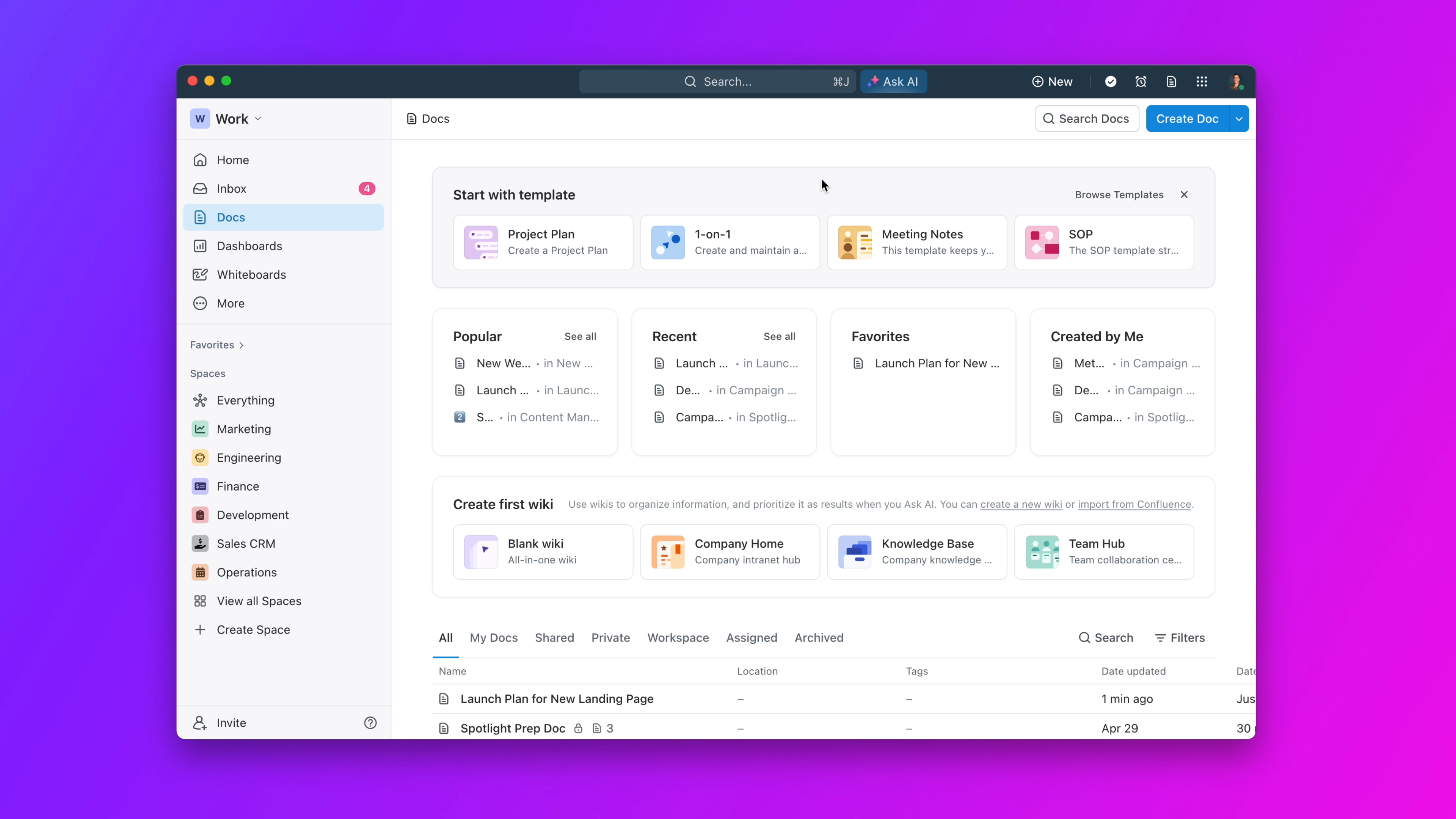
ClickUp: A Detailed Look
- Strengths:
- Extreme Customizability: You can adapt it to almost any workflow. It is like a box of LEGOs—you can build anything, but you have to build it yourself.
- Comprehensive Feature Set: Includes docs, whiteboards, and goal tracking, which can consolidate your tool stack.
- Scalability: It offers a good free tier and pricing that works for small teams up to large enterprises.
- Weaknesses:
- Overwhelming for New Users: The huge number of features creates a steep learning curve.
- Risk of Over-Configuration: Teams can spend more time customizing the tool than doing actual work.
- Performance: The platform can feel slow when loaded with many complex projects.

Asana: A Detailed Look
- Strengths:
- Best-in-Class User Experience: It is widely seen as one of the most intuitive and easy-to-adopt PM tools.
- Strong Collaboration Features: It is designed from the ground up for clear team communication.
- Mature and Reliable: A stable platform with proven, enterprise-grade security and many integrations.
- Weaknesses:
- Less Granular Customization: It is less flexible than ClickUp for creating highly specific workflows.
- AI is an Add-On: Many key AI features are only available in the more expensive pricing tiers.
- Can Become Noisy: Without good governance, the volume of notifications can become distracting.

Sunsama: A Detailed Look
- Strengths:
- Promotes Deep Work: The manual, daily planning ritual helps users stay intentional and focused.
- Excellent Integration Hub: It expertly pulls tasks from multiple sources into one clean planning interface.
- Reduces Overwhelm: It helps prevent the anxiety of a giant backlog by focusing on what is achievable today.
- Weaknesses:
- No Automation: It is a manual tool by design, making it a poor fit for users who need automatic scheduling.
- Limited Project Management: It is not a substitute for a full PM tool like Asana or ClickUp.
- Niche Audience: My experience shows it is best for individuals, not for managing complex team projects.
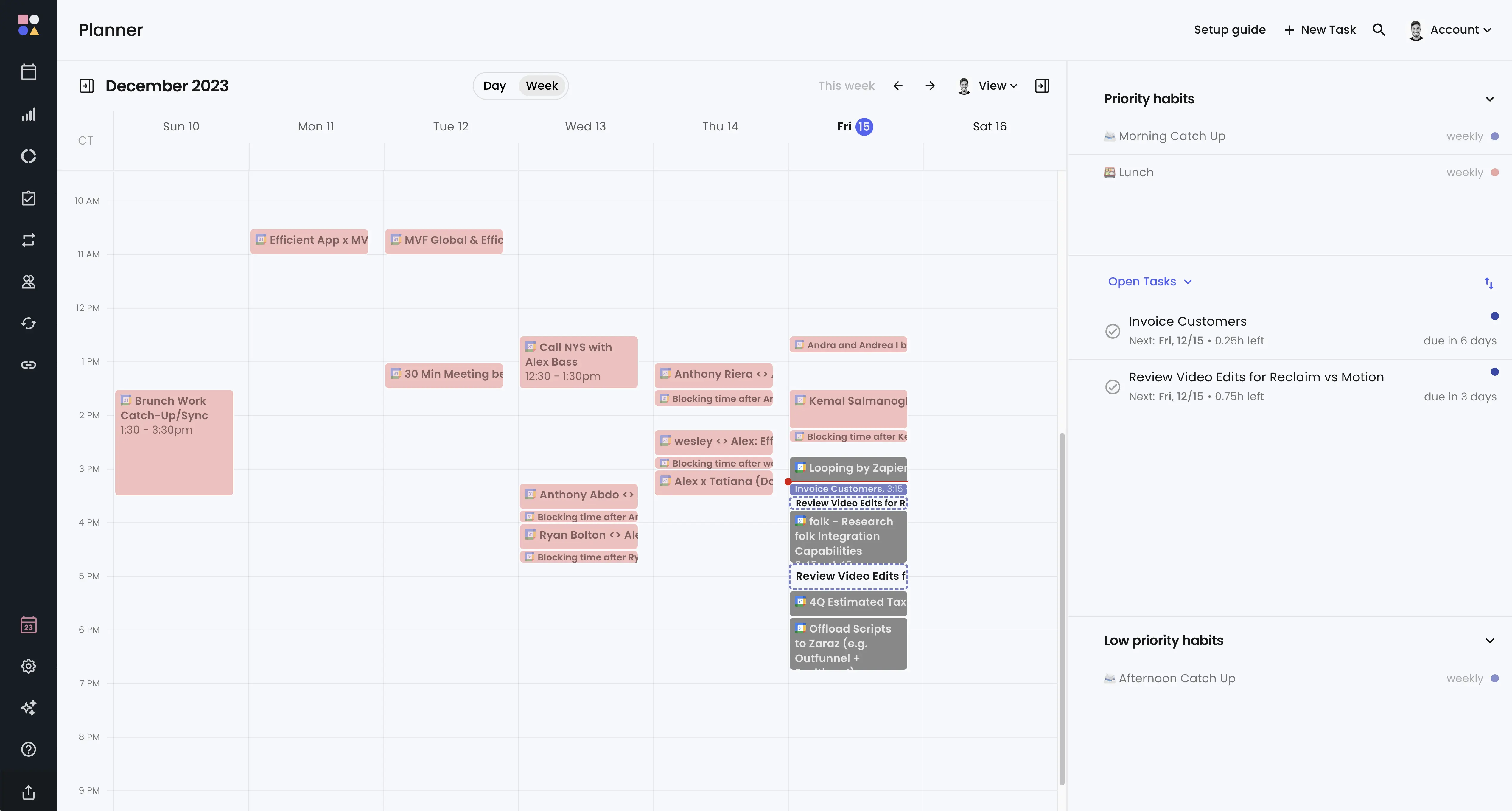
Reclaim.ai: A Detailed Look
- Strengths:
- Intelligent Time Blocking: It excels at finding and protecting calendar time for habits and deep work.
- Work/Life Balance: It automatically blends personal and professional tasks to create a sustainable schedule.
- Team Availability Sync: It smartly coordinates schedules to find the best meeting times without back-and-forth emails.
- Weaknesses:
- Not a Project Management Tool: It lacks features for tracking project progress, dependencies, or milestones.
- Requires Letting Go: Users must fully trust the algorithm, which is hard for those who prefer manual control.
- Calendar-Centric: Its utility is low if your work does not revolve around a digital calendar.
YMYL Professional Warning: Do Not Automate Critical Deadlines
A common question I receive is whether AI schedulers are reliable for client-facing deadlines. My professional guidance is unequivocal: No.
While tools like Motion are excellent for optimizing flexible internal tasks, you should never cede full control of immovable, high-stakes deadlines to an algorithm. A missed client commitment due to a scheduling error carries significant professional and financial liability.
Best Practice: Use AI to schedule your focus time around critical deadlines, but always lock in those key dates manually.

YMYL Deep Dive: Total Cost of Ownership (TCO) & Financial Risk
The sticker price of a tool is only one part of its true cost. To make a sound financial decision, you must consider the Total Cost of Ownership (TCO), which includes hidden expenses that can greatly affect your budget.
Here are hidden costs to consider:
- Implementation & Training Costs: These are higher for complex tools like ClickUp. For a 10-person team, budgeting 20-30 hours of dedicated setup time and 2-4 hours of training per person is a realistic starting point. At an average blended rate, this “hidden” setup cost can easily exceed several thousand dollars before the team even begins working.
- Dedicated Admin/Staff Costs: Highly customizable tools might require a dedicated person to manage them.
- Integration Maintenance: The cost of keeping the tool connected to your other software.
- Cost of AI Add-Ons: Some tools, like Asana, place advanced AI features in expensive upper tiers.
Financial Risk Assessment Table
| Tool | Pricing Model | Key Financial Risk | ROI Potential |
|---|---|---|---|
| Motion | Per User/Month | Risk of low adoption if AI is not trusted, leading to wasted spend. | High individual productivity gains. |
| ClickUp | Per User/Month (Tiered) | High TCO Risk. Hidden costs in customization, training, and potential admin staff. | High, if fully adopted. Consolidates tool spend. |
| Asana | Per User/Month (Tiered) | AI features are often in expensive higher tiers. | High team collaboration and alignment ROI. |
| Sunsama | Per User/Month | Premium price for a focused, individual tool. No team-wide project ROI. | High ROI in focus and burnout prevention for key individuals. |
| Reclaim.ai | Per User/Month (Tiered) | Justifying cost for a utility if its impact isn’t directly measured. | High ROI in protecting valuable deep work time for expensive staff (e.g., engineers). |
Professional Guidance: I advise clients to conduct a 24-month cost projection before committing. You should also factor in the cost of employee time for training and configuration as part of the total investment.
Use Case Mapping: Which Tool Is Right for Your Role & Team?
Based on my analysis, the best tool is the one that solves your most pressing problem. This section maps each tool to the specific persona and pain point it serves best.
Choose Motion if…
You are a busy professional or small business owner whose biggest bottleneck is the time spent manually scheduling tasks. You want a single platform for managing projects and automating your daily work plan. You are also willing to invest the time to feed the AI accurate data to get good results. For comprehensive insights, explore our detailed Motion Review and Motion Tutorials and Usecase guides.
Choose ClickUp or Asana if…
You are a Program Manager, Product Leader, or Scrum Master responsible for managing complex, multi-stakeholder projects within an Agile or hybrid framework. You need a central source of truth not just for tasks, but for strategic objectives (OKRs), product roadmaps, and sprint-level progress. Your main goals are team alignment, collaboration, and high-level reporting.
The Power Stack: Combining a Project Hub and a Daily Planner
For maximum productivity and control, the most effective solution I implement with clients is a hybrid approach. This combines a “System of Record” with a “Productivity Assistant.”
- Example Stack: Use Asana as the central hub for all team projects, milestones, and backlogs. Then, connect Sunsama to your Asana account.
- Workflow:
- Project Management (Asana): The entire project lives here. All communication, files, and long-term planning happen in Asana.
- Daily Planning (Sunsama): Each morning, you drag your assigned tasks for the day from Asana into your Sunsama plan. This allows you to create a focused, achievable daily list without the noise of the entire project backlog.
This stack gives you the best of both worlds: enterprise-grade project control and mindful, individual focus.
Choose Sunsama if…
You often feel overwhelmed by your backlog and want a more mindful, intentional approach to your daily work. You may already use a project tool like Asana but need a better system for planning your individual day. In my experience, combining ClickUp for backlog management with Sunsama for daily planning is a powerful productivity stack.
Choose Reclaim.ai if…
Your biggest challenge is protecting time for deep work and important tasks on a meeting-heavy calendar. You are more focused on optimizing your personal time management than on project-level tracking. You need a way to coordinate schedules across a team to reduce meeting conflicts.
Frequently Asked Questions (FAQs)
What is the main difference between Motion and Reclaim.ai?
Motion is a complete project management tool that also includes AI scheduling. Reclaim.ai is a pure scheduling utility designed to work with your existing calendar and task list. Think of Motion as an all-in-one system and Reclaim as a specialized add-on. For detailed comparisons, check our Motion FAQs section.
Is ClickUp better than Asana for large teams?
It depends on the team’s needs. ClickUp is more customizable but also far more complex, which can slow down adoption. Asana is easier for large teams to adopt quickly but offers less flexibility in its workflows.
Can Sunsama replace Asana?
No, they are complementary tools that solve different problems. Asana is for managing the team’s project backlog and long-term plans. Sunsama is for planning an individual’s work for today, often by pulling tasks from Asana.
Which tool has the steepest learning curve?
Based on my implementation projects, ClickUp has the steepest learning curve. Its extreme customizability is a great strength, but it can be overwhelming for new teams without a dedicated implementation plan.
Which tool poses the biggest security risk?
Motion and Reclaim.ai present a higher level of risk due to their deep calendar access. A security breach of your account could expose your entire schedule. This risk requires careful consideration and a conversation with your IT security team.
How should I choose if I’m a solo consultant?
If your primary need is mindful daily planning, Sunsama is an excellent choice. If you want full automation and also need a system to manage client projects, Motion could be a better fit, provided you are comfortable with its AI-driven approach.
Is Motion’s AI reliable for client-facing deadlines?
I advise against relying on any AI scheduler for critical, client-facing deadlines. In my professional opinion, you should use AI for flexible internal tasks and manually lock in any deadlines that have external consequences. Never cede full control of immovable deadlines to an algorithm.
Which of these tools is best for a software development team running Scrum?
For a software development team running Scrum, ClickUp or Asana are the industry-standard choices. ClickUp offers deeper customization, including native velocity charts and robust integrations with GitHub and GitLab that can link commits and merge requests directly to tasks. Asana provides a more intuitive, out-of-the-box experience for sprint planning and is often easier for cross-functional teams (like marketing and design) to adopt alongside engineering. Motion, Sunsama, and Reclaim.ai are not suitable as primary Agile management tools, as they lack core features like sprint management, story points, and burndown reporting.

Final Verdict: Matching the Right Philosophy to Your Pain Point
My analysis shows there is no single “best” tool. The right choice is about matching the tool’s philosophy to your biggest pain point. Motion offers a powerful vision for individuals who live by their calendar. But for teams managing complex projects, the proven ecosystems and robust security of ClickUp and Asana remain the enterprise standard.
Sunsama and Reclaim.ai are not direct competitors to these larger systems. They are powerful, specialized assistants for mastering personal productivity. By understanding this, you can confidently select the right tool—or combination of tools—to solve your specific challenges. My final advice: don’t choose a tool for its features; choose it for the single biggest problem it will solve for you and your team.
For further exploration of AI-powered project management solutions, I recommend reviewing our comprehensive guide on Best 10 AI Team Communication Platforms: Strategic Choices for Project & Product Managers in 2025, which complements the tools discussed in this analysis.
To dive deeper into Motion specifically, explore our detailed Motion Overview and Features analysis for additional insights into its capabilities and implementation strategies.
Disclaimer: This analysis is based on verified 2025 data and expert reviews. However, software platforms evolve rapidly. We strongly recommend conducting a free trial and performing an independent security assessment to ensure the tool meets your specific financial, operational, and compliance requirements before making a purchasing decision. For enterprise-level decisions, I encourage consultation with IT security or PMO experts. This website operates on an affiliate marketing model, and we may earn commissions when you purchase through our links.


Leave a Reply